Notice: This page requires JavaScript to function properly.
Please enable JavaScript in your browser settings or update your browser.
Learn Validating Your HTML Code for Best Practices | HTML Tags and Attributes
Ultimate HTML

bookValidating Your HTML Code for Best Practices

Writing HTML requires attention to every tag, bracket, and attribute. For beginners, it's easy to miss small details and that's why HTML validators exist.

Validators check your code for syntax errors and help you fix issues before they cause problems.

Note
What Validators Check

Validators do not check meaning (semantics). They focus only on whether your markup follows HTML rules:

  • Correct HTML syntax;
  • Following HTML standards (like HTML5);
  • Correct tag names and spelling;
  • Correct use of attributes;
  • Properly opened and closed tags;
  • Correct nesting (elements placed in the right order).

Let's use a popular online validator called the W3C Markup Validation Service to practice validation. Open the following link in a new tab by clicking on it: Validator

Now, let's validate a piece of code together. Copy the code provided below for testing purposes:

index.html

index.html

copy

Paste the code into the validator's window between the opening and closing <body> tags. Then, click the "Check" button.
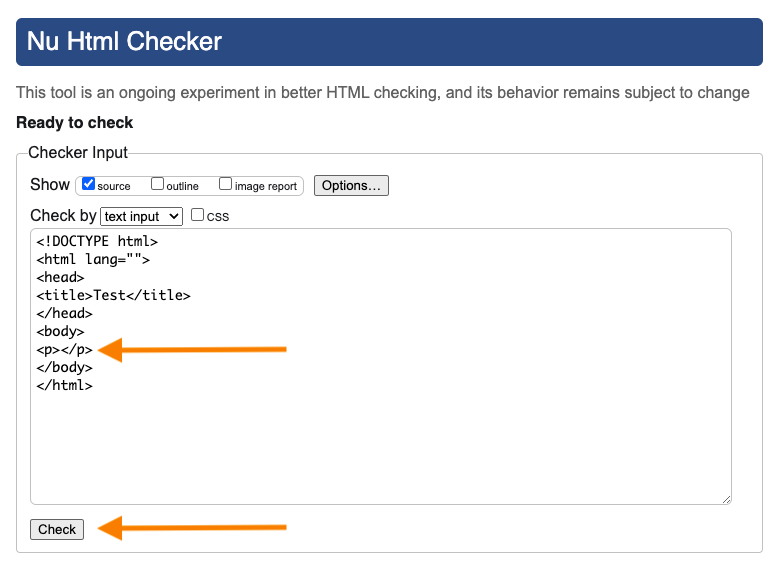
Errors the validator identifies should be fixed in the order they are listed. While warnings are optional to correct, analyzing them and ensuring high-quality markup is good practice.
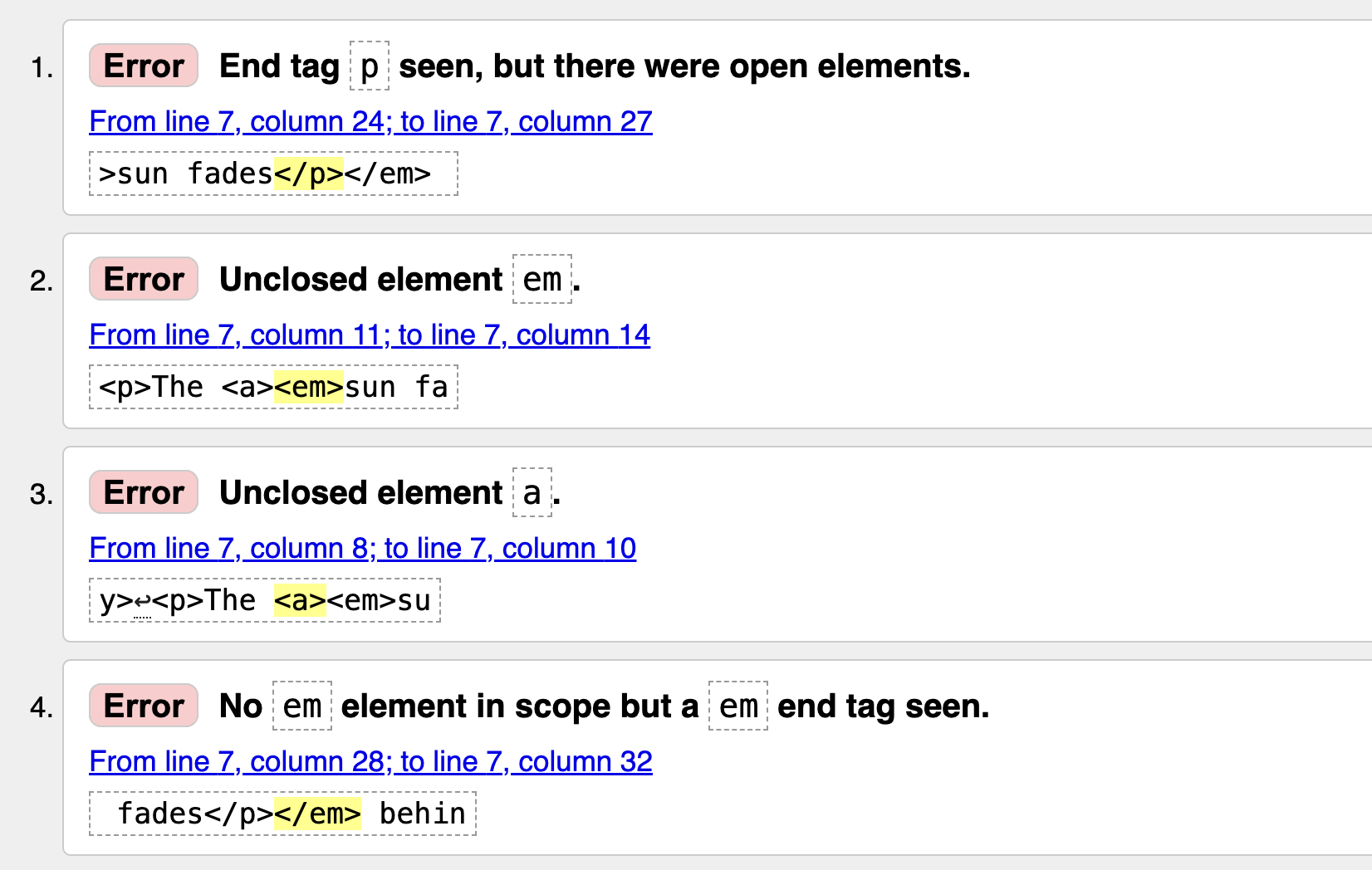
Let's fix all the errors in the code example:

index.html

index.html

copy

By correcting the tag order and closing all elements properly, the code becomes valid and easier for browsers to interpret.

question mark

Validator ...

Select the correct answer

Everything was clear?

How can we improve it?

Thanks for your feedback!

SectionΒ 2. ChapterΒ 12

Ask AI

expand

Ask AI

ChatGPT

Ask anything or try one of the suggested questions to begin our chat

Suggested prompts:

What are some common HTML validation errors beginners make?

Can you explain the difference between errors and warnings in the validator?

How do I fix the errors shown in the validator screenshot?

bookValidating Your HTML Code for Best Practices

Swipe to show menu

Writing HTML requires attention to every tag, bracket, and attribute. For beginners, it's easy to miss small details and that's why HTML validators exist.

Validators check your code for syntax errors and help you fix issues before they cause problems.

Note
What Validators Check

Validators do not check meaning (semantics). They focus only on whether your markup follows HTML rules:

  • Correct HTML syntax;
  • Following HTML standards (like HTML5);
  • Correct tag names and spelling;
  • Correct use of attributes;
  • Properly opened and closed tags;
  • Correct nesting (elements placed in the right order).

Let's use a popular online validator called the W3C Markup Validation Service to practice validation. Open the following link in a new tab by clicking on it: Validator

Now, let's validate a piece of code together. Copy the code provided below for testing purposes:

index.html

index.html

copy

Paste the code into the validator's window between the opening and closing <body> tags. Then, click the "Check" button.

Errors the validator identifies should be fixed in the order they are listed. While warnings are optional to correct, analyzing them and ensuring high-quality markup is good practice.

Let's fix all the errors in the code example:

index.html

index.html

copy

By correcting the tag order and closing all elements properly, the code becomes valid and easier for browsers to interpret.

question mark

Validator ...

Select the correct answer

Everything was clear?

How can we improve it?

Thanks for your feedback!

SectionΒ 2. ChapterΒ 12
some-alt