Controlling Direction
Свайпніть щоб показати меню
The flex-direction property enables us to determine the direction in which flex items are arranged. By default, this property is set to row, resulting in a left-to-right layout in browsers that use English as the default language. You can set it to:
flex-direction: row | column | row-reverse | column-reverse;
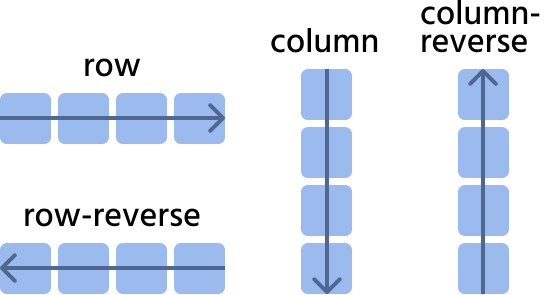
Let's consider the next website navigation as an example.
row

index.html

index.css
row-reverse
index.html
index.css
column
Pay attention to the width of the items; they cover the entire width of the parent.
index.html
index.css
column-reverse
index.html
index.css
Дякуємо за ваш відгук!
Запитати АІ

Запитати АІ

Запитайте про що завгодно або спробуйте одне із запропонованих запитань, щоб почати наш чат
Controlling Direction
The flex-direction property enables us to determine the direction in which flex items are arranged. By default, this property is set to row, resulting in a left-to-right layout in browsers that use English as the default language. You can set it to:
flex-direction: row | column | row-reverse | column-reverse;
Let's consider the next website navigation as an example.
row
index.html
index.css
row-reverse
index.html
index.css
column
Pay attention to the width of the items; they cover the entire width of the parent.
index.html
index.css
column-reverse
index.html
index.css
Дякуємо за ваш відгук!
