Спарклайни
Свайпніть щоб показати меню
Міні-діаграми — це найкомпактніший спосіб додати візуальний контекст до таблиці. Замість того, щоб змушувати читача переводити погляд з комірки таблиці на окрему діаграму десь на аркуші, міні-діаграма відображає тенденцію безпосередньо в комірці.
Вони не замінюють повноцінні діаграми. Міні-діаграма не може показати підписи осей, точні значення чи детальні порівняння між багатьма продуктами одночасно. Її призначення — дозволити читачу швидко переглянути стовпець міні-діаграм і одразу побачити, які продукти мають зростання, які залишаються стабільними, а які знижуються — не виходячи з таблиці.
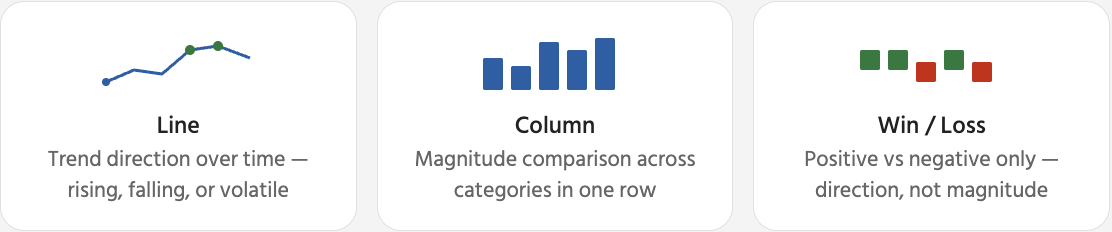
Після вибору міні-діаграми на стрічці з’являється контекстна вкладка Міні-діаграма. Тут можна керувати виглядом міні-діаграми та визначати, які точки даних виділяти. Найкорисніші параметри — це маркери та виділення точок, які допомагають читачу швидко визначити пікові та мінімальні значення без необхідності переглядати самі числа.

Видалення спарклайнів: виберіть клітинку(и) зі спарклайном → вкладка Спарклайн → Очистити → Очистити вибрані спарклайни. Це видаляє лише візуальний індикатор — дані таблиці в тому ж рядку залишаються незмінними. Натискання Delete видаляє вміст клітинки, а не спарклайн.
Дякуємо за ваш відгук!
Запитати АІ

Запитати АІ

Запитайте про що завгодно або спробуйте одне із запропонованих запитань, щоб почати наш чат
Спарклайни
Міні-діаграми — це найкомпактніший спосіб додати візуальний контекст до таблиці. Замість того, щоб змушувати читача переводити погляд з комірки таблиці на окрему діаграму десь на аркуші, міні-діаграма відображає тенденцію безпосередньо в комірці.
Вони не замінюють повноцінні діаграми. Міні-діаграма не може показати підписи осей, точні значення чи детальні порівняння між багатьма продуктами одночасно. Її призначення — дозволити читачу швидко переглянути стовпець міні-діаграм і одразу побачити, які продукти мають зростання, які залишаються стабільними, а які знижуються — не виходячи з таблиці.
Після вибору міні-діаграми на стрічці з’являється контекстна вкладка Міні-діаграма. Тут можна керувати виглядом міні-діаграми та визначати, які точки даних виділяти. Найкорисніші параметри — це маркери та виділення точок, які допомагають читачу швидко визначити пікові та мінімальні значення без необхідності переглядати самі числа.
Видалення спарклайнів: виберіть клітинку(и) зі спарклайном → вкладка Спарклайн → Очистити → Очистити вибрані спарклайни. Це видаляє лише візуальний індикатор — дані таблиці в тому ж рядку залишаються незмінними. Натискання Delete видаляє вміст клітинки, а не спарклайн.
Дякуємо за ваш відгук!
