Вибір правильного типу діаграми
Свайпніть щоб показати меню
Вибір правильного типу діаграми — це аналітична навичка.
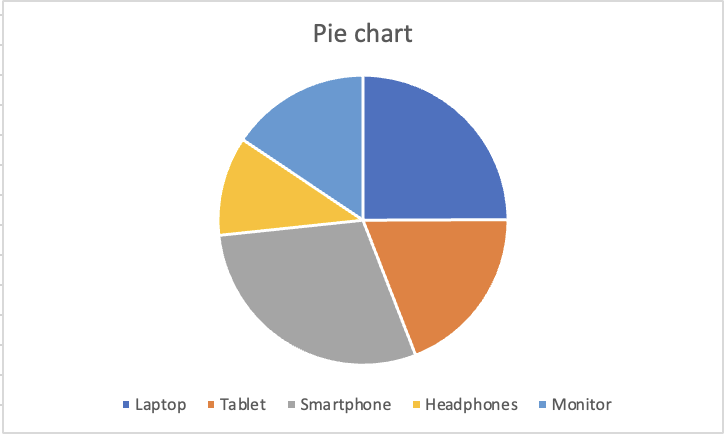
Кругова діаграма
Показує, як окремі категорії складають 100%. Ефективна лише тоді, коли категорій мало (ідеально — 5 або менше) і різниця між секторами достатньо помітна. Не рекомендується використовувати, якщо сектори подібні за розміром.
Точкова діаграма
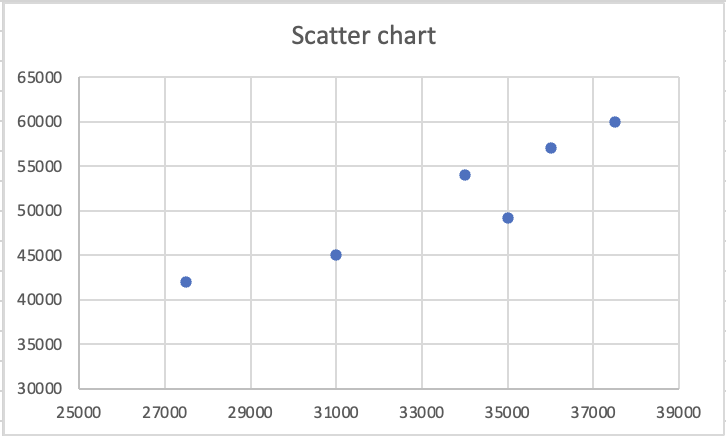
Кожна точка — це пара значень, одна колонка стає віссю X, інша — віссю Y. Використовується для виявлення кореляції, кластерів або аномалій між двома числовими змінними. Не підходить для категорій.
У стовпчиковій або лінійній діаграмі одна вісь — це категорії, інша — значення. У точковій діаграмі обидві осі — числові значення, і Excel поєднує їх як координати. Кожна точка — це не категорія. Це точка даних із позицією X з однієї колонки та позицією Y з іншої.
Це робить точкові діаграми потужним інструментом для конкретного аналітичного питання: якщо одне значення зростає, чи зростає інше? Якщо точки формують діагональний візерунок від нижнього лівого до верхнього правого кута, обидві змінні змінюються разом. Якщо точки розташовані випадково, видимого зв’язку немає. Скупчення точок в одній області сигналізує, що певні комбінації значень часто зустрічаються у даних.

Професійна звітність повністю уникає 3D-діаграм. Правило просте: зрозумілість важливіша за оформлення. Двовимірна стовпчикова діаграма, яка чітко передає дані, завжди краща за 3D-діаграму, яка виглядає ефектно, але створює неоднозначність.
Дякуємо за ваш відгук!
Запитати АІ

Запитати АІ

Запитайте про що завгодно або спробуйте одне із запропонованих запитань, щоб почати наш чат
