Змішування Мов за Допомогою Магічних Команд
Свайпніть щоб показати меню

Магічні команди — це спеціальні інструкції, які використовуються на початку комірки блокнота для зміни мови виконання або виконання певних завдань середовища. У Databricks вони дозволяють поєднувати Python, SQL та Markdown-текст в одному файлі.
Однією з найпотужніших можливостей блокнота Databricks є його поліглотна природа. Вам не потрібно обирати між "Python-фахівцем" чи "SQL-фахівцем". Натомість ви використовуєте найкращий інструмент для конкретного етапу вашого проєкту. Це стає можливим завдяки магічним командам.
Мова за замовчуванням та магічні команди
Кожен блокнот має "мову за замовчуванням", яку ви обираєте під час створення файлу. Ви можете побачити цю мову (наприклад, Python) поруч із назвою блокнота у верхній частині екрана. У Python-блокноті кожна комірка вважає, що вона написана на Python, якщо не вказано інше. Щоб змінити мову лише для однієї комірки, почніть її з магічної команди.
Перемикання на SQL за допомогою %sql
Ви вже бачили %sql. Коли ви працюєте у ноутбуці, орієнтованому на Python, часто виникає потреба швидко переглянути вміст таблиці за допомогою стандартного SQL-запиту.
%sql
SELECT count(*)
FROM workspace.default.diamonds
Розміщуючи %sql на самому початку, кластер Databricks ігнорує інтерпретатор Python для цієї комірки та використовує натомість SQL-движок. Це дозволяє виконувати дослідження даних із швидкістю SQL, а потім переходити до наступної комірки для продовження роботи з Python-логікою.
Документація з %md (Markdown)
Робота з даними є спільною діяльністю, тому ваш код має бути зрозумілим для інших. Магічна команда %md дозволяє писати Markdown — простий спосіб створювати форматований текст, заголовки та маркери списків.
Під час виконання комірки, що починається з %md, код не виконується; текст відображається як професійно оформлений документ.
%md
# Project: Diamonds
This notebook explores the **Diamonds Sales Data** from two years ago.
* Step 1: Data Cleaning
* Step 2: Aggregation

Виконання Python у SQL-ноутбуці за допомогою %python
Зворотне також справедливо. Якщо ви працюєте у ноутбуці з SQL за замовчуванням, ви можете використати %python для виконання завдання, для якого SQL не призначений, наприклад, складний цикл або прогнозування з використанням машинного навчання.
Інші корисні магічні команди
Окрім перемикання мов, існують магічні команди для взаємодії з оточенням:
- %run: Використовується для запуску іншого ноутбука з поточного ноутбука. Це корисно для імпорту допоміжних функцій або спільних змінних:

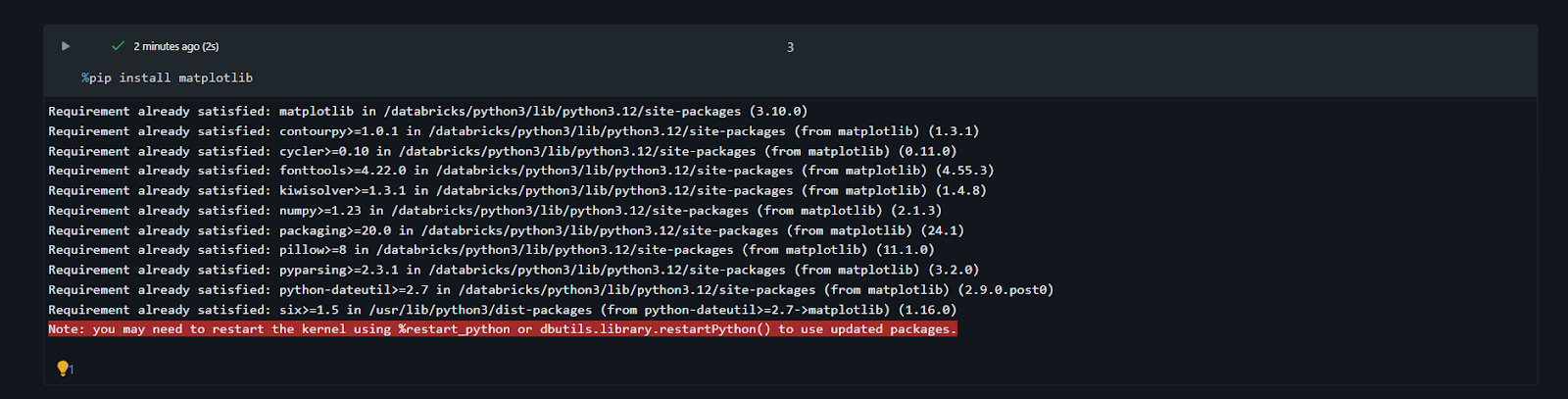
- %pip: Використовується для встановлення певних бібліотек Python безпосередньо у сесію кластера, не залишаючи ноутбука:
Оволодівши цими командами, ваші ноутбуки перетворюються з простих «файлів коду» на повноцінні, добре задокументовані історії даних.
1. Яке основне призначення використання магічної команди %md у нотатнику?
2. Яка комірка призведе до помилки, якщо мова нотатника за замовчуванням — Python?
Дякуємо за ваш відгук!
Запитати АІ

Запитати АІ

Запитайте про що завгодно або спробуйте одне із запропонованих запитань, щоб почати наш чат
Змішування Мов за Допомогою Магічних Команд
Магічні команди — це спеціальні інструкції, які використовуються на початку комірки блокнота для зміни мови виконання або виконання певних завдань середовища. У Databricks вони дозволяють поєднувати Python, SQL та Markdown-текст в одному файлі.
Однією з найпотужніших можливостей блокнота Databricks є його поліглотна природа. Вам не потрібно обирати між "Python-фахівцем" чи "SQL-фахівцем". Натомість ви використовуєте найкращий інструмент для конкретного етапу вашого проєкту. Це стає можливим завдяки магічним командам.
Мова за замовчуванням та магічні команди
Кожен блокнот має "мову за замовчуванням", яку ви обираєте під час створення файлу. Ви можете побачити цю мову (наприклад, Python) поруч із назвою блокнота у верхній частині екрана. У Python-блокноті кожна комірка вважає, що вона написана на Python, якщо не вказано інше. Щоб змінити мову лише для однієї комірки, почніть її з магічної команди.
Перемикання на SQL за допомогою %sql
Ви вже бачили %sql. Коли ви працюєте у ноутбуці, орієнтованому на Python, часто виникає потреба швидко переглянути вміст таблиці за допомогою стандартного SQL-запиту.
%sql
SELECT count(*)
FROM workspace.default.diamonds
Розміщуючи %sql на самому початку, кластер Databricks ігнорує інтерпретатор Python для цієї комірки та використовує натомість SQL-движок. Це дозволяє виконувати дослідження даних із швидкістю SQL, а потім переходити до наступної комірки для продовження роботи з Python-логікою.
Документація з %md (Markdown)
Робота з даними є спільною діяльністю, тому ваш код має бути зрозумілим для інших. Магічна команда %md дозволяє писати Markdown — простий спосіб створювати форматований текст, заголовки та маркери списків.
Під час виконання комірки, що починається з %md, код не виконується; текст відображається як професійно оформлений документ.
%md
# Project: Diamonds
This notebook explores the **Diamonds Sales Data** from two years ago.
* Step 1: Data Cleaning
* Step 2: Aggregation
Виконання Python у SQL-ноутбуці за допомогою %python
Зворотне також справедливо. Якщо ви працюєте у ноутбуці з SQL за замовчуванням, ви можете використати %python для виконання завдання, для якого SQL не призначений, наприклад, складний цикл або прогнозування з використанням машинного навчання.
Інші корисні магічні команди
Окрім перемикання мов, існують магічні команди для взаємодії з оточенням:
- %run: Використовується для запуску іншого ноутбука з поточного ноутбука. Це корисно для імпорту допоміжних функцій або спільних змінних:
- %pip: Використовується для встановлення певних бібліотек Python безпосередньо у сесію кластера, не залишаючи ноутбука:
Оволодівши цими командами, ваші ноутбуки перетворюються з простих «файлів коду» на повноцінні, добре задокументовані історії даних.
Дякуємо за ваш відгук!
