Що таке кластер?
Свайпніть щоб показати меню

У Databricks Compute (або Cluster) — це набір обчислювальних ресурсів і конфігурацій, на яких виконуються завдання з обробки даних, науки про дані та аналітики. Це своєрідний «двигун», який забезпечує роботу ваших ноутбуків і запитів.
Перш ніж натиснути «Створити», потрібно зрозуміти, що відбувається «під капотом». У попередньому розділі кластер називали «машинним відділенням». Але що це означає з точки зору апаратного забезпечення?
Коли ви використовуєте стандартний застосунок, наприклад Excel, на своєму ноутбуці, ви обмежені потужністю цього одного комп’ютера. Якщо спробувати відкрити файл зі 100 мільйонами рядків, Excel може аварійно завершити роботу, оскільки «мозок» вашого ноутбука просто недостатньо потужний. Databricks вирішує цю проблему за допомогою розподілених обчислень.
Аналогія з рестораном
Щоб зрозуміти, як працює кластер, уявіть собі кухню зайнятого ресторану:
- Кластер — це вся команда кухарів;
- Вузли (Nodes) — це окремі кухарі;
- CPU (центральний процесор) — це швидкість кухаря. Кухар із потужним CPU може дуже швидко нарізати овочі;
- RAM (оперативна пам’ять) — це робоча поверхня кухаря. Якщо у кухаря маленька поверхня, він може працювати лише з однією маленькою тарілкою одночасно. Якщо поверхня велика (багато RAM), можна розкласти всі інгредієнти для складної страви одразу.
У кластері Databricks є Driver Node (головний кухар), який організовує роботу, і Worker Nodes (рядові кухарі), які виконують основну обробку даних.
Ключові терміни, які ви побачите в інтерфейсі
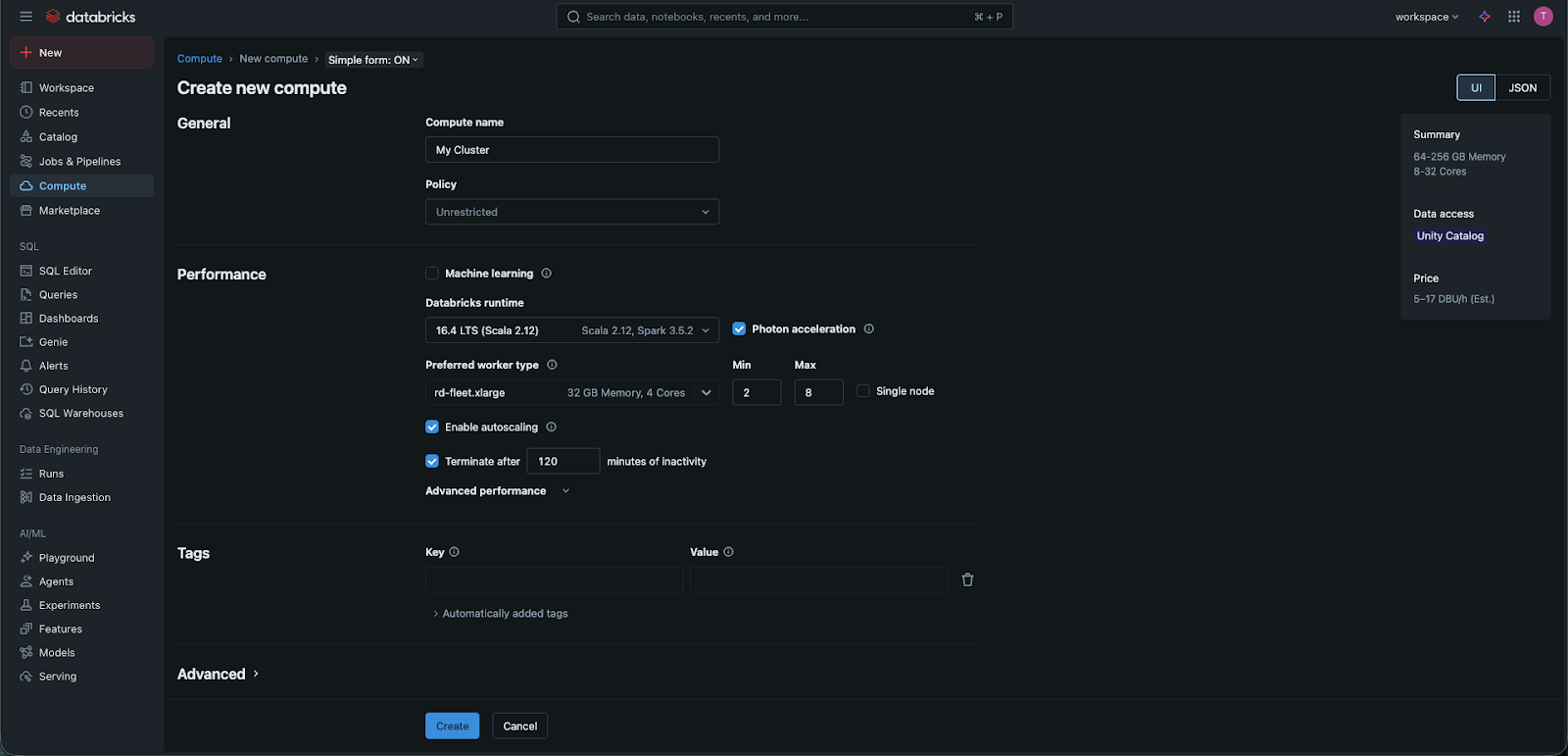
Коли ви створюєте кластер, з'являються кілька технічних термінів:
- Worker Type: тут обирається "розмір" ваших кухарів. Чи потрібен кухар з великим робочим простором (Memory Optimized), чи надзвичайно швидкий кухар (Compute Optimized)?
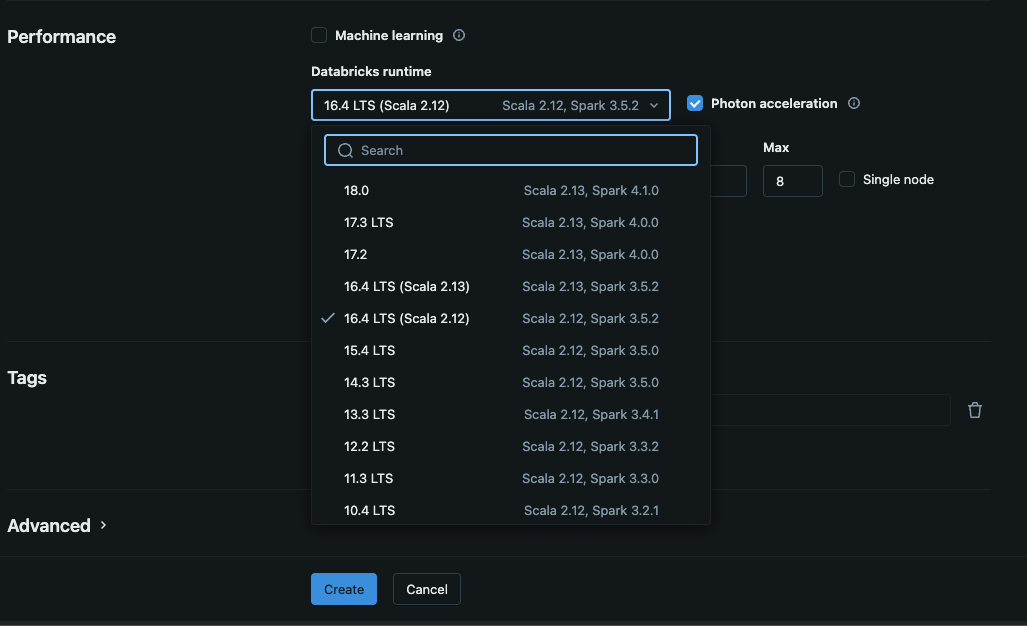
- Runtime Version: це "Середовище виконання" вашого кластера. Містить версію Apache Spark та Python, яку використовуватиме ваш код. Зазвичай рекомендується обирати останню версію "LTS" (Long Term Support).
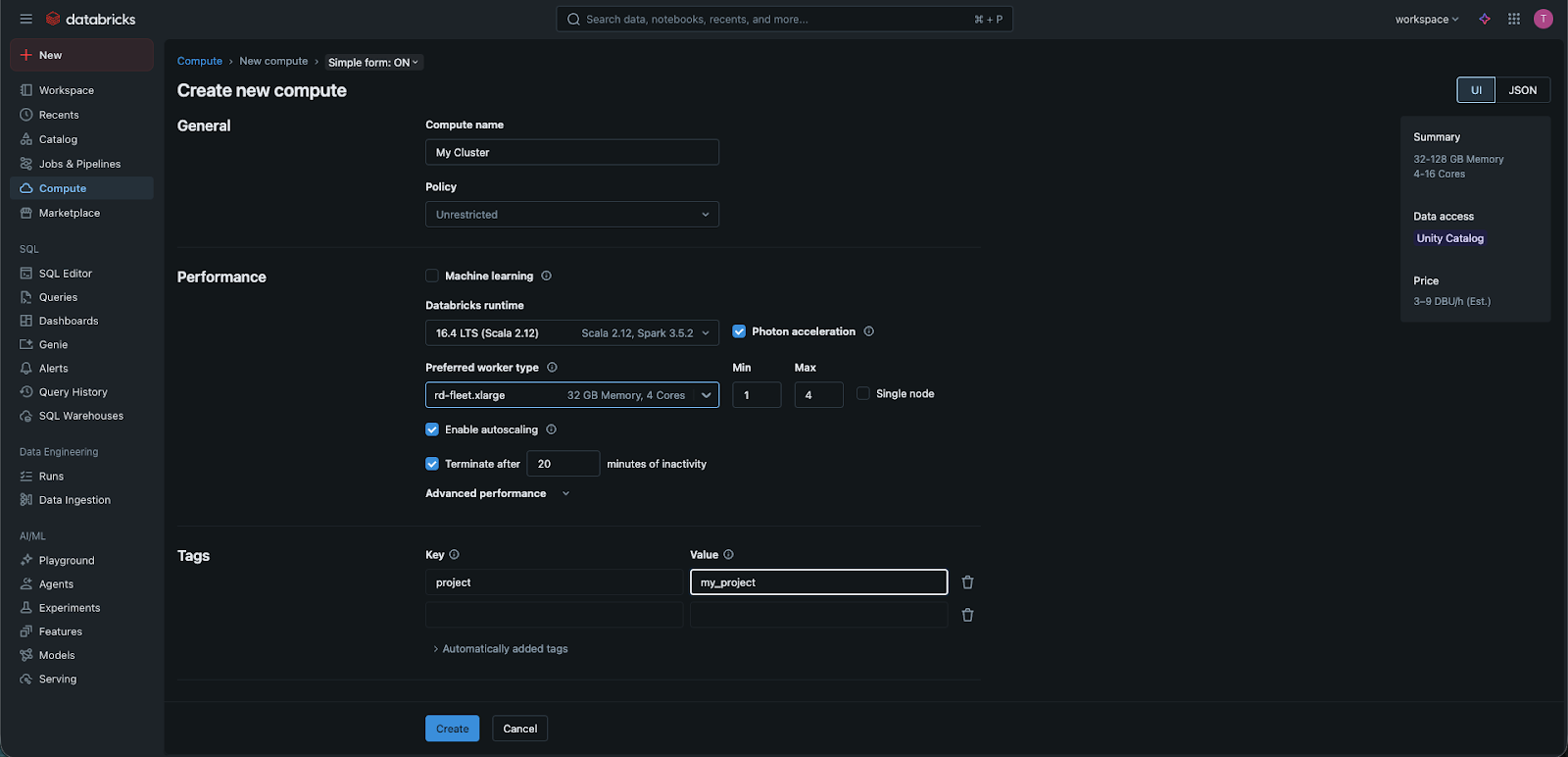
- Вузли: це кількість кухарів на вашій кухні. Для складних завдань "Big Data" може знадобитися 10 або 20 працівників. Для цього курсу та особистого навчання ми часто використовуватимемо режим Single Node — тобто один кухар виконує всю роботу — щоб знизити витрати;
- Автоматичне завершення роботи: кластер дозволяє вказати кількість хвилин, після яких кластер буде автоматично завершено. Це чудовий спосіб економити кошти — навіть неактивний кластер оплачується як у Databricks, так і у вашого хмарного провайдера, тому завжди доцільно встановлювати таку політику. У нашій аналогії це, ймовірно, кінець робочого дня для кухарів — у певний момент вони повинні мати змогу піти додому!
- Теги: наші кухарі працюють з великою кількістю матеріалів і рецептів, і їм потрібно відстежувати використання для кожної страви чи клієнта; саме це роблять теги у кластерах — вони дозволяють вказати мітки, за якими згодом можна переглядати час використання та витрати. Дуже корисна функція для аналізу метаданих.
Чому масштабування має значення
Перевага хмари полягає в тому, що вам не потрібно купувати цих "шеф-кухарів". Ви орендуєте їх погодинно. Якщо у вас є велике завдання, яке потрібно виконати за 5 хвилин, ви можете найняти 100 кухарів (вузлів), виконати роботу, а потім одразу "звільнити" їх, щоб припинити платити. Це і є основа ефективності Databricks.
1. У нашій кухонній аналогії що представляє RAM (оперативна пам'ять)?
2. Яка роль "Driver Node" у кластері Databricks?
3. Чому студент обирає кластер "Single Node" для практики?
Дякуємо за ваш відгук!
Запитати АІ

Запитати АІ

Запитайте про що завгодно або спробуйте одне із запропонованих запитань, щоб почати наш чат
Що таке кластер?
У Databricks Compute (або Cluster) — це набір обчислювальних ресурсів і конфігурацій, на яких виконуються завдання з обробки даних, науки про дані та аналітики. Це своєрідний «двигун», який забезпечує роботу ваших ноутбуків і запитів.
Перш ніж натиснути «Створити», потрібно зрозуміти, що відбувається «під капотом». У попередньому розділі кластер називали «машинним відділенням». Але що це означає з точки зору апаратного забезпечення?
Коли ви використовуєте стандартний застосунок, наприклад Excel, на своєму ноутбуці, ви обмежені потужністю цього одного комп’ютера. Якщо спробувати відкрити файл зі 100 мільйонами рядків, Excel може аварійно завершити роботу, оскільки «мозок» вашого ноутбука просто недостатньо потужний. Databricks вирішує цю проблему за допомогою розподілених обчислень.
Аналогія з рестораном
Щоб зрозуміти, як працює кластер, уявіть собі кухню зайнятого ресторану:
- Кластер — це вся команда кухарів;
- Вузли (Nodes) — це окремі кухарі;
- CPU (центральний процесор) — це швидкість кухаря. Кухар із потужним CPU може дуже швидко нарізати овочі;
- RAM (оперативна пам’ять) — це робоча поверхня кухаря. Якщо у кухаря маленька поверхня, він може працювати лише з однією маленькою тарілкою одночасно. Якщо поверхня велика (багато RAM), можна розкласти всі інгредієнти для складної страви одразу.
У кластері Databricks є Driver Node (головний кухар), який організовує роботу, і Worker Nodes (рядові кухарі), які виконують основну обробку даних.
Ключові терміни, які ви побачите в інтерфейсі
Коли ви створюєте кластер, з'являються кілька технічних термінів:
- Worker Type: тут обирається "розмір" ваших кухарів. Чи потрібен кухар з великим робочим простором (Memory Optimized), чи надзвичайно швидкий кухар (Compute Optimized)?
- Runtime Version: це "Середовище виконання" вашого кластера. Містить версію Apache Spark та Python, яку використовуватиме ваш код. Зазвичай рекомендується обирати останню версію "LTS" (Long Term Support).
- Вузли: це кількість кухарів на вашій кухні. Для складних завдань "Big Data" може знадобитися 10 або 20 працівників. Для цього курсу та особистого навчання ми часто використовуватимемо режим Single Node — тобто один кухар виконує всю роботу — щоб знизити витрати;
- Автоматичне завершення роботи: кластер дозволяє вказати кількість хвилин, після яких кластер буде автоматично завершено. Це чудовий спосіб економити кошти — навіть неактивний кластер оплачується як у Databricks, так і у вашого хмарного провайдера, тому завжди доцільно встановлювати таку політику. У нашій аналогії це, ймовірно, кінець робочого дня для кухарів — у певний момент вони повинні мати змогу піти додому!
- Теги: наші кухарі працюють з великою кількістю матеріалів і рецептів, і їм потрібно відстежувати використання для кожної страви чи клієнта; саме це роблять теги у кластерах — вони дозволяють вказати мітки, за якими згодом можна переглядати час використання та витрати. Дуже корисна функція для аналізу метаданих.
Чому масштабування має значення
Перевага хмари полягає в тому, що вам не потрібно купувати цих "шеф-кухарів". Ви орендуєте їх погодинно. Якщо у вас є велике завдання, яке потрібно виконати за 5 хвилин, ви можете найняти 100 кухарів (вузлів), виконати роботу, а потім одразу "звільнити" їх, щоб припинити платити. Це і є основа ефективності Databricks.
Дякуємо за ваш відгук!
