Using FILTER for Multi Result Lookups
Свайпніть щоб показати меню
Why Multi Result Lookups Are Needed
Traditional lookup functions such as VLOOKUP, XLOOKUP, or INDEX with XMATCH return a single result.
However, many real-world scenarios require retrieving multiple matching records.
For example:
- All orders placed by a specific customer;
- All employees in a department;
- All transactions above a certain value.
In these cases, a single-value lookup is not sufficient. Modern Excel provides dynamic array functions that can return multiple results at once.
The FILTER Function
The FILTER function extracts rows from a dataset that meet a specified condition.
Instead of returning a single value, FILTER returns all rows that match the criteria.
Basic Syntax
=FILTER(array; include; [if_empty])
array: the range containing the data;include: the condition that determines which rows should be returned;if_empty: optional value displayed if no matching results exist.
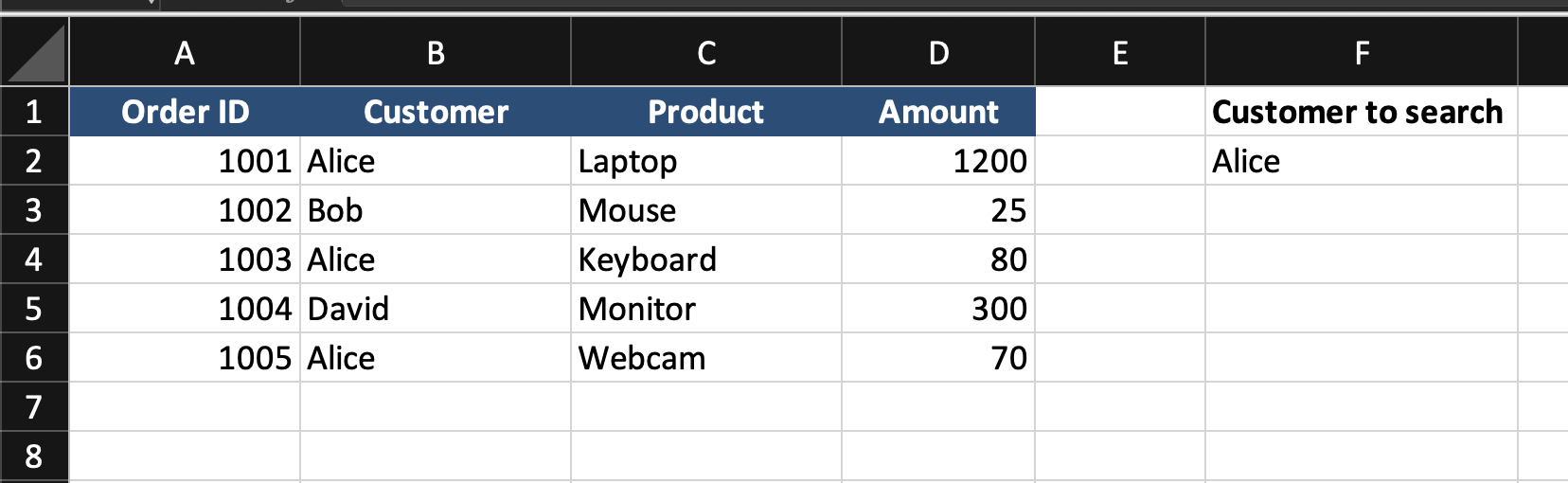
The customer name is entered in cell F2.
The goal is to return all orders placed by that customer.
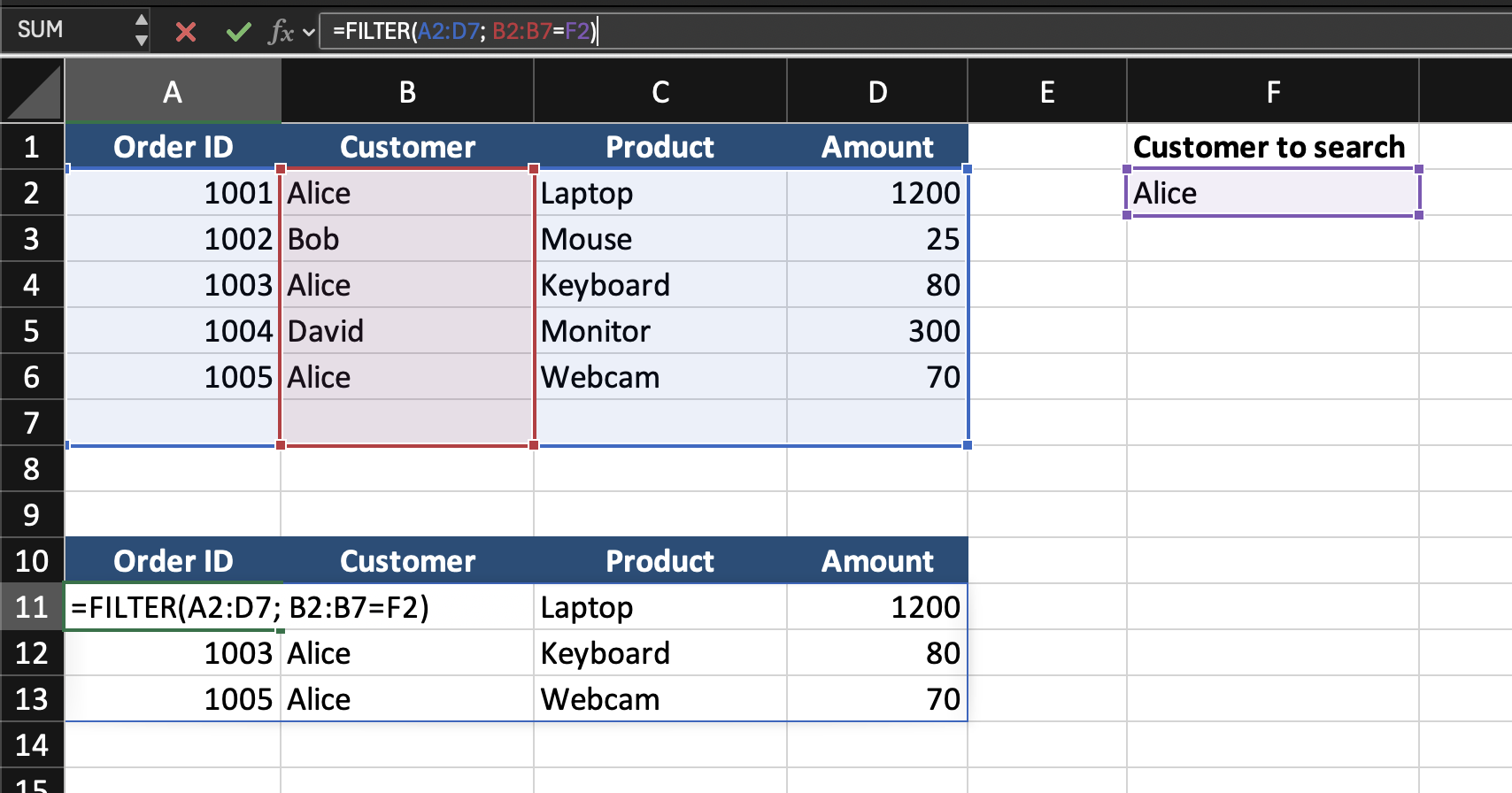
=FILTER(A2:D7; B2:B7=F2)
- Excel evaluates the condition:
B2:B7=F2. This checks which rows match the selected customer; - The
FILTERfunction extracts all rows where the condition isTRUE; - The results automatically spill into multiple rows.
If F2 contains Alice, Excel returns:
Dynamic Array Behavior
The results automatically expand into neighboring cells. This is called a spill range. If the dataset grows or the input value changes, the results update automatically.
Task
Scenario
A worksheet contains a table with Employee ID, Employee Name, Department, Salary.
A department name is entered in an input cell.
Your goal is to return all employees working in that department.
Task Instructions
- Use the
FILTERfunction to extract matching rows; - Return all employees belonging to the selected department;
- Ensure the results update automatically when the department changes.
Дякуємо за ваш відгук!
Запитати АІ

Запитати АІ

Запитайте про що завгодно або спробуйте одне із запропонованих запитань, щоб почати наш чат
Using FILTER for Multi Result Lookups
Why Multi Result Lookups Are Needed
Traditional lookup functions such as VLOOKUP, XLOOKUP, or INDEX with XMATCH return a single result.
However, many real-world scenarios require retrieving multiple matching records.
For example:
- All orders placed by a specific customer;
- All employees in a department;
- All transactions above a certain value.
In these cases, a single-value lookup is not sufficient. Modern Excel provides dynamic array functions that can return multiple results at once.
The FILTER Function
The FILTER function extracts rows from a dataset that meet a specified condition.
Instead of returning a single value, FILTER returns all rows that match the criteria.
Basic Syntax
=FILTER(array; include; [if_empty])
array: the range containing the data;include: the condition that determines which rows should be returned;if_empty: optional value displayed if no matching results exist.
The customer name is entered in cell F2.
The goal is to return all orders placed by that customer.
=FILTER(A2:D7; B2:B7=F2)
- Excel evaluates the condition:
B2:B7=F2. This checks which rows match the selected customer; - The
FILTERfunction extracts all rows where the condition isTRUE; - The results automatically spill into multiple rows.
If F2 contains Alice, Excel returns:
Dynamic Array Behavior
The results automatically expand into neighboring cells. This is called a spill range. If the dataset grows or the input value changes, the results update automatically.
Task
Scenario
A worksheet contains a table with Employee ID, Employee Name, Department, Salary.
A department name is entered in an input cell.
Your goal is to return all employees working in that department.
Task Instructions
- Use the
FILTERfunction to extract matching rows; - Return all employees belonging to the selected department;
- Ensure the results update automatically when the department changes.
Дякуємо за ваш відгук!
