Notice: This page requires JavaScript to function properly.
Please enable JavaScript in your browser settings or update your browser.
Вивчайте Базове Форматування Рядків | Робота з Типами Даних
Основи C#

bookБазове Форматування Рядків

We can output text and a variable value using an already known method (the + operator):

main.cs

main.cs

copy
12345678910111213
using System; namespace ConsoleApp { internal class Program { static void Main(string[] args) { int number = 10; Console.WriteLine("The value is: " + number); } } }

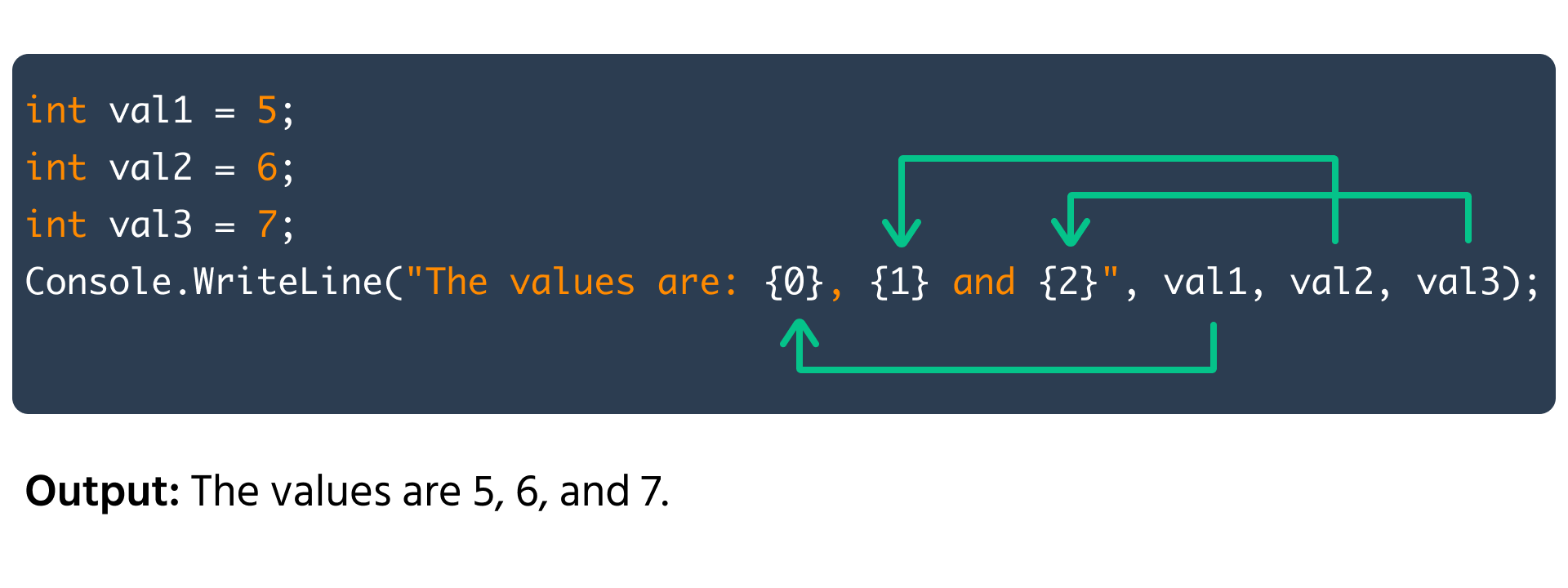
However there are better and more suitable methods for string formatting which can also handle complex cases. The first method is by using the placeholder syntax. To understand this syntax we will use the Console.WriteLine method:

main.cs

main.cs

copy
123456789101112131415
using System; namespace ConsoleApp { internal class Program { static void Main(string[] args) { int val1 = 10; int val2 = 20; int val3 = 30; Console.WriteLine("The values are: {0}, {1} and {2}", val1, val2, val3); } } }

In the above code we insert placeholders in the string where values are to be inserted. The syntax of a placeholder is a number (index) enclosed in curly brackets {index} and the value index starts from 0. When the output string is generated, the placeholders are filled with the corresponding values that are passed as additional arguments to the Console.WriteLine method.

Note

Arguments are the values we pass into a function or command. For-example, in Console.WriteLine("Value: {0}", 100);, the terms "Value: {0}" and 100 are values.

There is another much simpler method of formatting strings. We can use the $ character to indicate that a string is a formatted string and directly insert values inside it using the curly brackets ({}):

Using this syntax, we can also generate and store formatted strings into string variables:

main.cs

main.cs

copy
12345678910111213141516
using System; namespace ConsoleApp { internal class Program { static void Main(string[] args) { int val1 = 10; int val2 = 20; int val3 = 30; string text = $"The values are: {val1}, {val2} and {val3}"; Console.WriteLine(text); } } }
question mark

Which of the following methods can be used for string formatting in C#?

Select the correct answer

Все було зрозуміло?

Як ми можемо покращити це?

Дякуємо за ваш відгук!

Секція 2. Розділ 8

Запитати АІ

expand

Запитати АІ

ChatGPT

Запитайте про що завгодно або спробуйте одне із запропонованих запитань, щоб почати наш чат

Suggested prompts:

Can you show examples of each string formatting method in C#?

When should I use placeholders versus string interpolation?

Are there any performance differences between these formatting methods?

bookБазове Форматування Рядків

Свайпніть щоб показати меню

We can output text and a variable value using an already known method (the + operator):

main.cs

main.cs

copy
12345678910111213
using System; namespace ConsoleApp { internal class Program { static void Main(string[] args) { int number = 10; Console.WriteLine("The value is: " + number); } } }

However there are better and more suitable methods for string formatting which can also handle complex cases. The first method is by using the placeholder syntax. To understand this syntax we will use the Console.WriteLine method:

main.cs

main.cs

copy
123456789101112131415
using System; namespace ConsoleApp { internal class Program { static void Main(string[] args) { int val1 = 10; int val2 = 20; int val3 = 30; Console.WriteLine("The values are: {0}, {1} and {2}", val1, val2, val3); } } }

In the above code we insert placeholders in the string where values are to be inserted. The syntax of a placeholder is a number (index) enclosed in curly brackets {index} and the value index starts from 0. When the output string is generated, the placeholders are filled with the corresponding values that are passed as additional arguments to the Console.WriteLine method.

Note

Arguments are the values we pass into a function or command. For-example, in Console.WriteLine("Value: {0}", 100);, the terms "Value: {0}" and 100 are values.

There is another much simpler method of formatting strings. We can use the $ character to indicate that a string is a formatted string and directly insert values inside it using the curly brackets ({}):

Using this syntax, we can also generate and store formatted strings into string variables:

main.cs

main.cs

copy
12345678910111213141516
using System; namespace ConsoleApp { internal class Program { static void Main(string[] args) { int val1 = 10; int val2 = 20; int val3 = 30; string text = $"The values are: {val1}, {val2} and {val3}"; Console.WriteLine(text); } } }
question mark

Which of the following methods can be used for string formatting in C#?

Select the correct answer

Все було зрозуміло?

Як ми можемо покращити це?

Дякуємо за ваш відгук!

Секція 2. Розділ 8
some-alt