Managing the Stacking Order of Elements
Svep för att visa menyn
The z-index property determines the stacking order of positioned elements on a web page. It only applies to positioned elements, which have a position value of absolute, fixed, relative, or sticky. As the elements are taken out of the normal document flow, to determine which of these positioned elements should be displayed higher or lower, we specify z-index.
z-index: number_without_units
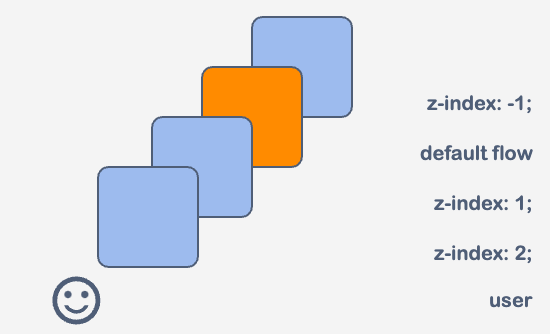
The higher value the z-index property has, the higher the element is shown on the user screen.
Let's practice. We have four div elements with the box class, each styled as a square and numbered to represent their order in the html document. The squares are currently positioned on top of each other. The task is to adjust the z-index property with the correct values to bring square 3 to the front and send square 4 to the back.

index.html

index.css
Note
If we set the same value for the
z-indexproperty to different elements, the browser will show the elements in the order in which the elements are in thehtmlfile.
Tack för dina kommentarer!
Fråga AI

Fråga AI

Fråga vad du vill eller prova någon av de föreslagna frågorna för att starta vårt samtal
