Controlling Direction
Svep för att visa menyn
The flex-direction property enables us to determine the direction in which flex items are arranged. By default, this property is set to row, resulting in a left-to-right layout in browsers that use English as the default language. You can set it to:
flex-direction: row | column | row-reverse | column-reverse;
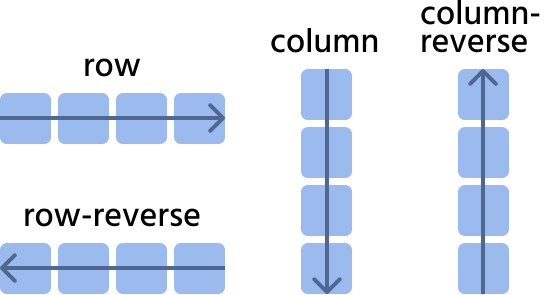
Let's consider the next website navigation as an example.
row

index.html

index.css
row-reverse
index.html
index.css
column
Pay attention to the width of the items; they cover the entire width of the parent.
index.html
index.css
column-reverse
index.html
index.css
Tack för dina kommentarer!
Fråga AI

Fråga AI

Fråga vad du vill eller prova någon av de föreslagna frågorna för att starta vårt samtal
Controlling Direction
The flex-direction property enables us to determine the direction in which flex items are arranged. By default, this property is set to row, resulting in a left-to-right layout in browsers that use English as the default language. You can set it to:
flex-direction: row | column | row-reverse | column-reverse;
Let's consider the next website navigation as an example.
row
index.html
index.css
row-reverse
index.html
index.css
column
Pay attention to the width of the items; they cover the entire width of the parent.
index.html
index.css
column-reverse
index.html
index.css
Tack för dina kommentarer!
