Minidiagram
Svep för att visa menyn
Sparklines är det mest kompakta sättet att lägga till visuell kontext i en tabell. Istället för att be läsaren titta från en tabellcell till ett separat diagram någon annanstans på bladet, placerar en sparkline trenden direkt i cellen.
De ersätter inte fullständiga diagram. En sparkline kan inte visa axelrubriker, exakta värden eller detaljerade jämförelser mellan många produkter samtidigt. Vad den gör är att låta läsaren snabbt skanna en kolumn med sparklines och omedelbart se vilka produkter som trendar uppåt, vilka som är stabila och vilka som minskar — utan att lämna tabellen.
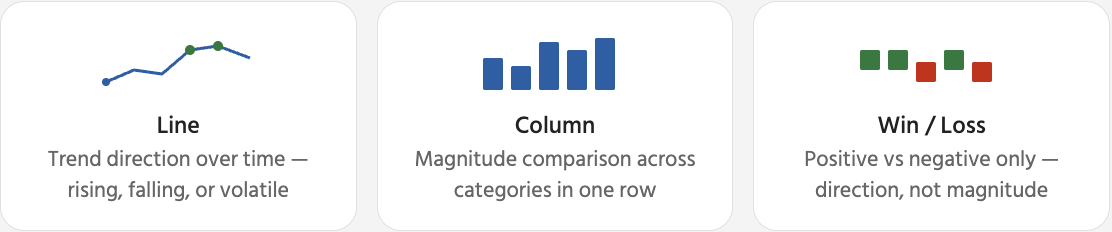
När en sparkline är markerad visas en kontextuell Sparkline-flik i menyfliksområdet. Här styr du hur sparkline ser ut och vilka datapunkter som ska framhävas. De mest användbara alternativen är markörer och punktmarkeringar — de hjälper läsaren att snabbt identifiera toppar och dalar utan att behöva läsa de underliggande siffrorna.

Ta bort minidiagram: markera cellen/cellerna med minidiagram → Fliken Minidiagram → Rensa → Rensa markerade minidiagram. Detta tar endast bort den visuella indikatorn — tabellens data i samma rad påverkas inte alls. Om du trycker på Delete tas cellinnehållet bort, inte minidiagrammet.
Tack för dina kommentarer!
Fråga AI

Fråga AI

Fråga vad du vill eller prova någon av de föreslagna frågorna för att starta vårt samtal
Minidiagram
Sparklines är det mest kompakta sättet att lägga till visuell kontext i en tabell. Istället för att be läsaren titta från en tabellcell till ett separat diagram någon annanstans på bladet, placerar en sparkline trenden direkt i cellen.
De ersätter inte fullständiga diagram. En sparkline kan inte visa axelrubriker, exakta värden eller detaljerade jämförelser mellan många produkter samtidigt. Vad den gör är att låta läsaren snabbt skanna en kolumn med sparklines och omedelbart se vilka produkter som trendar uppåt, vilka som är stabila och vilka som minskar — utan att lämna tabellen.
När en sparkline är markerad visas en kontextuell Sparkline-flik i menyfliksområdet. Här styr du hur sparkline ser ut och vilka datapunkter som ska framhävas. De mest användbara alternativen är markörer och punktmarkeringar — de hjälper läsaren att snabbt identifiera toppar och dalar utan att behöva läsa de underliggande siffrorna.
Ta bort minidiagram: markera cellen/cellerna med minidiagram → Fliken Minidiagram → Rensa → Rensa markerade minidiagram. Detta tar endast bort den visuella indikatorn — tabellens data i samma rad påverkas inte alls. Om du trycker på Delete tas cellinnehållet bort, inte minidiagrammet.
Tack för dina kommentarer!
