Välja Rätt Diagramtyp
Svep för att visa menyn
Att välja rätt diagramtyp är en analytisk färdighet.
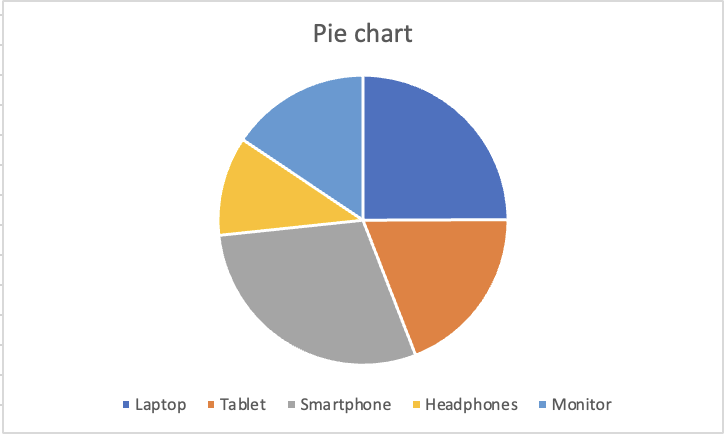
Cirkeldiagram
Visar hur enskilda kategorier summerar till 100 %. Endast effektivt när kategorierna är få (helst 5 eller färre) och skillnaderna mellan tårtbitarna är tillräckligt stora för att synas. Undvik när tårtbitarna är lika stora.
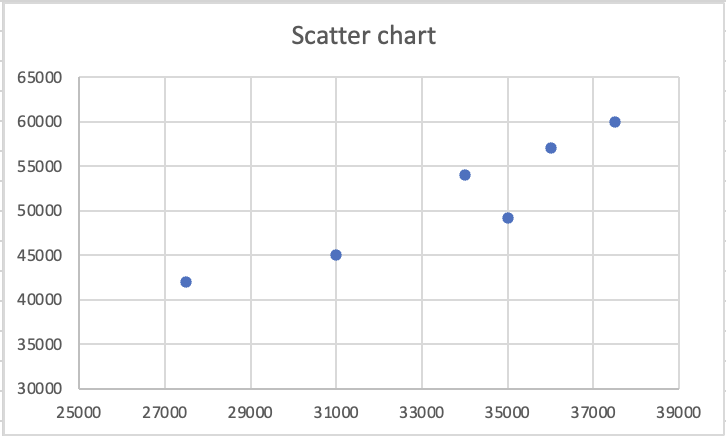
Punktdiagram
Varje punkt är ett par av värden, där en kolumn blir X-axeln och den andra blir Y-axeln. Används för att identifiera korrelation, kluster eller avvikare mellan två numeriska variabler. Ej lämplig för kategorier.
I ett kolumn- eller linjediagram är en axel kategorier och den andra är värden. I ett punktdiagram är båda axlarna numeriska värden, och Excel parar ihop dem som koordinater. Varje punkt är inte en kategori. Det är en datapunkt med både en X-position och en Y-position, där X kommer från en kolumn och Y från en annan.
Detta gör punktdiagram kraftfulla för en specifik analytisk fråga: när ett värde ökar, ökar det andra också? Om punkterna bildar ett diagonalt mönster från nedre vänstra till övre högra hörnet rör sig de två variablerna tillsammans. Om punkterna är slumpmässigt utspridda finns det ingen synlig relation. Ett kluster av punkter i ett område signalerar att vissa kombinationer av värden förekommer upprepade gånger i datan.

Professionell rapportering undviker helt 3D-diagram. Regeln är enkel: tydlighet går före utsmyckning. Ett 2D-kolumndiagram som tydligt kommunicerar datan är alltid bättre än ett 3D-diagram som ser imponerande ut men skapar oklarheter.
Tack för dina kommentarer!
Fråga AI

Fråga AI

Fråga vad du vill eller prova någon av de föreslagna frågorna för att starta vårt samtal
