Tabeller
Svep för att visa menyn
Områden är kraftfulla, men de är statiska. När din data fortsätter att växa – nya rader, nya kunder, nya transaktioner – behöver du något smartare. Det är här Tabeller kommer in.
Viktiga punkter
- En Tabell omvandlar ett område till en strukturerad, växande datamängd;
- Tryck Ctrl / Cmd + T för att konvertera ett område till en Tabell;
- Tabeller lägger till filter, strukturerade referenser och automatisk utvidgning;
- Varje kolumn = en datatyp. Varje rad = en post. Inga tomma rader inuti.
Vad är en Tabell?
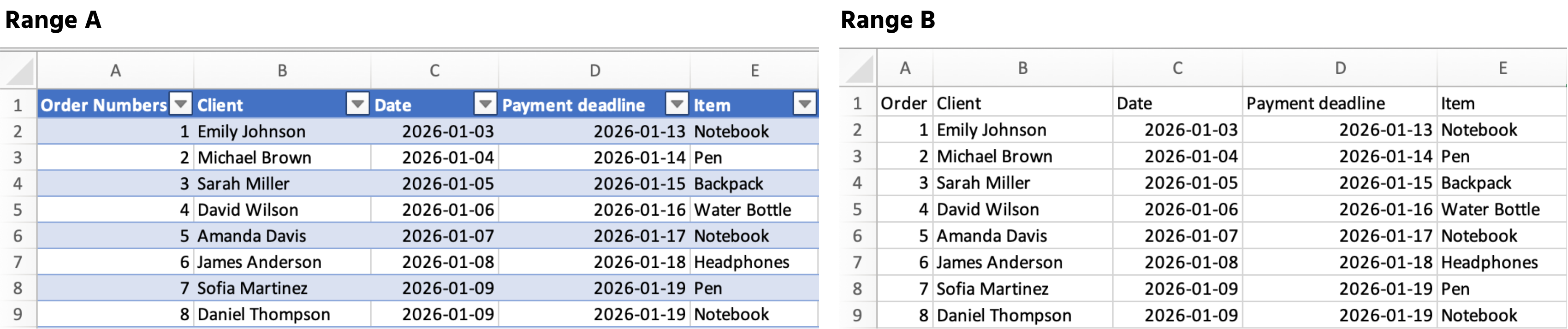
En Tabell är ett strukturerat område som talar om för Excel: "detta är en växande datamängd, behandla den som en."
När du konverterar ett område till en Tabell gör Excel automatiskt följande:
- Lägger till filter och sorteringsknappar i rubrikerna;
- Utökar formler och formatering till varje ny rad;
- Använder strukturerade referenser som
Sales[Total_Cost]istället förK2:K54.
Hur man skapar en tabell
- Klicka någonstans inne i dina data;
- Tryck Ctrl + T (Windows) eller Cmd + T (Mac);
- Bekräfta att dina data har rubriker → klicka på OK.
Tack för dina kommentarer!
Fråga AI

Fråga AI

Fråga vad du vill eller prova någon av de föreslagna frågorna för att starta vårt samtal
Tabeller
Områden är kraftfulla, men de är statiska. När din data fortsätter att växa – nya rader, nya kunder, nya transaktioner – behöver du något smartare. Det är här Tabeller kommer in.
Viktiga punkter
- En Tabell omvandlar ett område till en strukturerad, växande datamängd;
- Tryck Ctrl / Cmd + T för att konvertera ett område till en Tabell;
- Tabeller lägger till filter, strukturerade referenser och automatisk utvidgning;
- Varje kolumn = en datatyp. Varje rad = en post. Inga tomma rader inuti.
Vad är en Tabell?
En Tabell är ett strukturerat område som talar om för Excel: "detta är en växande datamängd, behandla den som en."
När du konverterar ett område till en Tabell gör Excel automatiskt följande:
- Lägger till filter och sorteringsknappar i rubrikerna;
- Utökar formler och formatering till varje ny rad;
- Använder strukturerade referenser som
Sales[Total_Cost]istället förK2:K54.
Hur man skapar en tabell
- Klicka någonstans inne i dina data;
- Tryck Ctrl + T (Windows) eller Cmd + T (Mac);
- Bekräfta att dina data har rubriker → klicka på OK.
Tack för dina kommentarer!
