Notice: This page requires JavaScript to function properly.
Please enable JavaScript in your browser settings or update your browser.
Lära Enkla Formler och Beräkningar i Excel | Grundläggande Formler
Practice
Projects
Quizzes & Challenges
Frågesporter
Challenges
/
Excel-formler

bookEnkla Formler och Beräkningar i Excel

Formula input can convert exprressions and give their results. It supports most of the common ones that comes to mind.

And sure, you can combine them to create more complex expressions. Excel will handle all calculations for you, with or without parentheses. For example:

But remember, this is Excel, not a calculator app. We can gain its full potential by using cell references instead of literal values. For example, we can calculate the sum of values in a row using cell references. When the value in any cell changes, the sum will automatically update.

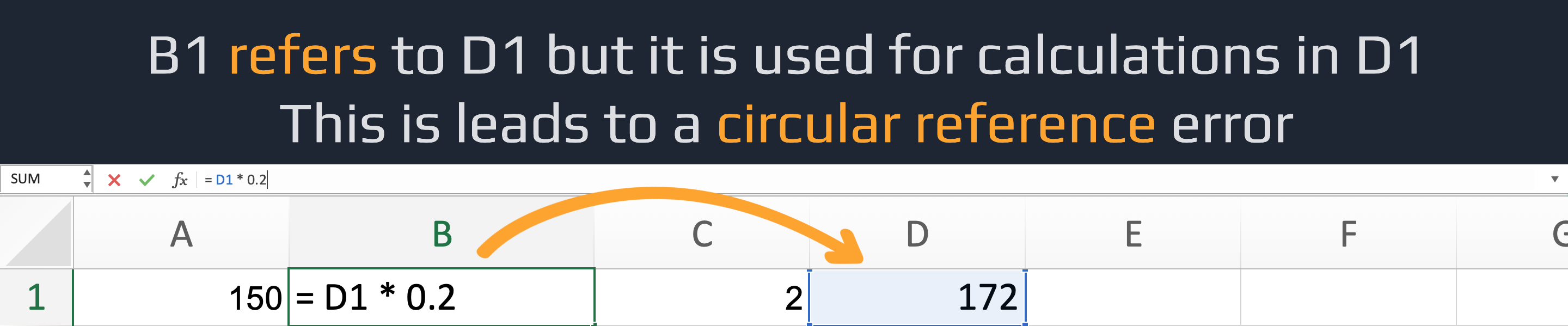
You should be careful and avoid using a cell to calculate a value for itself if it was already used in the calculation for the cell you want to update. This can lead to circular references and potentially incorrect results.

A circular reference error in Excel occurs when a formula refers to its own cell, directly or through a chain of other cells. This creates an endless loop that Excel can't resolve. For example, =A1 + 5 in cell A1 causes a direct circular reference.

question mark

Why should you use cell references instead of literal values in Excel formulas?

Select the correct answer

Var allt tydligt?

Hur kan vi förbättra det?

Tack för dina kommentarer!

Avsnitt 1. Kapitel 3

Fråga AI

expand

Fråga AI

ChatGPT

Fråga vad du vill eller prova någon av de föreslagna frågorna för att starta vårt samtal

bookEnkla Formler och Beräkningar i Excel

Svep för att visa menyn

Formula input can convert exprressions and give their results. It supports most of the common ones that comes to mind.

And sure, you can combine them to create more complex expressions. Excel will handle all calculations for you, with or without parentheses. For example:

But remember, this is Excel, not a calculator app. We can gain its full potential by using cell references instead of literal values. For example, we can calculate the sum of values in a row using cell references. When the value in any cell changes, the sum will automatically update.

You should be careful and avoid using a cell to calculate a value for itself if it was already used in the calculation for the cell you want to update. This can lead to circular references and potentially incorrect results.

A circular reference error in Excel occurs when a formula refers to its own cell, directly or through a chain of other cells. This creates an endless loop that Excel can't resolve. For example, =A1 + 5 in cell A1 causes a direct circular reference.

question mark

Why should you use cell references instead of literal values in Excel formulas?

Select the correct answer

Var allt tydligt?

Hur kan vi förbättra det?

Tack för dina kommentarer!

Avsnitt 1. Kapitel 3
some-alt