Indexes
Svep för att visa menyn
Let's consider how to work with arrays. First, let's understand how to access specific elements in an array.
To access a specific element in an array, use square brackets with the index. Remember that the index is not the actual position of the element, as indexing in PHP starts from 0. Let's look at an example for clarity.
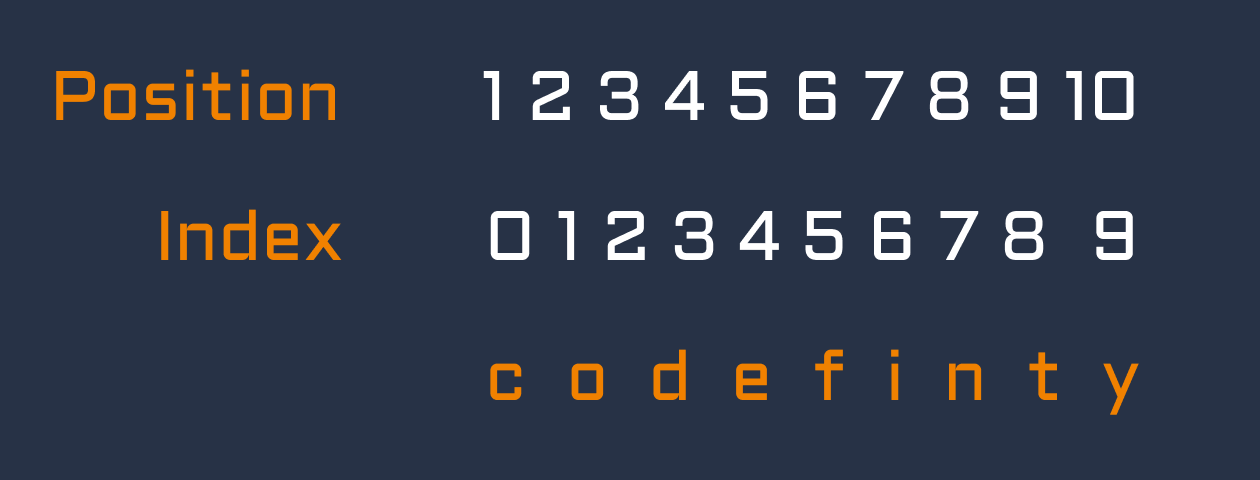
The index is always one less than the actual position. For example, we can retrieve several elements from an array in the example below:

main.php
1234567<?php // Initial array $site = ["c", "o", "d", "e", "f", "i", "n", "i", "t", "y"]; // Getting letters 'o' and 'y' echo $site[1] . " " . $site[9]; // outputs 'o y' ?>
In this example, the array $site contains the letters of the word "codefinity". We use numerical indices to access specific letters.
String Indexes
In PHP, just like arrays, strings also have indexes starting from zero. This means you can access each individual character of a string by its index, similar to how you work with elements in an array. For example, in the string $string = "Hello";, the character 'H' has index 0, 'e' has index 1, and so on. You can access characters using square brackets like $string[0] will give you 'H', or curly braces like $string{0} will also give you 'H'. This allows you to manipulate individual characters in a string as easily as elements in an array.
main.php
1234567<?php // Initial array $string = "Hello"; // Getting letter 'H' echo $string[0]; // outputs 'H' ?>
Svep för att börja koda
Fill in the blanks in the code. Access the second element of the array ($array) and print it to the screen.
Lösning
 Byt till skrivbordet för praktisk övningFortsätt där du är med ett av alternativen nedan
Tack för dina kommentarer!
single
Fråga AI

Fråga AI

Fråga vad du vill eller prova någon av de föreslagna frågorna för att starta vårt samtal
