Edição em Tempo Real
Deslize para mostrar o menu
Uma das maiores vantagens das pastas de trabalho do Excel baseadas na nuvem é a colaboração em tempo real. Vários usuários podem trabalhar no mesmo arquivo simultaneamente, sem a necessidade de criar cópias separadas da pasta de trabalho.
Quando uma pasta de trabalho compartilhada está armazenada no OneDrive ou SharePoint, o Excel sincroniza as atualizações automaticamente entre todos os colaboradores.
Compreendendo a Coautoria
A colaboração em tempo real no Excel é comumente chamada de coautoria. Isso permite que vários usuários editem a pasta de trabalho ao mesmo tempo.
Quando os colaboradores abrem o mesmo arquivo:
- O Excel exibe os usuários ativos próximo ao canto superior direito;
- As alterações aparecem automaticamente à medida que os usuários editam a pasta de trabalho;
- As atualizações são sincronizadas continuamente em segundo plano.
Esse processo cria um fluxo de trabalho muito mais rápido em comparação ao envio manual de anexos atualizados da pasta de trabalho.
Visualizando Alterações ao Vivo na Pasta de Trabalho
À medida que os colaboradores editam a pasta de trabalho, o Excel atualiza as células em tempo real. Os usuários podem notar seleções destacadas ou indicadores mostrando onde outra pessoa está trabalhando no momento.
Por exemplo, se um usuário atualiza os números de vendas enquanto outro edita dados regionais, ambas as alterações podem aparecer quase instantaneamente em toda a pasta de trabalho compartilhada.
Isso ajuda as equipes a se manterem sincronizadas durante sessões colaborativas de trabalho.
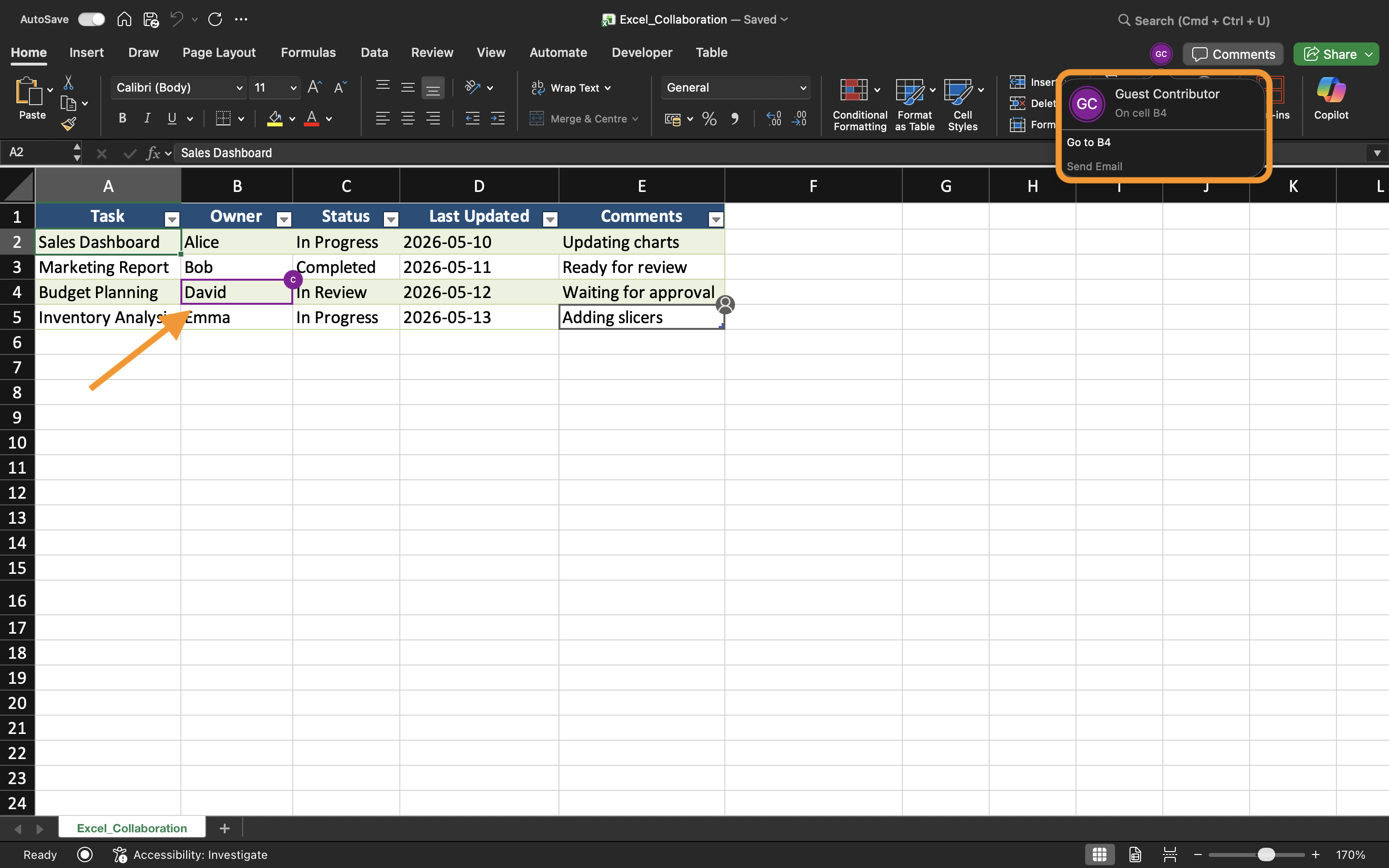
Evitando Conflitos de Edição
Embora o Excel gerencie a maior parte da sincronização automaticamente, ainda podem ocorrer conflitos quando vários usuários editam as mesmas células ao mesmo tempo.
Para reduzir problemas de edição:
- Atribuir áreas diferentes da planilha para os colaboradores;
- Comunicar-se antes de realizar grandes alterações estruturais;
- Evitar excluir planilhas durante a colaboração ativa;
- Manter o AutoSalvar ativado.
Essas práticas ajudam a manter fluxos de trabalho compartilhados mais estáveis.
Trabalhando no Excel Desktop e na Web
A colaboração em tempo real funciona tanto no Excel para Desktop quanto no Excel para a Web. Os usuários podem colaborar mesmo utilizando dispositivos e sistemas operacionais diferentes.
No entanto, alguns recursos avançados do Excel podem se comportar de maneira diferente dependendo da plataforma utilizada. Para a melhor experiência de colaboração, as equipes devem tentar usar versões compatíveis do Excel sempre que possível.
Benefícios da Edição em Tempo Real
A edição em tempo real aprimora o trabalho em equipe, tornando a colaboração mais rápida e transparente. As equipes podem revisar atualizações imediatamente, reduzir atrasos na comunicação e evitar confusões causadas por cópias desatualizadas da pasta de trabalho.
Esse fluxo de trabalho é especialmente útil para:
- Planejamento orçamentário;
- Relatórios de vendas;
- Acompanhamento de projetos;
- Programação de equipes;
- Painéis operacionais.
Tarefa
A pasta de trabalho contém um relatório trimestral de vendas compartilhado, gerenciado por vários membros do departamento. O objetivo é testar a colaboração em tempo real e observar como as atualizações da pasta de trabalho são sincronizadas entre os usuários.
- Abra a pasta de trabalho compartilhada em dois dispositivos ou sessões de navegador diferentes;
- Edite áreas diferentes da planilha simultaneamente;
- Observe como o Excel sincroniza as alterações na pasta de trabalho;
- Verifique se as atualizações aparecem automaticamente para todos os colaboradores;
- Teste a colaboração usando tanto o Excel para Desktop quanto o Excel para a Web.
Obrigado pelo seu feedback!
Pergunte à IA

Pergunte à IA

Pergunte o que quiser ou experimente uma das perguntas sugeridas para iniciar nosso bate-papo
