Noções Essenciais de Gerenciamento de Arquivos
Deslize para mostrar o menu
Boa gestão de arquivos é uma parte importante dos fluxos de trabalho profissionais no Excel. Mesmo pastas de trabalho bem projetadas podem se tornar difíceis de manter se os arquivos estiverem mal organizados ou armazenados de forma inconsistente.
Uma gestão de arquivos limpa ajuda as equipes a localizar pastas de trabalho rapidamente, reduzir duplicidade e manter sistemas de colaboração confiáveis.
Compreendendo os Formatos de Arquivo do Excel
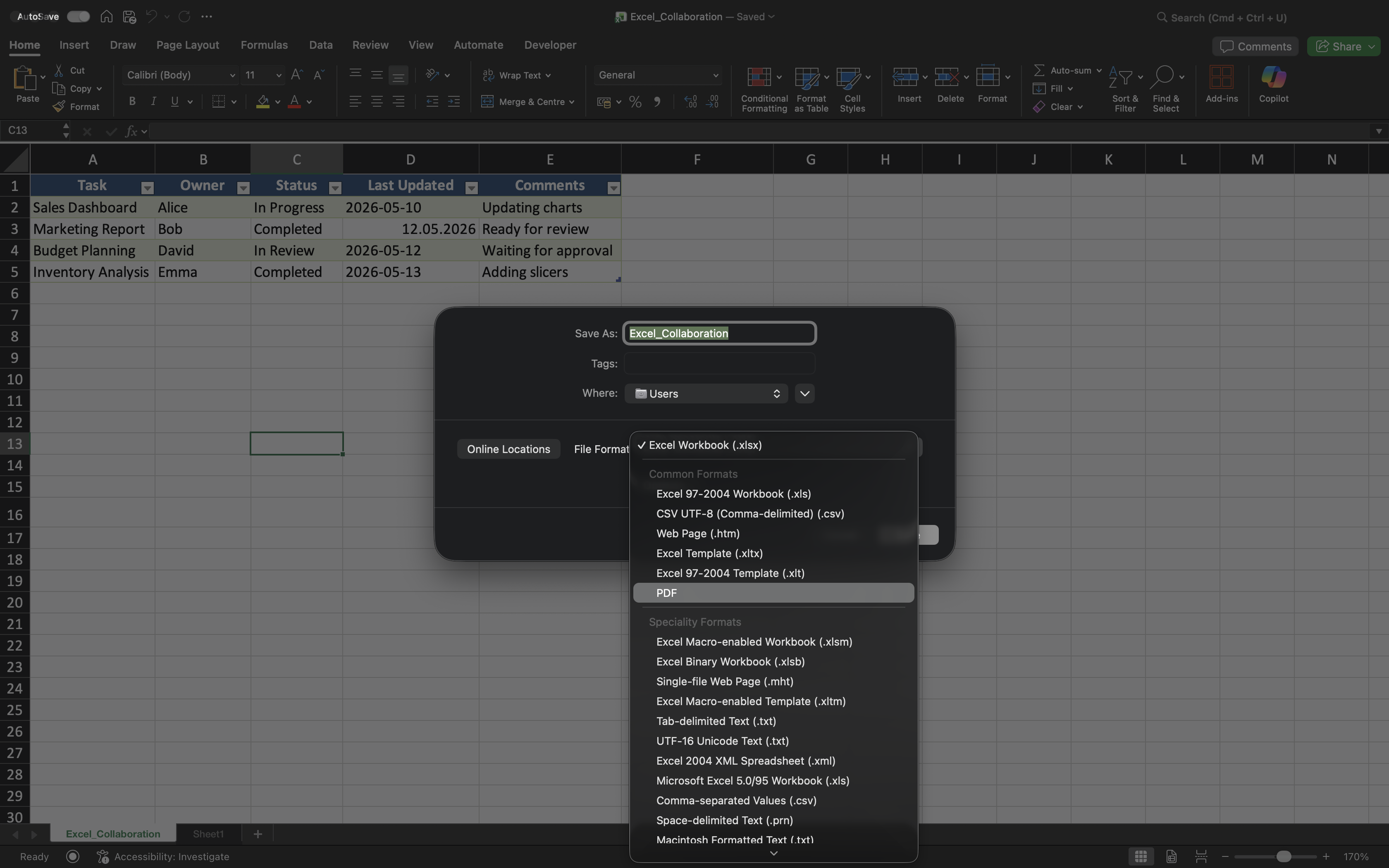
O Excel suporta diversos formatos de arquivo projetados para diferentes finalidades.
Os formatos mais comuns incluem:
- XLSX — formato padrão de pasta de trabalho do Excel;
- XLSM — formato de pasta de trabalho que suporta macros;
- CSV — formato de texto simples comumente usado para troca de dados;
- PDF — formato não editável utilizado para compartilhamento de relatórios finalizados.
Escolher o formato de arquivo correto ajuda a evitar problemas de compatibilidade e melhora a confiabilidade do fluxo de trabalho.
Organização de Pastas de Trabalho
Projetos compartilhados no Excel devem utilizar estruturas de pastas claras e consistentes. Isso facilita a localização das pastas de trabalho e reduz arquivos duplicados desnecessários.
Por exemplo, as equipes geralmente separam:
- Relatórios ativos;
- Arquivos arquivados;
- Modelos;
- Exportações finais.
Pastas bem organizadas ajudam a manter fluxos de trabalho empresariais mais limpos ao longo do tempo.
Uso de Nomes Consistentes para Pastas de Trabalho
Os nomes das pastas de trabalho devem descrever claramente o conteúdo do arquivo e permanecer consistentes entre projetos.
Bons nomes de pastas de trabalho geralmente incluem:
- Nome do projeto ou relatório;
- Período do relatório, se necessário;
- Contexto empresarial claro.
Nomes como Sales_Report_Q2_2026.xlsx são muito mais fáceis de gerenciar do que versões pouco claras como Final_Report_New.xlsx.
Exportação e Compartilhamento de Relatórios
Pastas de trabalho do Excel nem sempre são compartilhadas como arquivos editáveis. Em muitos ambientes empresariais, relatórios finalizados são exportados como PDFs antes da distribuição.
Exportações em PDF ajudam a preservar a formatação da pasta de trabalho e evitam edições acidentais pelos destinatários.
Arquivos CSV, por outro lado, são comumente usados ao transferir dados entre diferentes sistemas ou aplicações.
Mantendo Fluxos de Colaboração Organizados
À medida que os projetos crescem, uma má gestão de arquivos pode gerar confusão e caos de versões. As equipes devem evitar armazenar cópias locais desnecessárias ou criar sistemas de nomenclatura inconsistentes.
Sempre que possível:
- Armazenar pastas de trabalho compartilhadas no OneDrive;
- Compartilhar links em vez de anexos;
- Arquivar versões antigas das pastas de trabalho;
- Manter as pastas dos projetos organizadas.
Esses hábitos ajudam a manter ambientes de colaboração mais limpos e confiáveis.
Obrigado pelo seu feedback!
Pergunte à IA

Pergunte à IA

Pergunte o que quiser ou experimente uma das perguntas sugeridas para iniciar nosso bate-papo
