Dos Dados ao Gráfico
Deslize para mostrar o menu
O Excel oferece duas maneiras de criar um gráfico. Gráficos Recomendados é o ponto de partida mais rápido. O Excel analisa os dados selecionados e sugere tipos de gráficos que se adequam à sua estrutura. O grupo Gráficos na guia Inserir oferece controle manual para escolher qualquer tipo diretamente.

Gráfico de Colunas / Barras
A altura de cada barra representa o valor. Os espaços entre as barras enfatizam que as categorias são distintas e independentes, não fazem parte de uma sequência contínua.
Comparação:
- Receita total por produto;
- Vendas por região ou categoria;
- Qualquer classificação ou comparação lado a lado;
- Não é ideal para mostrar variação ao longo do tempo.
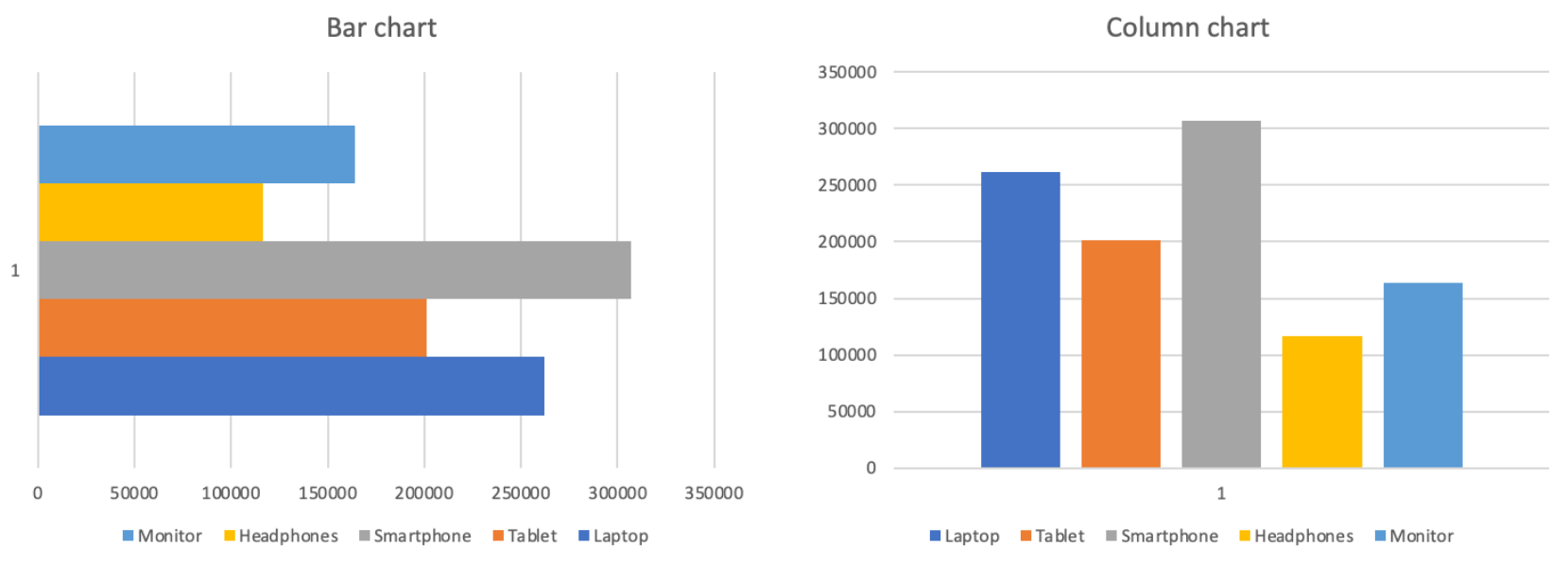
Gráfico de Linhas
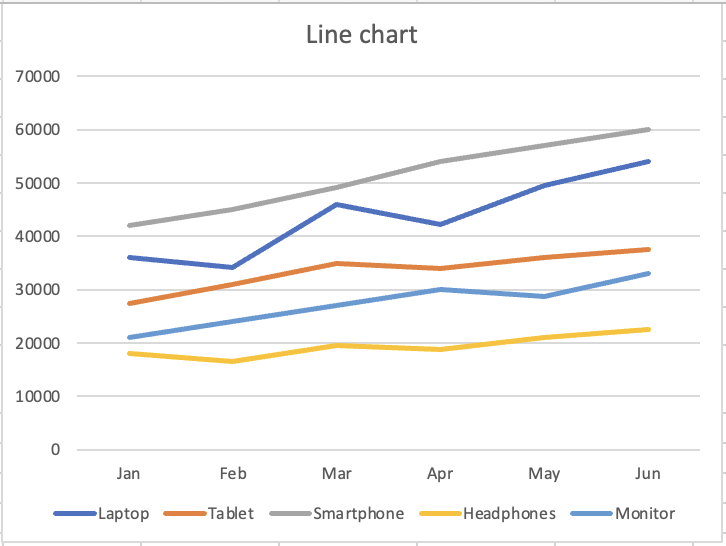
A linha contínua sugere movimento e progressão. Cada ponto se conecta ao próximo, mostrando direção e impulso. A forma visual indica ao leitor "isso está mudando".
Tendência ao longo do tempo:
- Receita mensal por produto;
- Qualquer métrica acompanhada em períodos de tempo;
- Comparação de tendências de múltiplas séries;
- Não é ideal para comparar categorias distintas.
Obrigado pelo seu feedback!
Pergunte à IA

Pergunte à IA

Pergunte o que quiser ou experimente uma das perguntas sugeridas para iniciar nosso bate-papo
Dos Dados ao Gráfico
O Excel oferece duas maneiras de criar um gráfico. Gráficos Recomendados é o ponto de partida mais rápido. O Excel analisa os dados selecionados e sugere tipos de gráficos que se adequam à sua estrutura. O grupo Gráficos na guia Inserir oferece controle manual para escolher qualquer tipo diretamente.
Gráfico de Colunas / Barras
A altura de cada barra representa o valor. Os espaços entre as barras enfatizam que as categorias são distintas e independentes, não fazem parte de uma sequência contínua.
Comparação:
- Receita total por produto;
- Vendas por região ou categoria;
- Qualquer classificação ou comparação lado a lado;
- Não é ideal para mostrar variação ao longo do tempo.
Gráfico de Linhas
A linha contínua sugere movimento e progressão. Cada ponto se conecta ao próximo, mostrando direção e impulso. A forma visual indica ao leitor "isso está mudando".
Tendência ao longo do tempo:
- Receita mensal por produto;
- Qualquer métrica acompanhada em períodos de tempo;
- Comparação de tendências de múltiplas séries;
- Não é ideal para comparar categorias distintas.
Obrigado pelo seu feedback!
