Texto, Alinhamento e Formatação Reutilizável
Deslize para mostrar o menu
Tamanho da Fonte
O tamanho da fonte deve refletir a importância, não servir apenas para decorar células individuais. Alterar o tamanho para estabelecer a estrutura — título, cabeçalho, dados, observação — e manter cada nível consistente em toda a tabela.
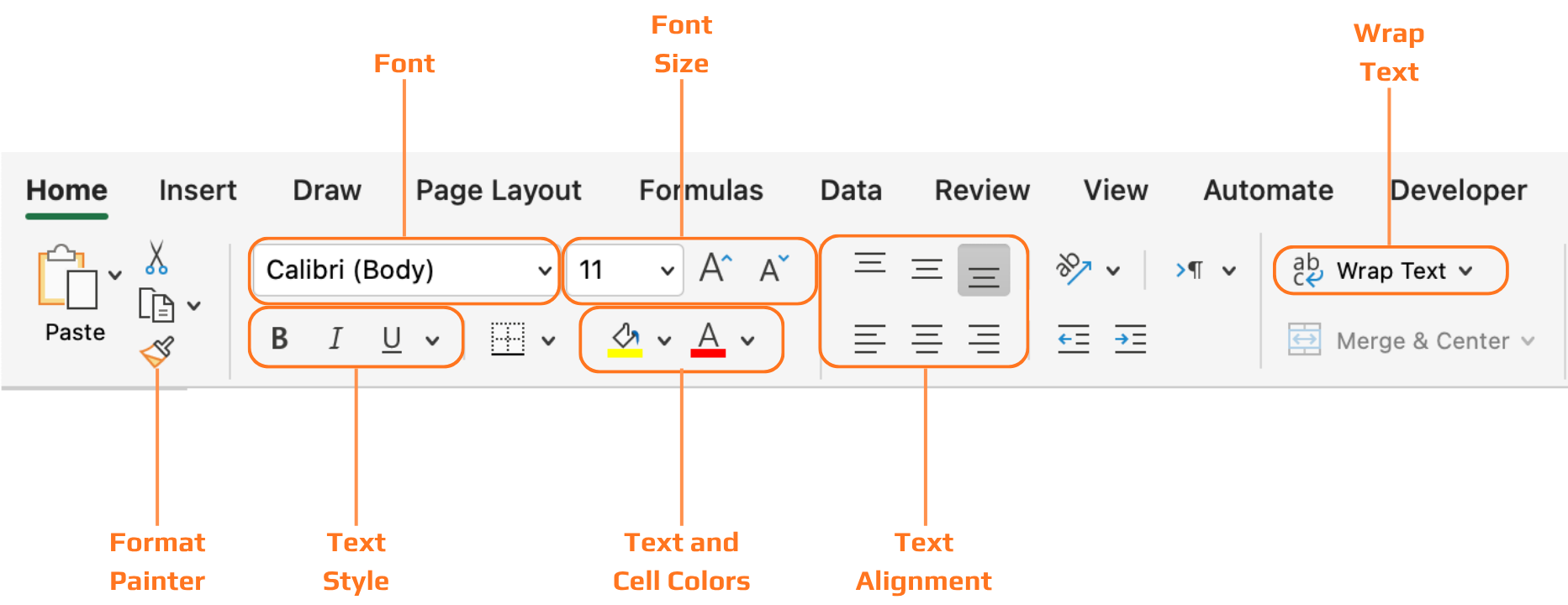
Alinhamento do Texto
- Alinhamento horizontal: texto → alinhado à esquerda. Números → alinhados à direita (os pontos decimais ficam alinhados, facilitando a comparação das colunas). Rótulos de status → centralizado funciona bem;
- Alinhamento vertical: o padrão do Excel é o alinhamento inferior. Ao aumentar a altura de uma linha, o conteúdo desce para a parte inferior — altere para o meio para um visual mais limpo.

Texto girado ou inclinado está disponível para cabeçalhos estreitos, mas deve ser usado com moderação. Dificulta a leitura e pode parecer estranho. Utilize apenas quando o espaço horizontal for realmente limitado.
Quebra de Texto
- Quebra de texto desativada: a anotação longa se estende para as células adjacentes, cobrindo outros dados e prejudicando o layout da tabela;
- Quebra de texto ativada: a anotação permanece dentro da célula. A altura da linha é ajustada automaticamente. Todas as outras colunas permanecem inalteradas;
Pincel de Formatação
Copia toda a formatação (tamanho da fonte, alinhamento, quebra, cor) de uma célula e aplica em qualquer outra. Mais rápido e confiável do que repetir cada etapa manualmente.
- Selecione a célula cuja formatação deseja copiar;
- Clique em Pincel de Formatação no grupo Área de Transferência na guia Página Inicial;
- Clique (ou arraste sobre) a célula ou intervalo de destino. A formatação é aplicada instantaneamente.
Estilos de Célula
Predefinições de formatação integradas para títulos, cabeçalhos, totais, avisos e destaques. Útil quando se deseja um resultado profissional sem criar cada estilo manualmente. Passe o mouse sobre um estilo para visualizá-lo antes de aplicar.
- Selecione a célula ou intervalo;
- Guia Página Inicial → Estilos de Célula → passe o mouse para visualizar → clique para aplicar;
- Você pode voltar à formatação manual a qualquer momento.
Clique duas vezes no Pincel de Formatação para mantê-lo ativado. Assim, é possível aplicar a mesma formatação em vários intervalos consecutivos. Pressione Esc para desativar ao finalizar.
Obrigado pelo seu feedback!
Pergunte à IA

Pergunte à IA

Pergunte o que quiser ou experimente uma das perguntas sugeridas para iniciar nosso bate-papo
