What are Arrays?
Deslize para mostrar o menu
Consider a situation where we need to store the subject marks of 50 students. One way is to make 50 integer variables that hold the marks of 50 students ,however it is very tedious and in-efficient. Instead, you can create an array.
An Array is like a collection of variables of the same type.
You can create an array using the following syntax:

main.cs
1datatype[] arrayName = new datatype[size];

new is a keyword that creates a new instance of a type and allocates memory for it. At this stage, treat it as a required part of array syntax.
The datatype indicates the type of elements the array will possess, it can be int, float, char etc.
While size is the number of elements the array will have.
Using the above syntax you can create an integer array having 50 elements:
main.cs
1int[] studentMarks = new int[50];
The size of an array is fixed and cannot be changed. In case you want to initialize an array with some elements at the time of declaration, you can use the following syntax:
main.cs
1datatype[] arrayName = {element1, element2, element3, ...};
In this case you don't need to specify the size of the array. It is automatically inferred by the compiler based on the number of elements the array is initialized with:
main.cs
12345678910111213using System; namespace ConsoleApp { internal class Program { static void Main(string[] args) { int[] primeNumbers = { 2, 3, 5, 7, 11, 13, 17, 19, 23, 29}; Console.WriteLine(primeNumbers[3]); // Output: 7 } } }
The size of the above array is 10 since it is initialized with ten elements. This size stays fixed throughout the program.
Indexing in Arrays is a method to access elements using numerical indices.
The first element is accessed with index 0, the second with index 1, and so on. This allows for quick and easy retrieval and modification of values. In the upcoming chapters, you will explore this concept in more detail, practicing how to find elements using their indices.
Following is an illustration of a string array that has 4 elements:
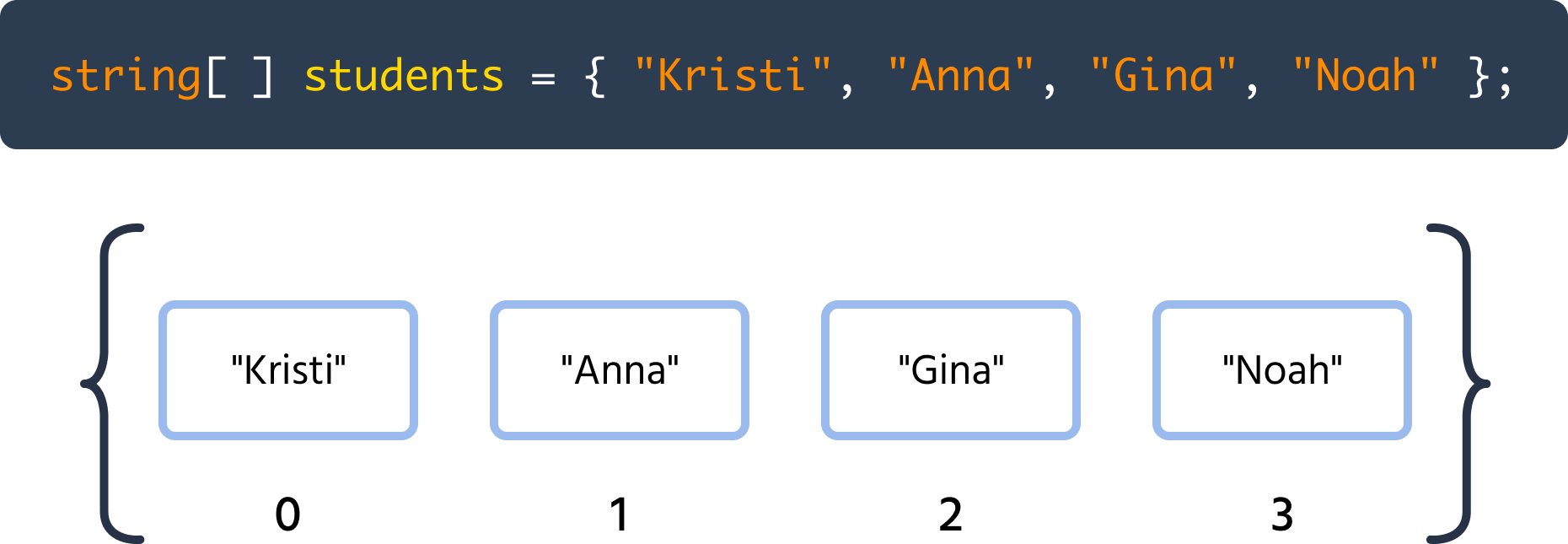
Each element is like a box which contains a value, and that value can be changed.
Obrigado pelo seu feedback!
Pergunte à IA

Pergunte à IA

Pergunte o que quiser ou experimente uma das perguntas sugeridas para iniciar nosso bate-papo
