Notice: This page requires JavaScript to function properly.
Please enable JavaScript in your browser settings or update your browser.
Aprenda Mathematical Operations in Java | Section
Java Fundamentals

bookMathematical Operations in Java

Operators

We observed that we used basic mathematical operators such as +, -, /, and *. These operators are familiar to us from calculators or mathematics; you can also use them in a code editor.

Let's go through the basics:

  • + – addition;
  • - – subtraction;
  • / – division;
  • * – multiplication.

You can use these four fundamental operators with numerical data types (byte, short, long, float, double).

Let's explore the usage of these operators with an example code:

Main.java

Main.java

copy
1234567891011121314
package com.example; public class Main { public static void main(String[] args) { // Creating an int variable with value 10 int a = 10; // Creating an int variable with value 17 int b = 17; // Creating an int variable to store the sum of `a` and `b` int res = a + b; // Printing the result to the console System.out.println(res); } }

As we can see, the variable res holds the value 27, which is the sum of 10 and 17.

Let's consider a few more examples:

Main.java

Main.java

copy
12345678910111213141516171819
package com.example; public class Main { public static void main(String[] args) { // Creating an int variable with the sum of 16 and 4 int plus = 16 + 4; /* Creating an int variable with the value of the subtraction of the `plus` variable and 10 */ int minus = plus - 10; /* Variable that holds the result of multiplying the `minus` variable by 4 */ int multiplying = minus * 4; /* Using subtraction and division operations on the `multiplying` variable */ int complexDivision = (multiplying - 4) / 9; // Printing the result to the console System.out.println(complexDivision); } }

We can use both numbers and variables in operations, but creating many variables increases stack memory usage, so using numbers directly is often preferable. Operator precedence is applied: parentheses first, then multiplication or division, and finally addition or subtraction.

This allows us to perform simple operations with different numeric values.

Order of Operations

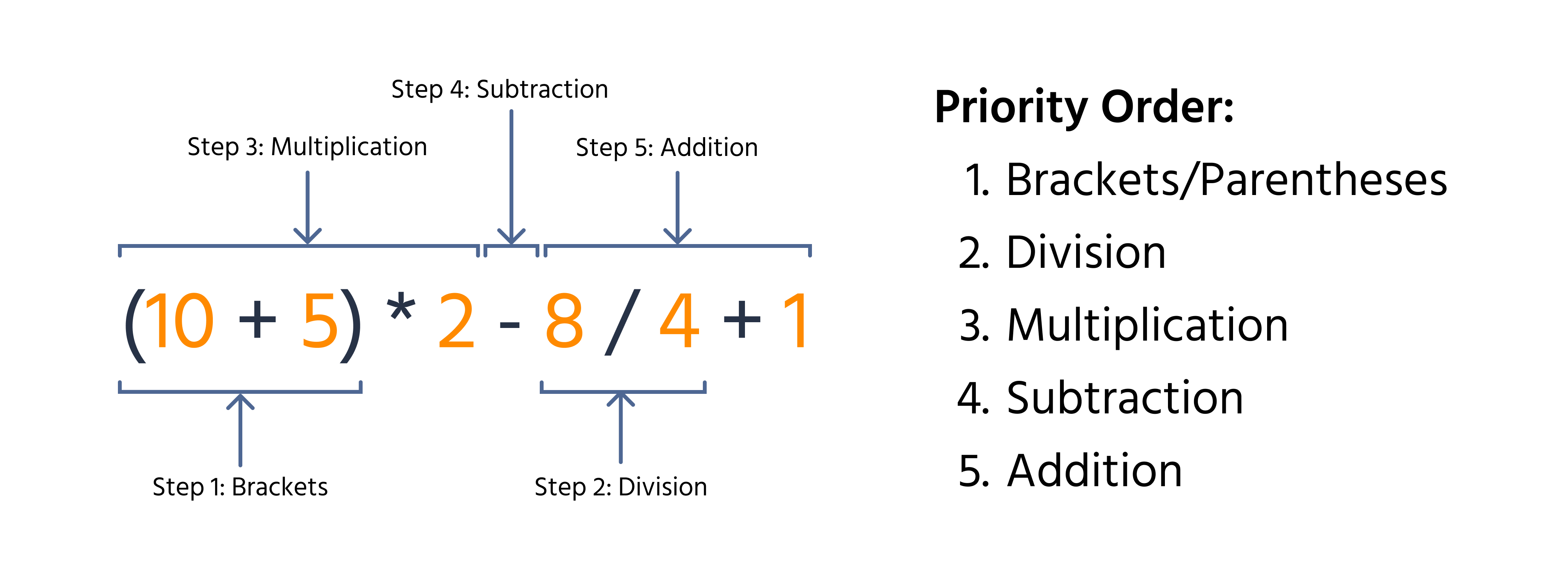
Java follows the basic principles of mathematics, and operations also have an order of execution. Let's take a look at an example:

main.java

main.java

copy
12345678
package com.example; public class Main { public static void main(String[] args) { int result = (10 + 5) * 2 - 8 / 4 + 1; System.out.println(result); } }

Here we arrived at the result by performing operations sequentially. Let's take a look at the order:

So, you can prioritize the execution of operations using regular parentheses, just like in arithmetic.

Tarefa

Swipe to start coding

  1. Add the values of the variables firstNumber and secondNumber.
  2. Divide the sum by the value of the variable thirdNumber.
  3. Store the final result in the variable result.

Solução

Tudo estava claro?

Como podemos melhorá-lo?

Obrigado pelo seu feedback!

Seção 1. Capítulo 9
single

single

Pergunte à IA

expand

Pergunte à IA

ChatGPT

Pergunte o que quiser ou experimente uma das perguntas sugeridas para iniciar nosso bate-papo

close

bookMathematical Operations in Java

Deslize para mostrar o menu

Operators

We observed that we used basic mathematical operators such as +, -, /, and *. These operators are familiar to us from calculators or mathematics; you can also use them in a code editor.

Let's go through the basics:

  • + – addition;
  • - – subtraction;
  • / – division;
  • * – multiplication.

You can use these four fundamental operators with numerical data types (byte, short, long, float, double).

Let's explore the usage of these operators with an example code:

Main.java

Main.java

copy
1234567891011121314
package com.example; public class Main { public static void main(String[] args) { // Creating an int variable with value 10 int a = 10; // Creating an int variable with value 17 int b = 17; // Creating an int variable to store the sum of `a` and `b` int res = a + b; // Printing the result to the console System.out.println(res); } }

As we can see, the variable res holds the value 27, which is the sum of 10 and 17.

Let's consider a few more examples:

Main.java

Main.java

copy
12345678910111213141516171819
package com.example; public class Main { public static void main(String[] args) { // Creating an int variable with the sum of 16 and 4 int plus = 16 + 4; /* Creating an int variable with the value of the subtraction of the `plus` variable and 10 */ int minus = plus - 10; /* Variable that holds the result of multiplying the `minus` variable by 4 */ int multiplying = minus * 4; /* Using subtraction and division operations on the `multiplying` variable */ int complexDivision = (multiplying - 4) / 9; // Printing the result to the console System.out.println(complexDivision); } }

We can use both numbers and variables in operations, but creating many variables increases stack memory usage, so using numbers directly is often preferable. Operator precedence is applied: parentheses first, then multiplication or division, and finally addition or subtraction.

This allows us to perform simple operations with different numeric values.

Order of Operations

Java follows the basic principles of mathematics, and operations also have an order of execution. Let's take a look at an example:

main.java

main.java

copy
12345678
package com.example; public class Main { public static void main(String[] args) { int result = (10 + 5) * 2 - 8 / 4 + 1; System.out.println(result); } }

Here we arrived at the result by performing operations sequentially. Let's take a look at the order:

So, you can prioritize the execution of operations using regular parentheses, just like in arithmetic.

Tarefa

Swipe to start coding

  1. Add the values of the variables firstNumber and secondNumber.
  2. Divide the sum by the value of the variable thirdNumber.
  3. Store the final result in the variable result.

Solução

Switch to desktopMude para o desktop para praticar no mundo realContinue de onde você está usando uma das opções abaixo
Tudo estava claro?

Como podemos melhorá-lo?

Obrigado pelo seu feedback!

Seção 1. Capítulo 9
single

single

some-alt