Bewerken in Realtime
Veeg om het menu te tonen
Een van de grootste voordelen van cloudgebaseerde Excel-werkboeken is samenwerking in realtime. Meerdere gebruikers kunnen gelijktijdig in hetzelfde bestand werken zonder aparte kopieën van het werkboek te maken.
Wanneer een gedeeld werkboek is opgeslagen in OneDrive of SharePoint, synchroniseert Excel automatisch de updates tussen alle samenwerkende gebruikers.
Co-auteurschap begrijpen
Samenwerking in realtime in Excel wordt vaak co-auteurschap genoemd. Hiermee kunnen meerdere gebruikers het werkboek tegelijkertijd bewerken.
Wanneer samenwerkers hetzelfde bestand openen:
- Excel toont actieve gebruikers rechtsboven in het scherm;
- Wijzigingen verschijnen automatisch terwijl gebruikers het werkboek bewerken;
- Updates worden continu op de achtergrond gesynchroniseerd.
Dit zorgt voor een veel snellere workflow dan het handmatig versturen van bijgewerkte werkboekbijlagen.
Live wijzigingen in het werkboek bekijken
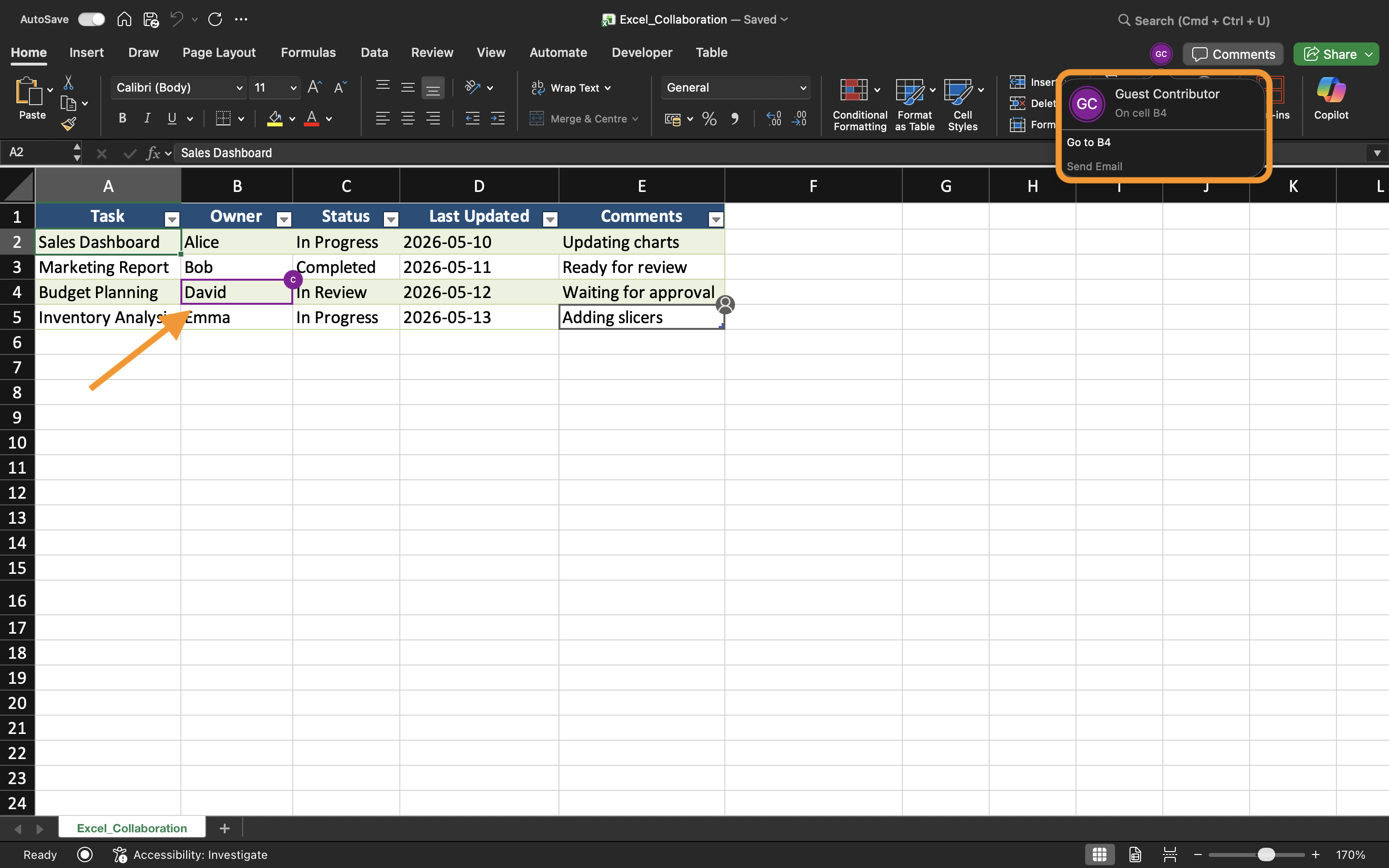
Terwijl samenwerkers het werkboek bewerken, werkt Excel cellen in realtime bij. Gebruikers kunnen gemarkeerde selecties of indicatoren zien die aangeven waar een andere persoon momenteel werkt.
Als bijvoorbeeld één gebruiker verkoopcijfers bijwerkt terwijl een ander regionale gegevens aanpast, kunnen beide wijzigingen vrijwel direct zichtbaar zijn in het gedeelde werkboek.
Dit helpt teams om tijdens gezamenlijke werksessies gesynchroniseerd te blijven.
Conflicten bij bewerken voorkomen
Hoewel Excel de meeste synchronisatie automatisch afhandelt, kunnen er toch conflicten ontstaan wanneer meerdere gebruikers gelijktijdig dezelfde cellen bewerken.
Om bewerkingsproblemen te verminderen:
- Wijs verschillende werkbladgebieden toe aan samenwerkers;
- Communiceer voordat grote structurele wijzigingen worden aangebracht;
- Vermijd het verwijderen van werkbladen tijdens actieve samenwerking;
- Houd AutoSave ingeschakeld.
Deze werkwijzen helpen om een soepelere gedeelde workflow te behouden.
Werken op zowel desktop- als webversie van Excel
Samenwerking in realtime werkt zowel in de Excel Desktop-app als in Excel voor het web. Gebruikers kunnen samenwerken, zelfs als ze verschillende apparaten en besturingssystemen gebruiken.
Sommige geavanceerde Excel-functies kunnen echter anders werken, afhankelijk van het gebruikte platform. Voor de beste samenwerkingservaring is het aan te raden dat teams waar mogelijk compatibele Excel-versies gebruiken.
Voordelen van realtime bewerken
Realtime bewerken verbetert het teamwerk door samenwerking sneller en transparanter te maken. Teams kunnen updates direct bekijken, communicatievertragingen verminderen en verwarring door verouderde werkboekkopieën voorkomen.
Deze workflow is vooral nuttig voor:
- Budgetplanning;
- Verkooprapportage;
- Projectopvolging;
- Teamplanning;
- Operationele dashboards.
Taak
Het werkboek bevat een gedeeld kwartaalrapport voor de verkoop, beheerd door meerdere leden van de afdeling. Het doel is om real-time samenwerking te testen en te observeren hoe werkboekupdates tussen gebruikers worden gesynchroniseerd.
- Open het gedeelde werkboek op twee aparte apparaten of browsersessies;
- Bewerk gelijktijdig verschillende delen van het werkblad;
- Observeer hoe Excel wijzigingen in het werkboek synchroniseert;
- Controleer of updates automatisch verschijnen voor alle samenwerkers;
- Test samenwerking met zowel Excel Desktop als Excel voor het web.
Bedankt voor je feedback!
Vraag AI

Vraag AI

Vraag wat u wilt of probeer een van de voorgestelde vragen om onze chat te starten.
