Essentiële Bestandsbeheer
Veeg om het menu te tonen
Goed bestandsbeheer is een belangrijk onderdeel van professionele Excel-werkstromen. Zelfs goed ontworpen werkmappen kunnen lastig te onderhouden zijn als bestanden slecht georganiseerd of inconsistent opgeslagen worden.
Net bestandsbeheer helpt teams om werkmappen snel te vinden, duplicatie te verminderen en betrouwbare samenwerkingssystemen te behouden.
Inzicht in Excel-bestandsindelingen
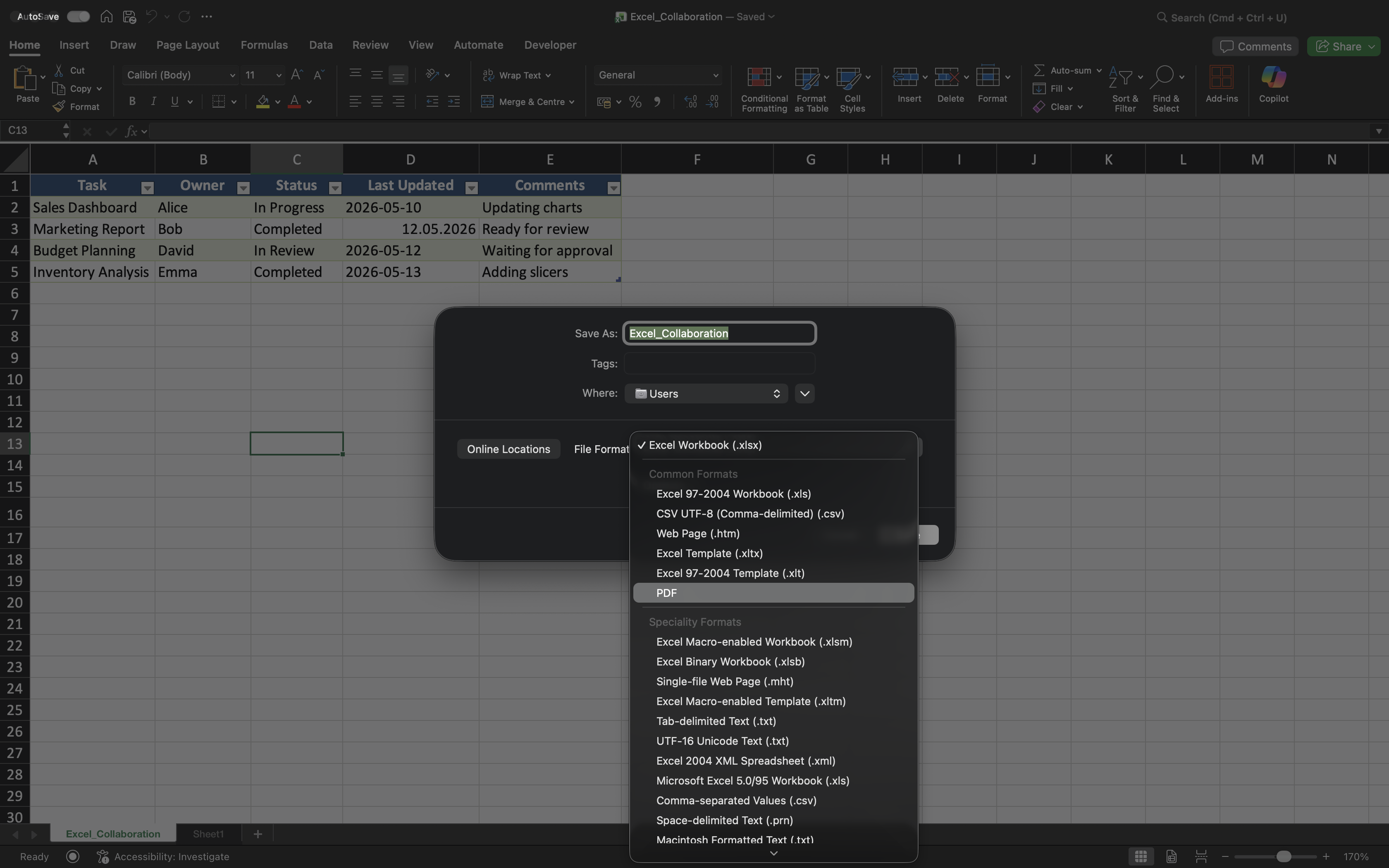
Excel ondersteunt verschillende bestandsindelingen voor uiteenlopende doeleinden.
Veelvoorkomende indelingen zijn:
- XLSX — standaard Excel-werkmapindeling;
- XLSM — werkmapindeling die macro's ondersteunt;
- CSV — platte-tekstindeling die vaak wordt gebruikt voor gegevensuitwisseling;
- PDF — niet-bewerkbaar formaat voor het delen van definitieve rapporten.
Het kiezen van de juiste bestandsindeling helpt compatibiliteitsproblemen te voorkomen en verhoogt de betrouwbaarheid van de werkstroom.
Werkmapmappen organiseren
Gedeelde Excel-projecten dienen duidelijke en consistente mappenstructuren te gebruiken. Dit maakt werkmappen eenvoudiger vindbaar en vermindert onnodige duplicaten.
Teams maken bijvoorbeeld vaak onderscheid tussen:
- Actieve rapporten;
- Gearchiveerde bestanden;
- Sjablonen;
- Definitieve exports.
Goed georganiseerde mappen dragen bij aan schonere bedrijfsprocessen op de lange termijn.
Consistente werkmapnamen gebruiken
Werkmapnamen moeten de inhoud van het bestand duidelijk beschrijven en consistent zijn binnen projecten.
Goede werkmapnamen bevatten vaak:
- Project- of rapportnaam;
- Rapportageperiode indien nodig;
- Duidelijke zakelijke context.
Namen zoals Sales_Report_Q2_2026.xlsx zijn veel eenvoudiger te beheren dan onduidelijke versies zoals Final_Report_New.xlsx.
Rapporten exporteren en delen
Excel-werkmappen worden niet altijd gedeeld als bewerkbare bestanden. In veel zakelijke omgevingen worden definitieve rapporten als PDF geëxporteerd voordat ze worden verspreid.
PDF-exports helpen de opmaak van de werkmap te behouden en voorkomen dat ontvangers per ongeluk wijzigingen aanbrengen.
CSV-bestanden worden daarentegen vaak gebruikt bij het overdragen van gegevens tussen verschillende systemen of applicaties.
Samenwerkingsprocessen overzichtelijk houden
Naarmate projecten groeien, kan slecht bestandsbeheer leiden tot verwarring en versiechaos. Teams moeten het opslaan van onnodige lokale kopieën of het creëren van inconsistente naamgevingssystemen vermijden.
Waar mogelijk:
- Gedeelde werkmappen opslaan in OneDrive;
- Links delen in plaats van bijlagen;
- Verouderde werkmapversies archiveren;
- Projectmappen georganiseerd houden.
Deze gewoonten dragen bij aan een schonere en betrouwbaardere samenwerkingsomgeving.
Bedankt voor je feedback!
Vraag AI

Vraag AI

Vraag wat u wilt of probeer een van de voorgestelde vragen om onze chat te starten.
