Gems
Veeg om het menu te tonen
Gems
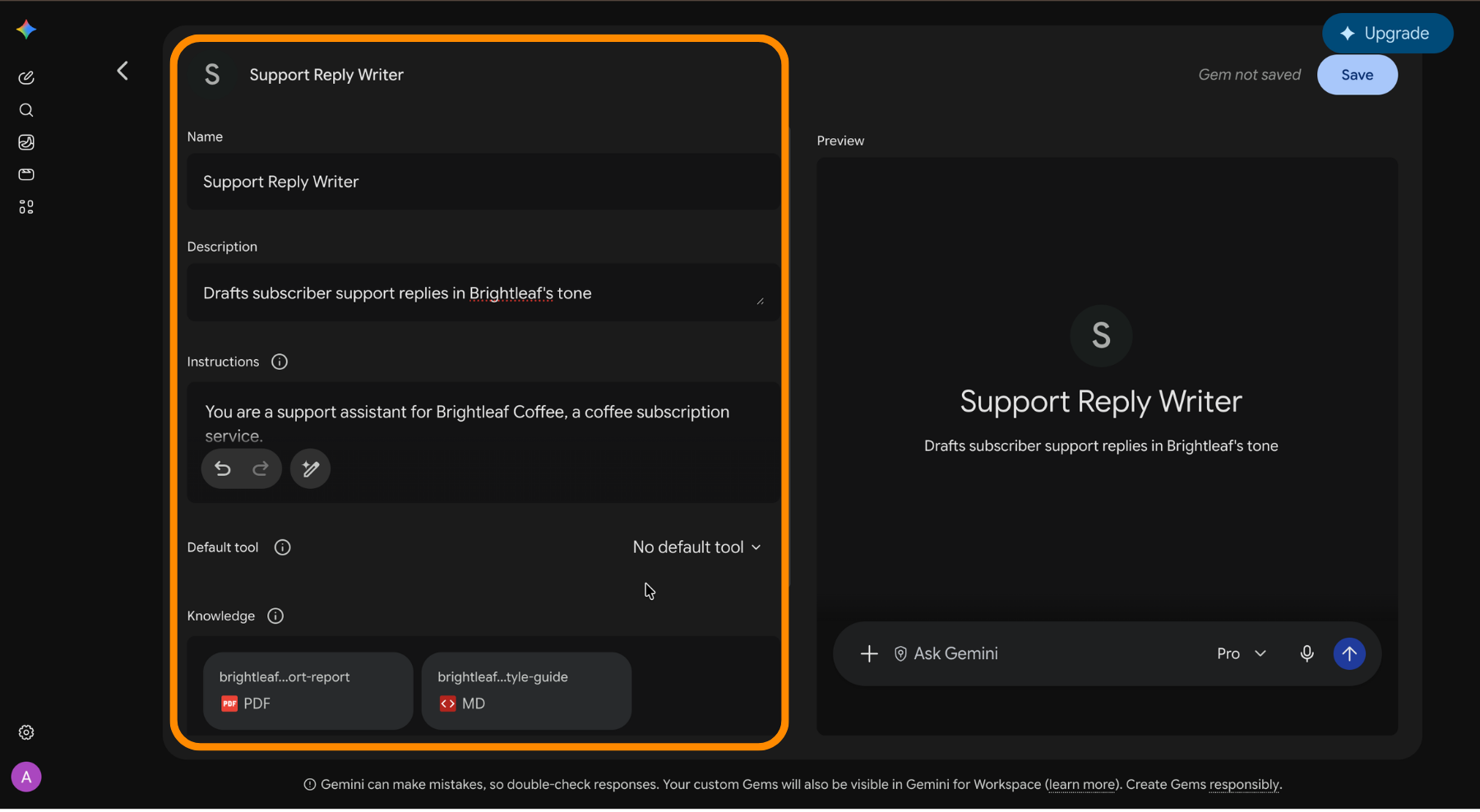
A Gem is a saved setup you can call again instead of rebuilding it every session. Each one holds a name, instructions, an optional default tool, and up to ten reference files. Gems are free on every plan, including the free one.
- Open
Gemsin the navigation drawer and create a new one; - Write the instructions – who Gemini is here, what the work is, and how the output should look;
- Set a default tool if the Gem always uses the same one, such as deep research for a research Gem;
- Attach the reference files it should consult;
- Save it, then start chats directly from the Gem.
When a Notebook Fits Better
Ten files is the ceiling for a Gem. If your reference material is larger than that, or every answer has to be traceable to a document you supplied, a notebook is the better container. Notebooks are built to ground answers in the sources you give them rather than in general knowledge, which is a different job from the one a Gem does.
Was alles duidelijk?
Bedankt voor je feedback!
Sectie 1. Hoofdstuk 6
Vraag AI

Vraag AI

Vraag wat u wilt of probeer een van de voorgestelde vragen om onze chat te starten.
