Notice: This page requires JavaScript to function properly.
Please enable JavaScript in your browser settings or update your browser.
Leer Eenvoudige Formules en Berekeningen in Excel | Basisformules
Excel Formules

bookEenvoudige Formules en Berekeningen in Excel

Formula input can convert exprressions and give their results. It supports most of the common ones that comes to mind.

And sure, you can combine them to create more complex expressions. Excel will handle all calculations for you, with or without parentheses. For example:

But remember, this is Excel, not a calculator app. We can gain its full potential by using cell references instead of literal values. For example, we can calculate the sum of values in a row using cell references. When the value in any cell changes, the sum will automatically update.

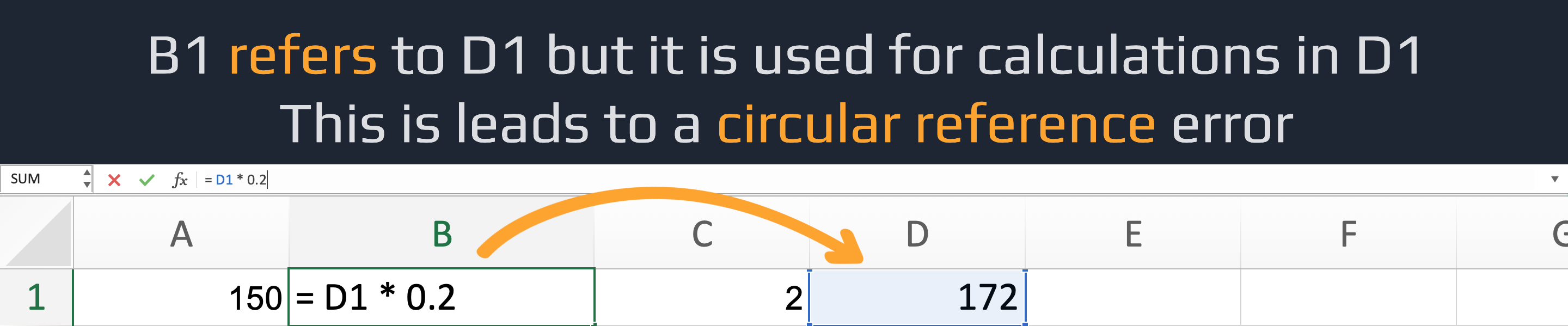
You should be careful and avoid using a cell to calculate a value for itself if it was already used in the calculation for the cell you want to update. This can lead to circular references and potentially incorrect results.

A circular reference error in Excel occurs when a formula refers to its own cell, directly or through a chain of other cells. This creates an endless loop that Excel can't resolve. For example, =A1 + 5 in cell A1 causes a direct circular reference.

question mark

Why should you use cell references instead of literal values in Excel formulas?

Select the correct answer

Was alles duidelijk?

Hoe kunnen we het verbeteren?

Bedankt voor je feedback!

Sectie 1. Hoofdstuk 3

Vraag AI

expand

Vraag AI

ChatGPT

Vraag wat u wilt of probeer een van de voorgestelde vragen om onze chat te starten.

bookEenvoudige Formules en Berekeningen in Excel

Veeg om het menu te tonen

Formula input can convert exprressions and give their results. It supports most of the common ones that comes to mind.

And sure, you can combine them to create more complex expressions. Excel will handle all calculations for you, with or without parentheses. For example:

But remember, this is Excel, not a calculator app. We can gain its full potential by using cell references instead of literal values. For example, we can calculate the sum of values in a row using cell references. When the value in any cell changes, the sum will automatically update.

You should be careful and avoid using a cell to calculate a value for itself if it was already used in the calculation for the cell you want to update. This can lead to circular references and potentially incorrect results.

A circular reference error in Excel occurs when a formula refers to its own cell, directly or through a chain of other cells. This creates an endless loop that Excel can't resolve. For example, =A1 + 5 in cell A1 causes a direct circular reference.

question mark

Why should you use cell references instead of literal values in Excel formulas?

Select the correct answer

Was alles duidelijk?

Hoe kunnen we het verbeteren?

Bedankt voor je feedback!

Sectie 1. Hoofdstuk 3
some-alt