Python-code Schrijven en Uitvoeren
Veeg om het menu te tonen

Python is een primaire taal in Databricks die wordt gebruikt voor gegevensmanipulatie, machine learning en automatisering. Databricks-notebooks bieden een interactieve omgeving waarin Python-code in cellen wordt geschreven en uitgevoerd op een verbonden cluster.
Nu je notebook is aangemaakt en gekoppeld aan een cluster, kun je beginnen met het schrijven en uitvoeren van code. Omdat Databricks-notebooks zijn geïnspireerd op Jupyter, zal de ervaring vertrouwd aanvoelen als je eerder andere programmeeromgevingen hebt gebruikt.
Inzicht in cellen
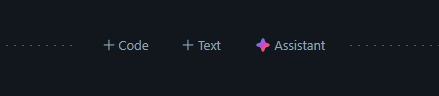
Het bouwblok van een notebook is de cel. Je kunt zoveel cellen toevoegen als je wilt in één notebook. Om een nieuwe cel te maken, beweeg je de muis boven of onder een bestaande cel en klik je op het "+"-icoon naast de opties Code of Tekst, waarmee je een cel naar keuze toevoegt.
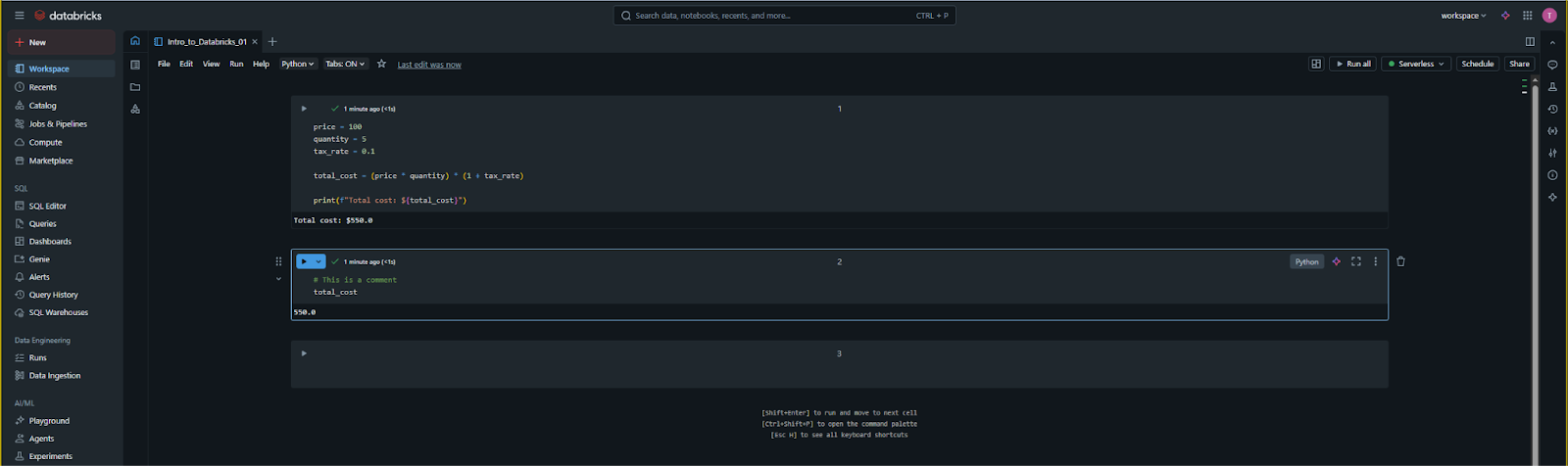
- Invoer: je typt je Python-code in het grijze vak;
- Uitvoer: na uitvoering verschijnen de resultaten (zoals datatabellen, afgedrukte tekst of foutmeldingen) direct onder die specifieke cel.
Code uitvoeren
Er zijn drie hoofdmanieren om een Python-cel in Databricks uit te voeren:
- Het afspeelicoon: klik op het "Run Cell" (driehoek) pictogram in de rechterbovenhoek van de cel;
- Shift + Enter: hiermee voer je de huidige cel uit en wordt de cursor automatisch naar de volgende cel verplaatst (of wordt er een nieuwe aangemaakt);
- Ctrl + Enter (Cmd + Enter op Mac): hiermee voer je de huidige cel uit en blijft de cursor in dezelfde cel staan. Dit is handig wanneer je hetzelfde codeblok meerdere keren wilt testen.
Een eenvoudige Python-oefening
Je hebt in de video gezien hoe je met variabelen werkt. Hier is een interessanter voorbeeld om te testen of je omgeving werkt: het uitvoeren van een eenvoudige berekening. Kopieer de volgende code in een cel:
12345678910# Defining the variables price = 100 quantity = 5 tax_rate = 0.1 # Performing the calculation total_cost = (price * quantity) * (1 + tax_rate) # Printing the result print(f"The total cost of the items is: ${total_cost}")
Wanneer je deze cel uitvoert, verwerkt het cluster de variabelen en wordt de tekst weergegeven: The total cost of the items is: $550.0.
Werken met variabelen over cellen heen
Een belangrijk kenmerk van Databricks is statuspersistentie. Dit betekent dat als je een variabele in één cel definieert, deze beschikbaar blijft in elke volgende cel in dat notebook zolang de cluster actief is.
Als je bijvoorbeeld een nieuwe cel onder de vorige toevoegt en simpelweg print(total_cost) typt, onthoudt het systeem nog steeds dat de waarde 550.0 was. Als je de cluster opnieuw opstart of "Clear State" gebruikt, moet je de cellen opnieuw vanaf het begin uitvoeren om die variabelen opnieuw te initialiseren.
Commentaar en documentatie
In Python-cellen is elke regel die begint met een # een commentaar. Deze worden genegeerd door de cluster, maar zijn essentieel om je logica aan teamleden uit te leggen. Door commentaar te gebruiken, kun je professionele codestandaarden handhaven binnen de samenwerkingsomgeving van de Workspace.
1. Welke sneltoets laat je een cel uitvoeren en in dezelfde cel blijven?
2. Wat gebeurt er met een variabele die is gedefinieerd in Cel 1 als je deze probeert te gebruiken in Cel 2?
Bedankt voor je feedback!
Vraag AI

Vraag AI

Vraag wat u wilt of probeer een van de voorgestelde vragen om onze chat te starten.
Python-code Schrijven en Uitvoeren
Python is een primaire taal in Databricks die wordt gebruikt voor gegevensmanipulatie, machine learning en automatisering. Databricks-notebooks bieden een interactieve omgeving waarin Python-code in cellen wordt geschreven en uitgevoerd op een verbonden cluster.
Nu je notebook is aangemaakt en gekoppeld aan een cluster, kun je beginnen met het schrijven en uitvoeren van code. Omdat Databricks-notebooks zijn geïnspireerd op Jupyter, zal de ervaring vertrouwd aanvoelen als je eerder andere programmeeromgevingen hebt gebruikt.
Inzicht in cellen
Het bouwblok van een notebook is de cel. Je kunt zoveel cellen toevoegen als je wilt in één notebook. Om een nieuwe cel te maken, beweeg je de muis boven of onder een bestaande cel en klik je op het "+"-icoon naast de opties Code of Tekst, waarmee je een cel naar keuze toevoegt.
- Invoer: je typt je Python-code in het grijze vak;
- Uitvoer: na uitvoering verschijnen de resultaten (zoals datatabellen, afgedrukte tekst of foutmeldingen) direct onder die specifieke cel.
Code uitvoeren
Er zijn drie hoofdmanieren om een Python-cel in Databricks uit te voeren:
- Het afspeelicoon: klik op het "Run Cell" (driehoek) pictogram in de rechterbovenhoek van de cel;
- Shift + Enter: hiermee voer je de huidige cel uit en wordt de cursor automatisch naar de volgende cel verplaatst (of wordt er een nieuwe aangemaakt);
- Ctrl + Enter (Cmd + Enter op Mac): hiermee voer je de huidige cel uit en blijft de cursor in dezelfde cel staan. Dit is handig wanneer je hetzelfde codeblok meerdere keren wilt testen.
Een eenvoudige Python-oefening
Je hebt in de video gezien hoe je met variabelen werkt. Hier is een interessanter voorbeeld om te testen of je omgeving werkt: het uitvoeren van een eenvoudige berekening. Kopieer de volgende code in een cel:
12345678910# Defining the variables price = 100 quantity = 5 tax_rate = 0.1 # Performing the calculation total_cost = (price * quantity) * (1 + tax_rate) # Printing the result print(f"The total cost of the items is: ${total_cost}")
Wanneer je deze cel uitvoert, verwerkt het cluster de variabelen en wordt de tekst weergegeven: The total cost of the items is: $550.0.
Werken met variabelen over cellen heen
Een belangrijk kenmerk van Databricks is statuspersistentie. Dit betekent dat als je een variabele in één cel definieert, deze beschikbaar blijft in elke volgende cel in dat notebook zolang de cluster actief is.
Als je bijvoorbeeld een nieuwe cel onder de vorige toevoegt en simpelweg print(total_cost) typt, onthoudt het systeem nog steeds dat de waarde 550.0 was. Als je de cluster opnieuw opstart of "Clear State" gebruikt, moet je de cellen opnieuw vanaf het begin uitvoeren om die variabelen opnieuw te initialiseren.
Commentaar en documentatie
In Python-cellen is elke regel die begint met een # een commentaar. Deze worden genegeerd door de cluster, maar zijn essentieel om je logica aan teamleden uit te leggen. Door commentaar te gebruiken, kun je professionele codestandaarden handhaven binnen de samenwerkingsomgeving van de Workspace.
Bedankt voor je feedback!
