Vervangen van verouderde opzoekfuncties door moderne oplossingen
Veeg om het menu te tonen
In de loop van de cursus zijn verschillende opzoekfuncties geïntroduceerd:
VLOOKUP, HLOOKUP, XLOOKUP, INDEX met XMATCH.
Al deze functies kunnen gegevens uit tabellen ophalen, maar ze verschillen in flexibiliteit, betrouwbaarheid en moderne relevantie.
Oudere spreadsheets vertrouwen vaak op VLOOKUP of HLOOKUP. Moderne Excel-werkwijzen geven echter meestal de voorkeur aan XLOOKUP of combinaties zoals INDEX met XMATCH.
Het vergelijken van deze benaderingen helpt om te begrijpen wanneer elke methode geschikt is.
Hetzelfde probleem op drie manieren opgelost
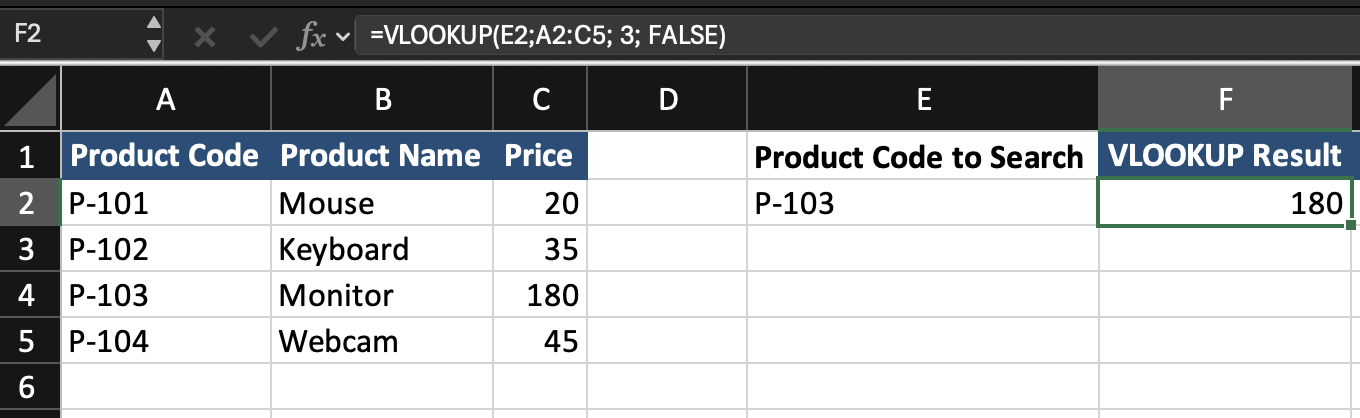
Stel dat het werkblad de volgende tabel bevat.
De productcode wordt ingevoerd in cel E2.
Het doel is om de Price te retourneren.
Benadering 1 Gebruik van VLOOKUP
=VLOOKUP(E2; A2:C5; 3; FALSE)
VLOOKUP doorzoekt de eerste kolom van de tabel en retourneert de waarde uit een opgegeven kolomnummer.
Benadering 2 met XLOOKUP
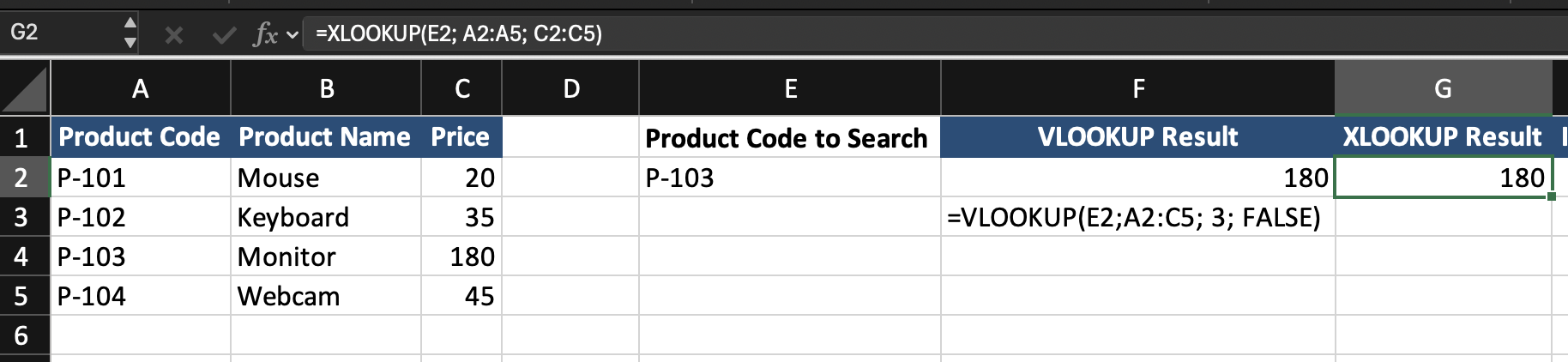
=XLOOKUP(E2; A2:A5; C2:C5)
XLOOKUP doorzoekt de opzoekkolom en geeft de overeenkomstige waarde uit de resultaatkolom terug.
Benadering 3 met INDEX en XMATCH
=INDEX(C2:C5; XMATCH(E2; A2:A5))
XMATCH vindt de positie van de opzoekwaarde. INDEX haalt de overeenkomstige waarde uit de resultaatkolom op.

Vergelijking van opzoekmethoden
Best practice voor modern Excel
Bij het maken van nieuwe spreadsheets:
Gebruik XLOOKUP voor de meeste opzoektaken.
Wanneer geavanceerde flexibiliteit vereist is, gebruik INDEX met XMATCH.
Verouderde functies zoals VLOOKUP en HLOOKUP worden voornamelijk gebruikt bij het werken met bestaande spreadsheets.
Bedankt voor je feedback!
Vraag AI

Vraag AI

Vraag wat u wilt of probeer een van de voorgestelde vragen om onze chat te starten.
Vervangen van verouderde opzoekfuncties door moderne oplossingen
In de loop van de cursus zijn verschillende opzoekfuncties geïntroduceerd:
VLOOKUP, HLOOKUP, XLOOKUP, INDEX met XMATCH.
Al deze functies kunnen gegevens uit tabellen ophalen, maar ze verschillen in flexibiliteit, betrouwbaarheid en moderne relevantie.
Oudere spreadsheets vertrouwen vaak op VLOOKUP of HLOOKUP. Moderne Excel-werkwijzen geven echter meestal de voorkeur aan XLOOKUP of combinaties zoals INDEX met XMATCH.
Het vergelijken van deze benaderingen helpt om te begrijpen wanneer elke methode geschikt is.
Hetzelfde probleem op drie manieren opgelost
Stel dat het werkblad de volgende tabel bevat.
De productcode wordt ingevoerd in cel E2.
Het doel is om de Price te retourneren.
Benadering 1 Gebruik van VLOOKUP
=VLOOKUP(E2; A2:C5; 3; FALSE)
VLOOKUP doorzoekt de eerste kolom van de tabel en retourneert de waarde uit een opgegeven kolomnummer.
Benadering 2 met XLOOKUP
=XLOOKUP(E2; A2:A5; C2:C5)
XLOOKUP doorzoekt de opzoekkolom en geeft de overeenkomstige waarde uit de resultaatkolom terug.
Benadering 3 met INDEX en XMATCH
=INDEX(C2:C5; XMATCH(E2; A2:A5))
XMATCH vindt de positie van de opzoekwaarde. INDEX haalt de overeenkomstige waarde uit de resultaatkolom op.
Vergelijking van opzoekmethoden
Best practice voor modern Excel
Bij het maken van nieuwe spreadsheets:
Gebruik XLOOKUP voor de meeste opzoektaken.
Wanneer geavanceerde flexibiliteit vereist is, gebruik INDEX met XMATCH.
Verouderde functies zoals VLOOKUP en HLOOKUP worden voornamelijk gebruikt bij het werken met bestaande spreadsheets.
Bedankt voor je feedback!
