Grunnleggende Filhåndtering
Sveip for å vise menyen
God filhåndtering er en viktig del av profesjonelle Excel-arbeidsflyter. Selv godt utformede arbeidsbøker kan bli vanskelige å vedlikeholde hvis filer er dårlig organisert eller lagret inkonsekvent.
Ryddig filhåndtering hjelper team med å finne arbeidsbøker raskt, redusere duplisering og opprettholde pålitelige samarbeidsrutiner.
Forståelse av Excel-filformater
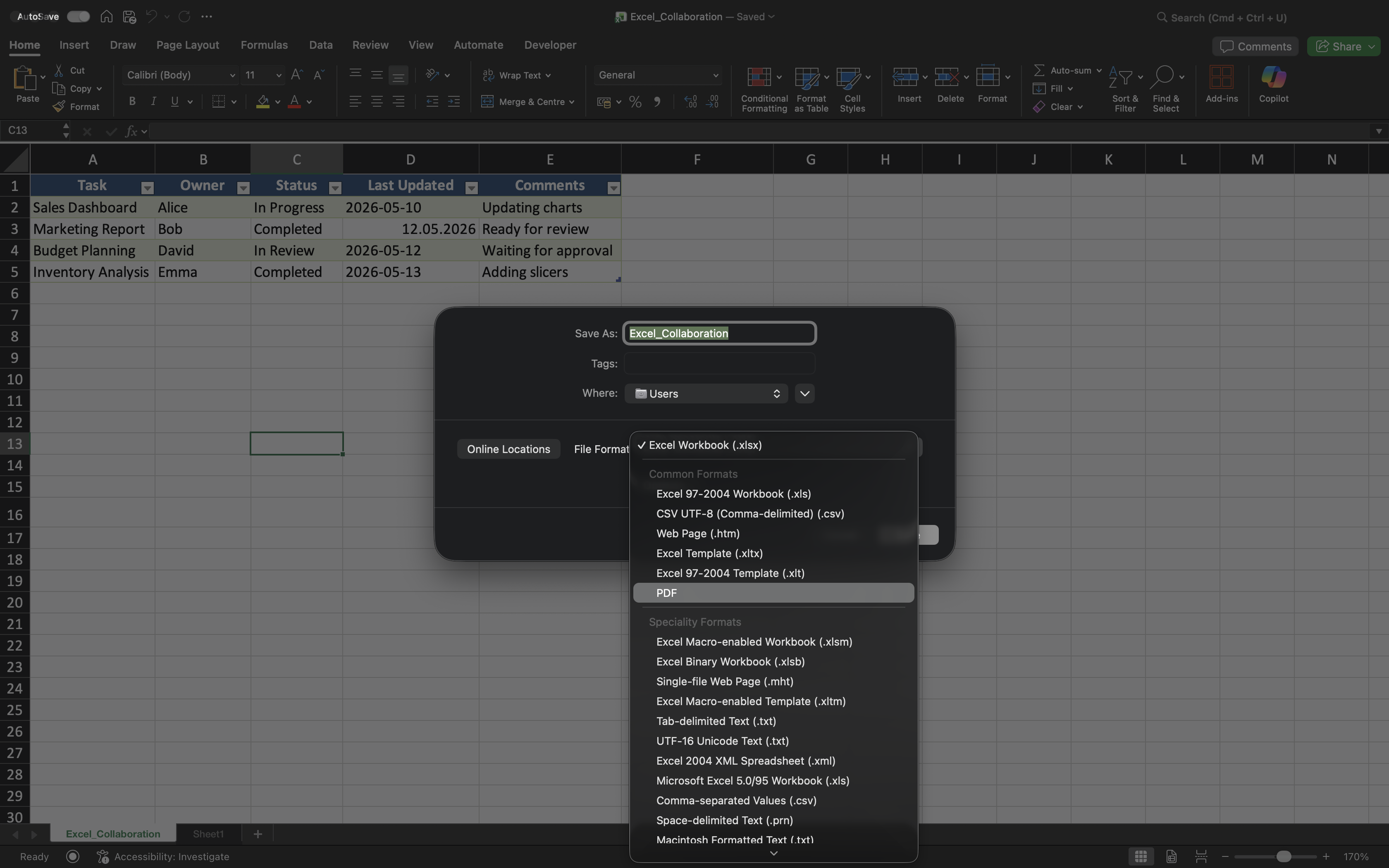
Excel støtter flere filformater utviklet for ulike formål.
Vanlige formater inkluderer:
- XLSX — standardformat for Excel-arbeidsbøker;
- XLSM — arbeidsbokformat som støtter makroer;
- CSV — ren tekst-format ofte brukt for datautveksling;
- PDF — ikke-redigerbart format brukt for deling av ferdige rapporter.
Å velge riktig filformat bidrar til å unngå kompatibilitetsproblemer og forbedrer arbeidsflytens pålitelighet.
Organisering av arbeidsbokmapper
Delte Excel-prosjekter bør bruke tydelige og konsistente mappestrukturer. Dette gjør det enklere å finne arbeidsbøker og reduserer unødvendige duplikater.
For eksempel skiller team ofte mellom:
- Aktive rapporter;
- Arkiverte filer;
- Maler;
- Endelige eksporter.
Godt organiserte mapper bidrar til å opprettholde ryddige forretningsprosesser over tid.
Bruk av konsistente arbeidsboknavn
Arbeidsboknavn bør tydelig beskrive filinnholdet og være konsistente på tvers av prosjekter.
Gode arbeidsboknavn inkluderer ofte:
- Prosjekt- eller rapportnavn;
- Rapportperiode hvis nødvendig;
- Tydelig forretningskontekst.
Navn som Sales_Report_Q2_2026.xlsx er mye enklere å håndtere enn uklare versjoner som Final_Report_New.xlsx.
Eksport og deling av rapporter
Excel-arbeidsbøker deles ikke alltid som redigerbare filer. I mange forretningsmiljøer eksporteres ferdige rapporter som PDF før distribusjon.
PDF-eksport bidrar til å bevare arbeidsbokens formatering og forhindrer utilsiktede endringer fra mottakere.
CSV-filer brukes derimot ofte når data skal overføres mellom ulike systemer eller applikasjoner.
Opprettholde ryddige samarbeidsrutiner
Etter hvert som prosjekter vokser, kan dårlig filhåndtering skape forvirring og versjonskaos. Team bør unngå å lagre unødvendige lokale kopier eller lage inkonsekvente navnesystemer.
Når det er mulig:
- Lagre delte arbeidsbøker i OneDrive;
- Del lenker i stedet for vedlegg;
- Arkiver utdaterte arbeidsbokversjoner;
- Hold prosjektmapper organiserte.
Disse rutinene bidrar til å opprettholde ryddige og mer pålitelige samarbeidsmiljøer.
Takk for tilbakemeldingene dine!
Spør AI

Spør AI

Spør om hva du vil, eller prøv ett av de foreslåtte spørsmålene for å starte chatten vår
