Understanding the Box Model in a Practical Way
Sveip for å vise menyen
HTML elements are rendered as rectangular boxes on a web page. Each element has its content area, padding, border, and margin.
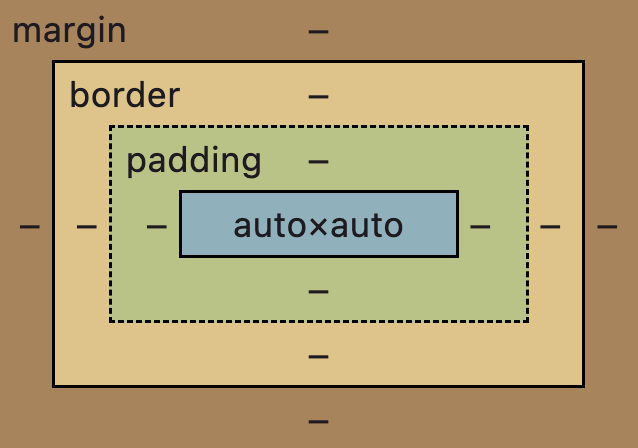
The Four Parts of the Box Model
Content
The content area contains text, images, or other elements. This is the visible inner part of the element.
Padding
Padding is the space between the content and the border. It creates internal spacing.
.box {
  padding: 20px;
}
Padding increases the visible size of the element.
Border
The border surrounds the padding and content.
.box {
  border: 4px solid darkblue;
}
By default, the border width is 0, and the border color matches the text color if not specified.
Margin
Margin is the space outside the border. It creates distance between elements.
.box {
  margin: 40px;
}
Margin does not affect the element's background color.

index.html

styles.css
In this example:
- The background fills the content and padding area;
- The border surrounds them;
- The margin creates space outside the box.

By default, some elements have predetermined padding and margin properties. It was made to ensure that a web page will be readable even without any styles.

The box model determines how much space an element occupies on a page.
The total size of an element depends on content size, padding, border, and margin.
Takk for tilbakemeldingene dine!
Spør AI

Spør AI

Spør om hva du vil, eller prøv ett av de foreslåtte spørsmålene for å starte chatten vår
