Velge Riktig Diagramtype
Sveip for å vise menyen
Å velge riktig diagramtype er en analytisk ferdighet.
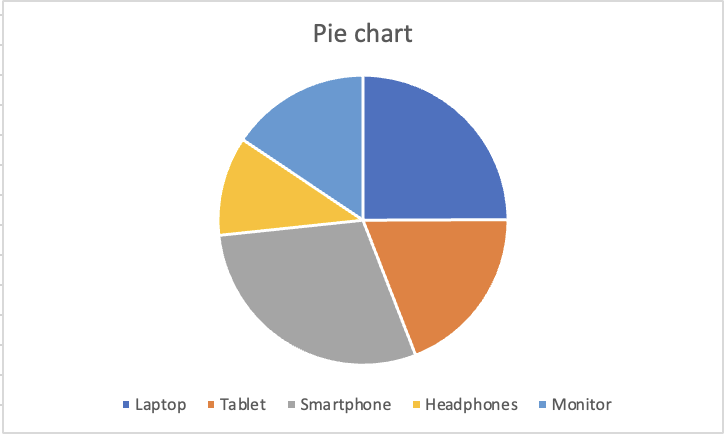
Sektordiagram
Viser hvordan individuelle kategorier utgjør 100 %. Kun effektivt når det er få kategorier (ideelt 5 eller færre) og forskjellene mellom sektorene er store nok til å se. Unngå når sektorene er omtrent like store.
Punktdiagram
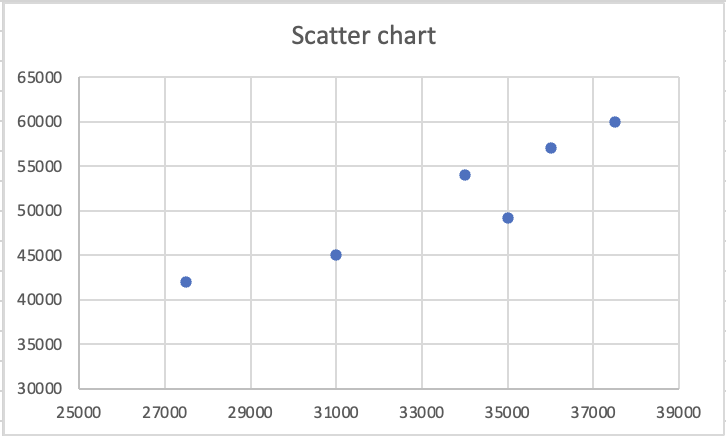
Hver prikk er et par av verdier, én kolonne blir X-aksen, den andre blir Y-aksen. Brukes for å identifisere korrelasjon, klynger eller avvik mellom to numeriske variabler. Ikke egnet for kategorier.
I et kolonne- eller linjediagram er én akse kategorier og den andre er verdier. I et punktdiagram er begge akser numeriske verdier, og Excel kobler dem sammen som koordinater. Hver prikk er ikke en kategori. Det er et datapunkt med både en X-posisjon og en Y-posisjon, hvor X kommer fra én kolonne og Y fra en annen.
Dette gjør punktdiagrammer kraftige for et spesifikt analytisk spørsmål: Når én verdi øker, øker den andre også? Hvis prikkene danner et diagonalt mønster fra nederst til venstre til øverst til høyre, beveger de to variablene seg sammen. Hvis prikkene er tilfeldig spredt, er det ingen synlig sammenheng. En klynge av prikker i ett område indikerer at visse kombinasjoner av verdier gjentar seg i dataene.

Profesjonell rapportering unngår 3D-diagrammer helt. Reglene er enkle: tydelighet har høyere prioritet enn dekorasjon. Et 2D-kolonnediagram som tydelig kommuniserer dataene er alltid bedre enn et 3D-diagram som ser imponerende ut, men skaper uklarhet.
Takk for tilbakemeldingene dine!
Spør AI

Spør AI

Spør om hva du vil, eller prøv ett av de foreslåtte spørsmålene for å starte chatten vår
Velge Riktig Diagramtype
Å velge riktig diagramtype er en analytisk ferdighet.
Sektordiagram
Viser hvordan individuelle kategorier utgjør 100 %. Kun effektivt når det er få kategorier (ideelt 5 eller færre) og forskjellene mellom sektorene er store nok til å se. Unngå når sektorene er omtrent like store.
Punktdiagram
Hver prikk er et par av verdier, én kolonne blir X-aksen, den andre blir Y-aksen. Brukes for å identifisere korrelasjon, klynger eller avvik mellom to numeriske variabler. Ikke egnet for kategorier.
I et kolonne- eller linjediagram er én akse kategorier og den andre er verdier. I et punktdiagram er begge akser numeriske verdier, og Excel kobler dem sammen som koordinater. Hver prikk er ikke en kategori. Det er et datapunkt med både en X-posisjon og en Y-posisjon, hvor X kommer fra én kolonne og Y fra en annen.
Dette gjør punktdiagrammer kraftige for et spesifikt analytisk spørsmål: Når én verdi øker, øker den andre også? Hvis prikkene danner et diagonalt mønster fra nederst til venstre til øverst til høyre, beveger de to variablene seg sammen. Hvis prikkene er tilfeldig spredt, er det ingen synlig sammenheng. En klynge av prikker i ett område indikerer at visse kombinasjoner av verdier gjentar seg i dataene.
Profesjonell rapportering unngår 3D-diagrammer helt. Reglene er enkle: tydelighet har høyere prioritet enn dekorasjon. Et 2D-kolonnediagram som tydelig kommuniserer dataene er alltid bedre enn et 3D-diagram som ser imponerende ut, men skaper uklarhet.
Takk for tilbakemeldingene dine!
