Sortering
Sveip for å vise menyen
Sortering i Excel lar deg raskt organisere data slik at du finner informasjon raskere og enkelt kan oppdage trender eller avvik. Du kan endre rekkefølgen på rader basert på tekst, tall, datoer eller til og med farger, noe som gjør regnearket mer nyttig for analyse.

Sortering endrer rekkefølgen på rader permanent. Når du har sortert og lagret, er den opprinnelige rekkefølgen borte.
Excel bruker automatisk riktig sorteringslogikk basert på kolonnens datatype. Den samme A→Å-knappen oppfører seg forskjellig avhengig av hva kolonnen inneholder:
Hvis en tallkolonne var formatert som tekst (vanlig etter import av CSV-filer), vil sortering gi strengrekkefølge: 1, 10, 100, 2, 20, 3 — ikke numerisk rekkefølge. Endre kolonneformatet først, og sorter deretter. Et raskt tips: tall lagret som tekst er venstrejustert i cellene sine.
Tilpasset sortering
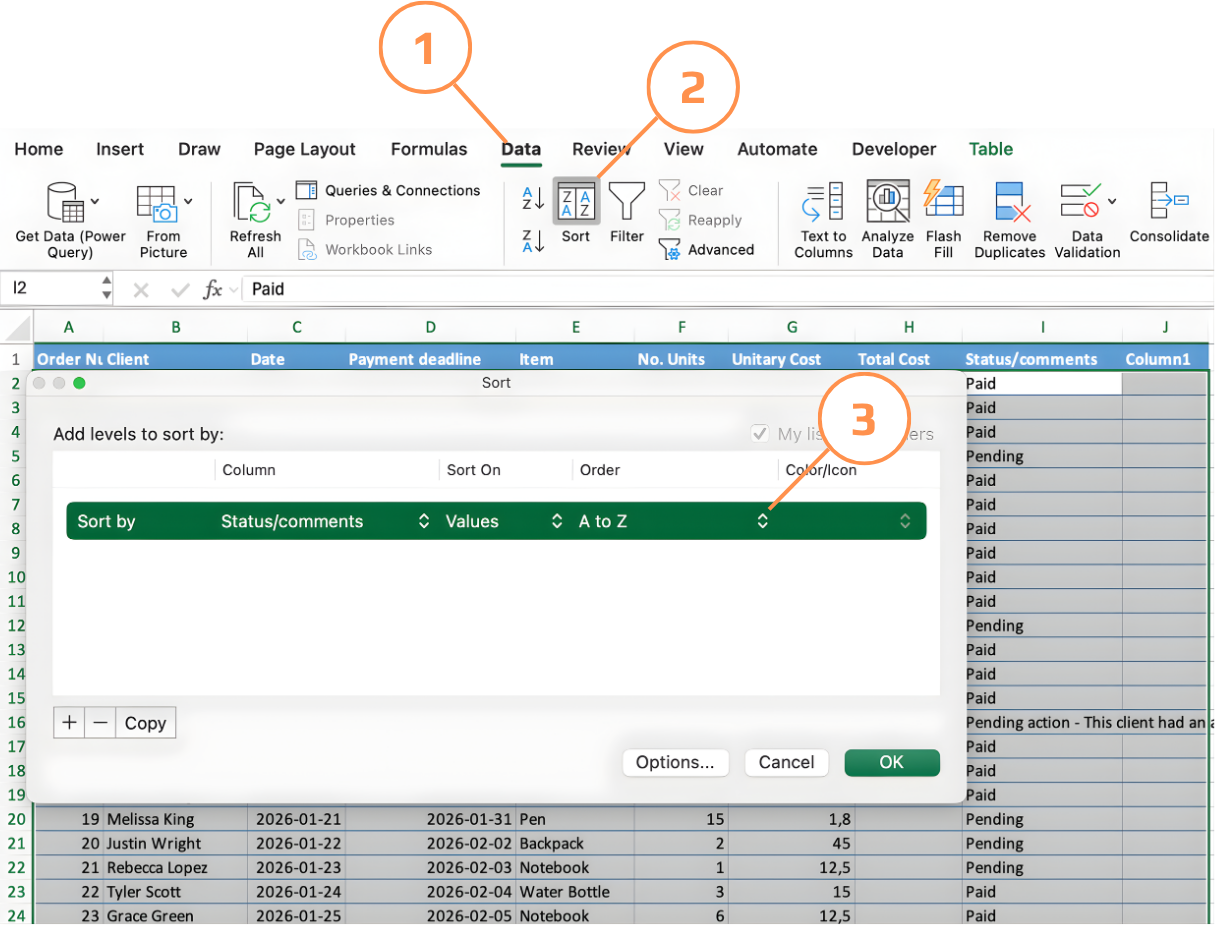
Åpnes via Data → Sorter eller Hjem → Sorter og filtrer → Tilpasset sortering. Støtter flere nivåer, egendefinerte sorteringsrekkefølger, sortering etter farge eller ikon, og bekreftelse av overskriftsgjenkjenning.
Alfabetisk rekkefølge gjenspeiler ikke alltid forretningslogikk. Hvis du sorterer en Status-kolonne alfabetisk, kommer "Betalt" før "Avventer" — men operasjonelt kan du ønske å ha avventende elementer øverst. Tilpassede sorteringsrekkefølger lar deg definere nøyaktig hvilken rekkefølge Excel skal følge.
Sortering etter en egendefinert liste (Windows):
- Klikk på en vilkårlig celle i tabellen → Data → Sorter for å åpne Sorteringsdialogen;
- I rullegardinmenyen Sorter etter, velg kolonnen (f.eks. Status);
- I rullegardinmenyen Rekkefølge, velg Egendefinert liste;
- Skriv inn ønsket rekkefølge, ett element per linje (f.eks. Avventer → Betalt → Kansellert) og klikk Legg til;
- Klikk OK to ganger — Excel omorganiserer radene etter din definerte rekkefølge, ikke alfabetisk rekkefølge.
Sortering etter en egendefinert liste (Mac):
- Opprett først din egendefinerte liste: gå til Excel-menyen → Innstillinger → Egendefinerte lister. Skriv inn rekkefølgen, ett element per linje (f.eks. Avventer → Betalt → Kansellert) og klikk Legg til, deretter OK.
- Klikk på en vilkårlig celle i tabellen → Data → Sorter for å åpne Sorteringsdialogen;
- I rullegardinmenyen Sorter etter, velg kolonnen (f.eks. Status).
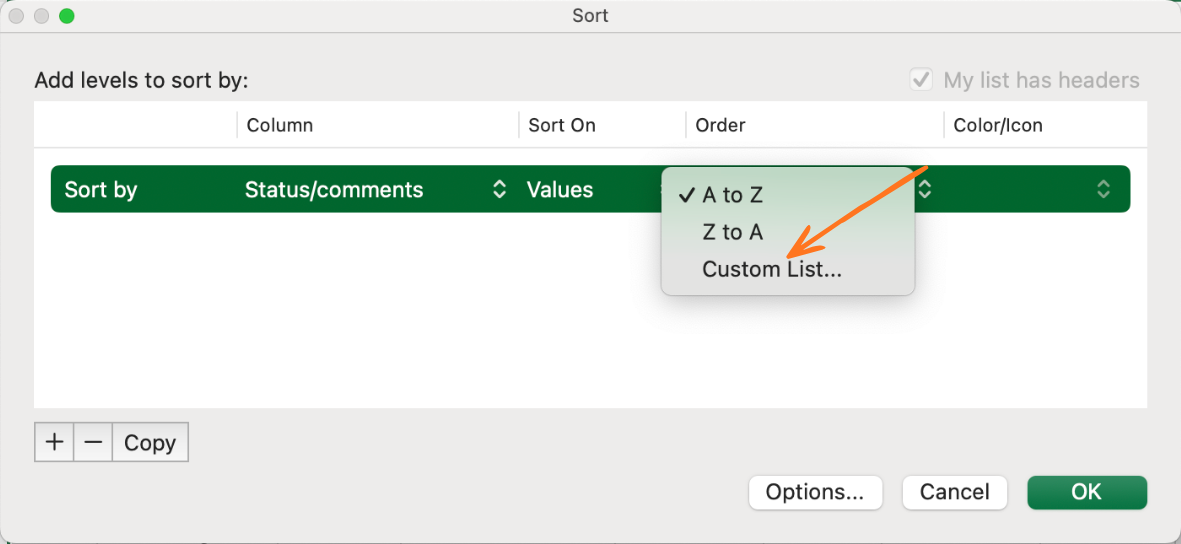
- I rullegardinmenyen Rekkefølge, velg Egendefinert liste — din tidligere lagrede liste vil vises her;
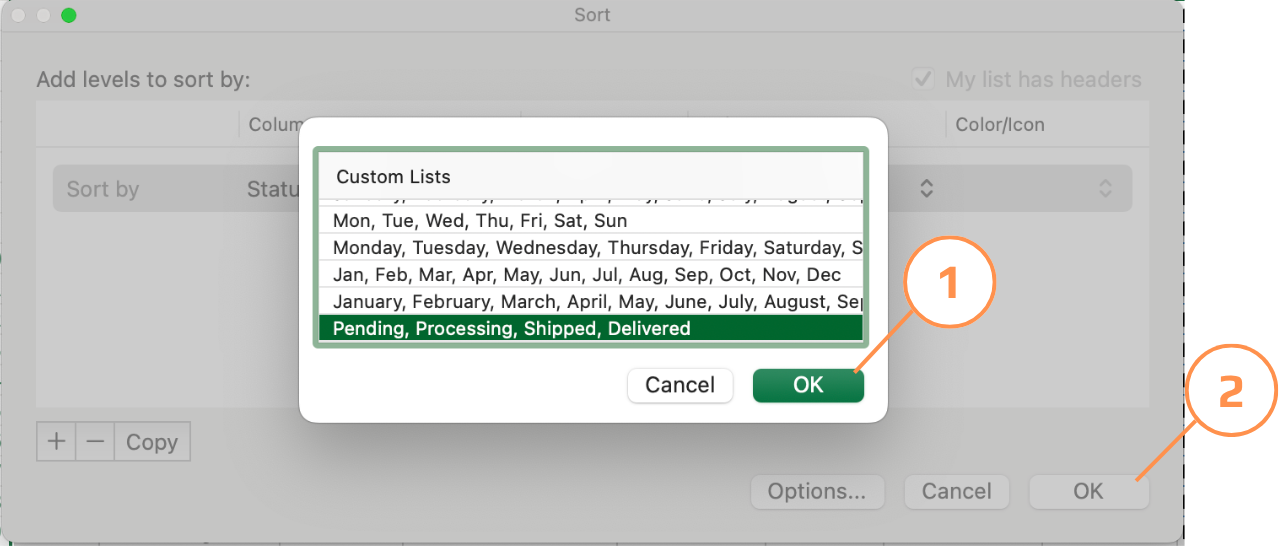
- Velg listen og klikk OK to ganger — Excel omorganiserer radene etter din definerte rekkefølge.
Takk for tilbakemeldingene dine!
Spør AI

Spør AI

Spør om hva du vil, eller prøv ett av de foreslåtte spørsmålene for å starte chatten vår
