Kontrollere referanser og formelresultater
Sveip for å vise menyen
Når du drar en formel nedover, justerer Excel automatisk hver cellereferanse med én rad. Som regel er det akkurat det du ønsker – formelen for rad 10 skal referere til dataene i rad 10. Men noen referanser skal aldri flyttes: en skattesats lagret i én celle, en valutakurs, en fast terskelverdi. Uten dollartegn vil slike referanser bli ødelagt uten varsel når du drar formelen.

Hvis =D9*G1 dras nedover, blir rad 10 til =D10*G2, rad 11 til =D11*G3, og så videre. G2 og G3 er tomme — derfor gir hver skatteberegning null. Ingen feilmelding. Bare feil tall som ser riktige ut.
Cellereferanser
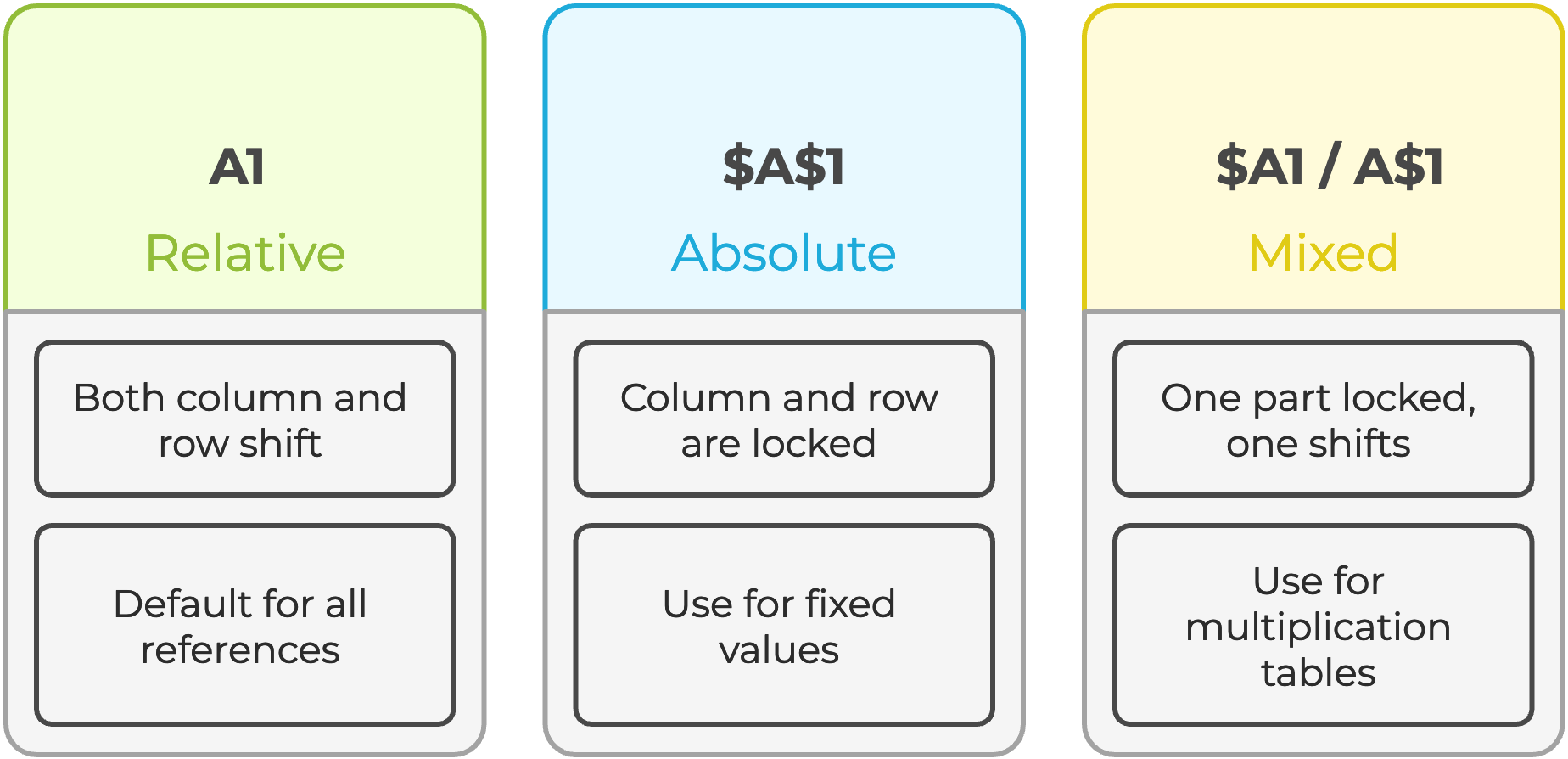
Velg en hvilken som helst cellereferanse i en formel i formellinjen og trykk F4 for å bla gjennom alle de fire referansetypene automatisk.
Lim inn utvalg
Noen ganger må du fryse beregnede resultater, sende et øyeblikksbilde til en kollega, forhindre omberegning eller bryte en sirkulær avhengighet. Lim inn verdier fjerner formelen og beholder kun tallet formelen produserte.
- Bruk hurtigtasten
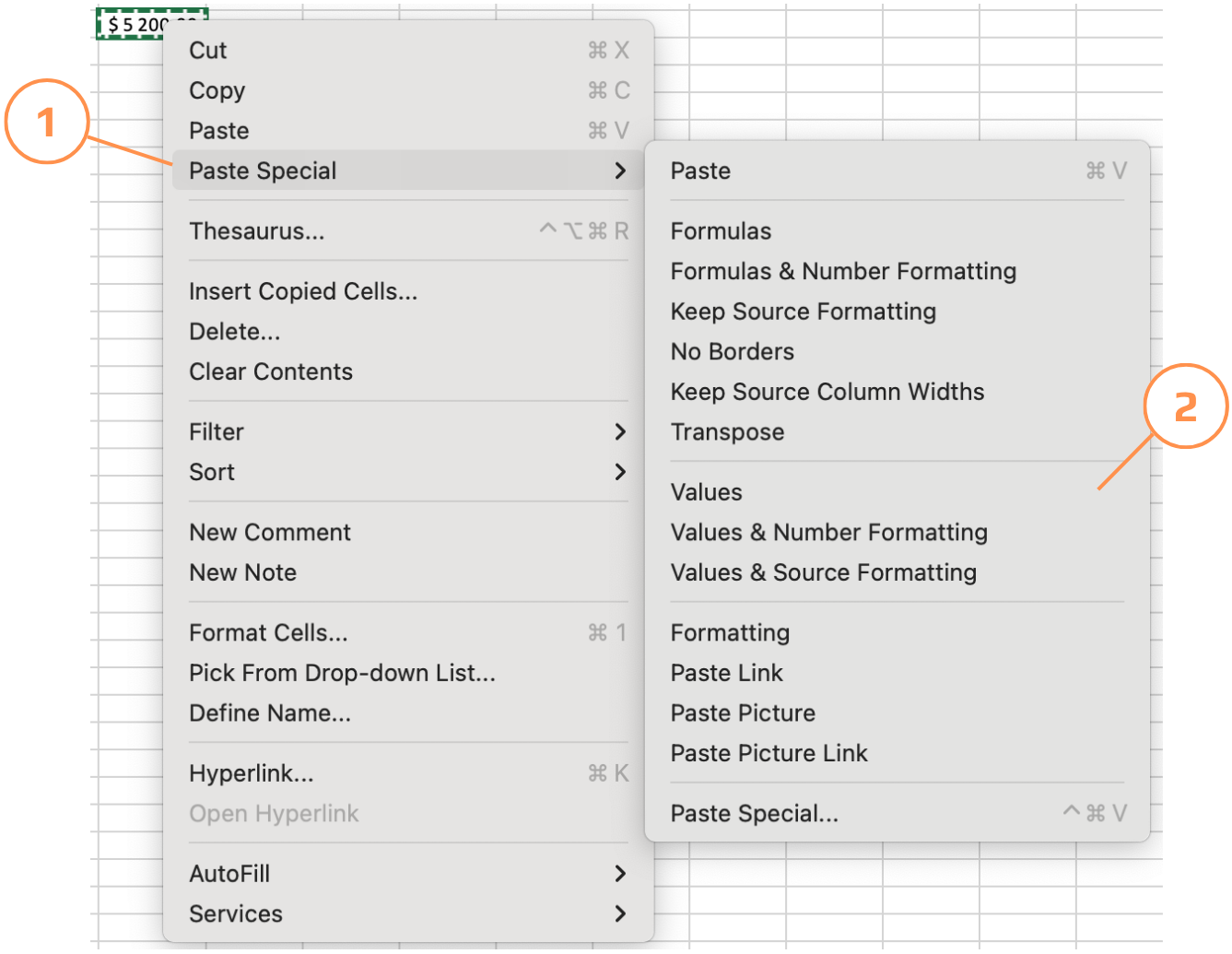
Ctrl+Alt+Vfor å lime inn kun verdier; - Kopier cellene → høyreklikk på målet → velg Lim inn utvalg → Verdier;
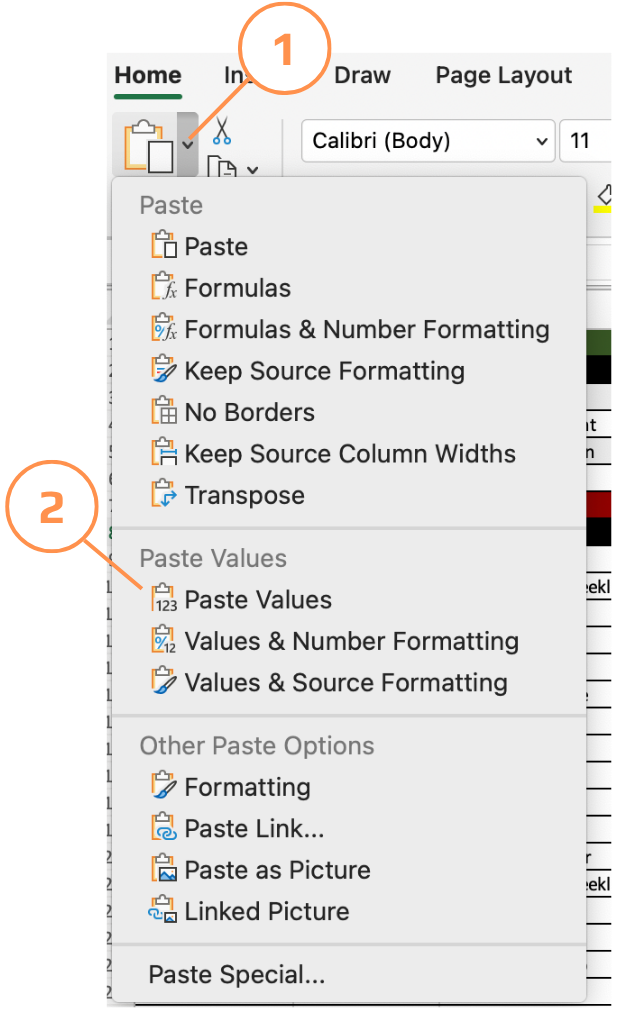
- Lim inn utvalg-menyen tilbyr mer enn bare verdier — du kan lime inn kun formater, kun formler, transponere rader til kolonner, eller lime inn som et koblet bilde. Alt tilgjengelig fra Hjem → Lim inn → Lim inn utvalg.
Hente data fra et annet ark
Når en verdi brukes på tvers av flere ark, for eksempel en skattesats, et år eller et firmanavn, er det mye ryddigere å lagre den én gang i et dedikert ark og referere til den overalt, i stedet for å duplisere den. Hvis verdien endres, oppdaterer du den på ett sted, og alle formler oppdateres automatisk.
=D9*'Tax rate'!$A$2
! (utropstegn) skiller arkets navn fra celleadressen. Excel skriver dette automatisk når du klikker på en celle i et annet ark mens du skriver inn en formel, så du trenger ikke å skrive det inn manuelt.
Takk for tilbakemeldingene dine!
Spør AI

Spør AI

Spør om hva du vil, eller prøv ett av de foreslåtte spørsmålene for å starte chatten vår
Kontrollere referanser og formelresultater
Når du drar en formel nedover, justerer Excel automatisk hver cellereferanse med én rad. Som regel er det akkurat det du ønsker – formelen for rad 10 skal referere til dataene i rad 10. Men noen referanser skal aldri flyttes: en skattesats lagret i én celle, en valutakurs, en fast terskelverdi. Uten dollartegn vil slike referanser bli ødelagt uten varsel når du drar formelen.
Hvis =D9*G1 dras nedover, blir rad 10 til =D10*G2, rad 11 til =D11*G3, og så videre. G2 og G3 er tomme — derfor gir hver skatteberegning null. Ingen feilmelding. Bare feil tall som ser riktige ut.
Cellereferanser
Velg en hvilken som helst cellereferanse i en formel i formellinjen og trykk F4 for å bla gjennom alle de fire referansetypene automatisk.
Lim inn utvalg
Noen ganger må du fryse beregnede resultater, sende et øyeblikksbilde til en kollega, forhindre omberegning eller bryte en sirkulær avhengighet. Lim inn verdier fjerner formelen og beholder kun tallet formelen produserte.
- Bruk hurtigtasten
Ctrl+Alt+Vfor å lime inn kun verdier; - Kopier cellene → høyreklikk på målet → velg Lim inn utvalg → Verdier;
- Lim inn utvalg-menyen tilbyr mer enn bare verdier — du kan lime inn kun formater, kun formler, transponere rader til kolonner, eller lime inn som et koblet bilde. Alt tilgjengelig fra Hjem → Lim inn → Lim inn utvalg.
Hente data fra et annet ark
Når en verdi brukes på tvers av flere ark, for eksempel en skattesats, et år eller et firmanavn, er det mye ryddigere å lagre den én gang i et dedikert ark og referere til den overalt, i stedet for å duplisere den. Hvis verdien endres, oppdaterer du den på ett sted, og alle formler oppdateres automatisk.
=D9*'Tax rate'!$A$2
! (utropstegn) skiller arkets navn fra celleadressen. Excel skriver dette automatisk når du klikker på en celle i et annet ark mens du skriver inn en formel, så du trenger ikke å skrive det inn manuelt.
Takk for tilbakemeldingene dine!
