Blanding av språk med magiske kommandoer
Sveip for å vise menyen

Magiske kommandoer er spesielle instruksjoner som brukes i starten av en notatblokkcelle for å endre kjørespråk eller utføre bestemte miljøoppgaver. I Databricks gjør de det mulig å kombinere Python, SQL og Markdown-tekst i én og samme fil.
En av de mest kraftfulle funksjonene i Databricks-notatblokken er dens polyglotte natur. Du trenger ikke velge mellom å være en "Python-person" eller en "SQL-person." I stedet bruker du det beste verktøyet for det aktuelle steget i prosjektet ditt. Dette muliggjøres gjennom magiske kommandoer.
Standardspråk vs. magiske kommandoer
Hver notatblokk har et "standardspråk" som du valgte da du opprettet filen. Du kan se dette språket (for eksempel Python) ved siden av notatblokkens navn øverst på skjermen. I en Python-notatblokk antar hver celle at den er Python med mindre du sier noe annet. For å overstyre standarden for én enkelt celle, starter du cellen med en magisk kommando.
Bytte til SQL med %sql
Du har allerede sett %sql. Når du jobber i et notatbokmiljø med mye Python, ønsker du ofte raskt å sjekke innholdet i en tabell ved hjelp av en standard SQL-spørring.
%sql
SELECT count(*)
FROM workspace.default.diamonds
Ved å plassere %sql helt øverst, ignorerer Databricks-klyngen Python-tolkeren for den cellen og bruker i stedet SQL-motoren. Dette gjør det mulig å utforske data med SQLs hastighet, og deretter gå videre til neste celle for å fortsette Python-logikken.
Dokumentasjon med %md (Markdown)
Databehandling er samarbeid, noe som betyr at koden din må være lesbar for andre. %md-magisk kommando lar deg skrive Markdown, som er en enkel måte å lage formatert tekst, overskrifter og punktlister på.
Når du kjører en celle som starter med %md, kjøres ikke kode; teksten vises som et profesjonelt utseende dokument.
%md
# Project: Diamonds
This notebook explores the **Diamonds Sales Data** from two years ago.
* Step 1: Data Cleaning
* Step 2: Aggregation

Kjøre Python i en SQL-notatbok med %python
Det motsatte gjelder også. Hvis du arbeider i en SQL-standard notatbok, kan du bruke %python for å utføre en oppgave som SQL ikke er laget for, som for eksempel en kompleks løkke eller en maskinlæringsprediksjon.
Andre nyttige magics
I tillegg til å bytte språk finnes det magics for å samhandle med miljøet:
- %run: Brukes til å kjøre en annen notatbok fra din nåværende notatbok. Dette er nyttig for å importere hjelpefunksjoner eller delte variabler:

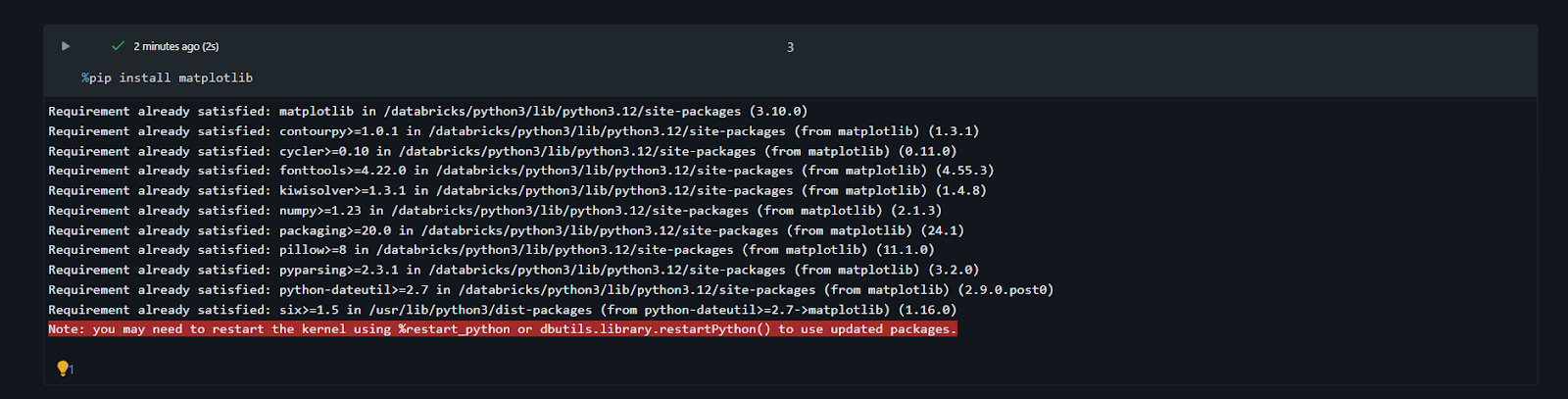
- %pip: Brukes til å installere spesifikke Python-biblioteker direkte i klyngens økt uten å forlate notatboken:
Ved å mestre disse kommandoene, går notatbøkene dine fra å være bare "kodefiler" til å bli omfattende, veldokumenterte datahistorier.
1. Hva er hovedformålet med å bruke %md-magikommandoen i en notatbok?
2. Hvis standard språket i en notatbok er satt til Python, hvilken celle vil gi en feil?
Takk for tilbakemeldingene dine!
Spør AI

Spør AI

Spør om hva du vil, eller prøv ett av de foreslåtte spørsmålene for å starte chatten vår
Blanding av språk med magiske kommandoer
Magiske kommandoer er spesielle instruksjoner som brukes i starten av en notatblokkcelle for å endre kjørespråk eller utføre bestemte miljøoppgaver. I Databricks gjør de det mulig å kombinere Python, SQL og Markdown-tekst i én og samme fil.
En av de mest kraftfulle funksjonene i Databricks-notatblokken er dens polyglotte natur. Du trenger ikke velge mellom å være en "Python-person" eller en "SQL-person." I stedet bruker du det beste verktøyet for det aktuelle steget i prosjektet ditt. Dette muliggjøres gjennom magiske kommandoer.
Standardspråk vs. magiske kommandoer
Hver notatblokk har et "standardspråk" som du valgte da du opprettet filen. Du kan se dette språket (for eksempel Python) ved siden av notatblokkens navn øverst på skjermen. I en Python-notatblokk antar hver celle at den er Python med mindre du sier noe annet. For å overstyre standarden for én enkelt celle, starter du cellen med en magisk kommando.
Bytte til SQL med %sql
Du har allerede sett %sql. Når du jobber i et notatbokmiljø med mye Python, ønsker du ofte raskt å sjekke innholdet i en tabell ved hjelp av en standard SQL-spørring.
%sql
SELECT count(*)
FROM workspace.default.diamonds
Ved å plassere %sql helt øverst, ignorerer Databricks-klyngen Python-tolkeren for den cellen og bruker i stedet SQL-motoren. Dette gjør det mulig å utforske data med SQLs hastighet, og deretter gå videre til neste celle for å fortsette Python-logikken.
Dokumentasjon med %md (Markdown)
Databehandling er samarbeid, noe som betyr at koden din må være lesbar for andre. %md-magisk kommando lar deg skrive Markdown, som er en enkel måte å lage formatert tekst, overskrifter og punktlister på.
Når du kjører en celle som starter med %md, kjøres ikke kode; teksten vises som et profesjonelt utseende dokument.
%md
# Project: Diamonds
This notebook explores the **Diamonds Sales Data** from two years ago.
* Step 1: Data Cleaning
* Step 2: Aggregation
Kjøre Python i en SQL-notatbok med %python
Det motsatte gjelder også. Hvis du arbeider i en SQL-standard notatbok, kan du bruke %python for å utføre en oppgave som SQL ikke er laget for, som for eksempel en kompleks løkke eller en maskinlæringsprediksjon.
Andre nyttige magics
I tillegg til å bytte språk finnes det magics for å samhandle med miljøet:
- %run: Brukes til å kjøre en annen notatbok fra din nåværende notatbok. Dette er nyttig for å importere hjelpefunksjoner eller delte variabler:
- %pip: Brukes til å installere spesifikke Python-biblioteker direkte i klyngens økt uten å forlate notatboken:
Ved å mestre disse kommandoene, går notatbøkene dine fra å være bare "kodefiler" til å bli omfattende, veldokumenterte datahistorier.
Takk for tilbakemeldingene dine!
