Administrere Filer i Arbeidsområdet
Sveip for å vise menyen

I Databricks er det et tydelig skille mellom Workspace Files (notatbøker og kode) og Data Objects (tabeller og råfiler). Catalog er den moderne inngangsporten som brukes til å administrere og oppdage disse dataobjektene.
En av de første tingene du må lære er at Databricks har "to sider av huset." Den ene siden er for arbeidet ditt – skriptene og notatbøkene dine. Den andre siden er for selve dataene du analyserer. Å forstå hvor hver del hører hjemme vil spare deg for mye frustrasjon når du begynner å skrive kode.
Workspace Files: Hvor koden din ligger
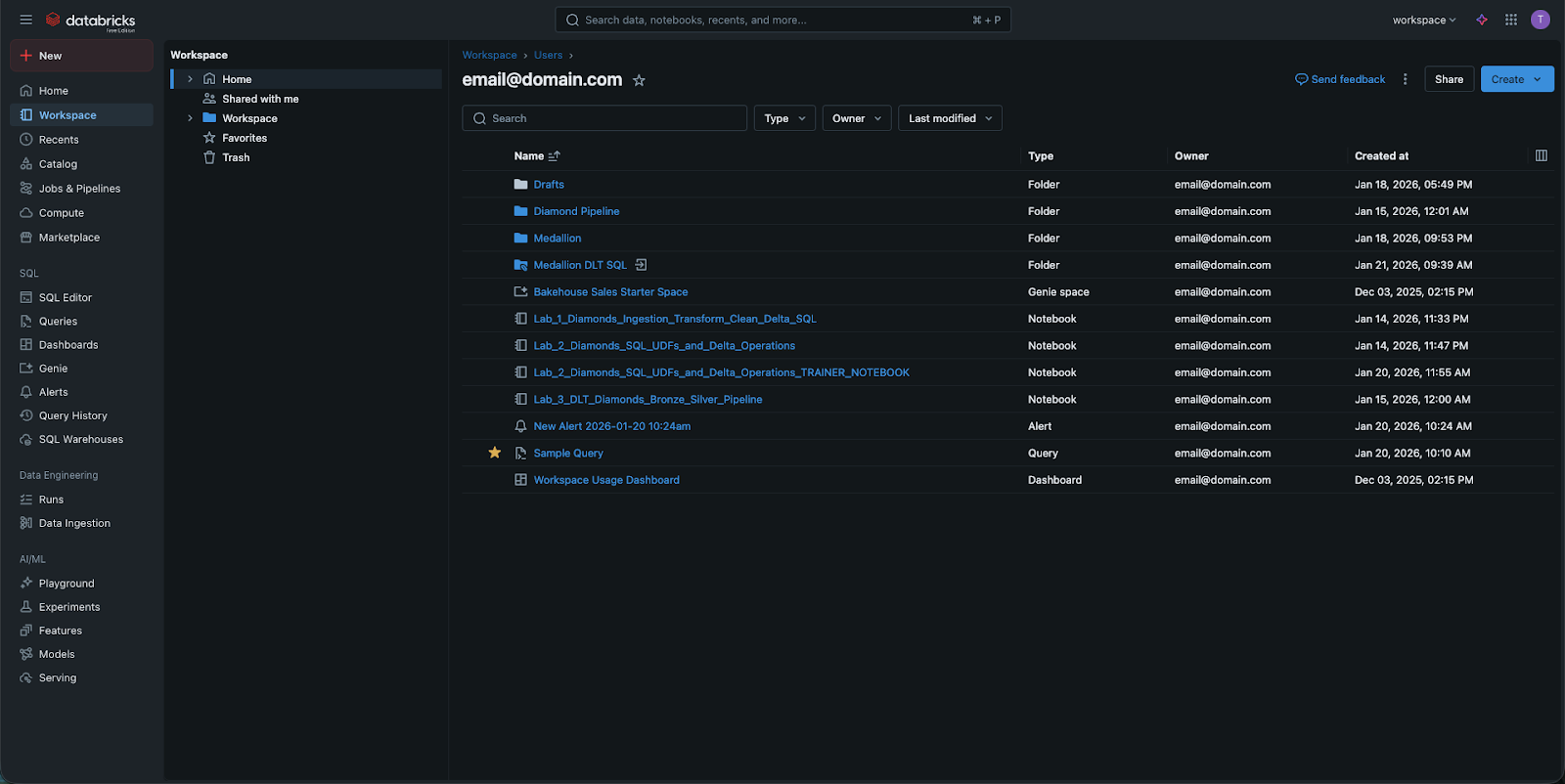
Når du klikker på Workspace-fanen i sidepanelet, ser du på et filsystem for din logikk.
- Dette er stedet hvor du oppretter mapper, undermapper og notatbøker.
- Du kan også lagre ikke-notatbokfiler her, som små Python-skript eller kravfiler.
- Viktig: dette er ikke "datatabeller." Du lagrer ikke en 100GB CSV-fil her. Dette området er for din immaterielle eiendom – koden som forteller Databricks hva som skal gjøres.
Katalogen: Hvor dataene dine ligger
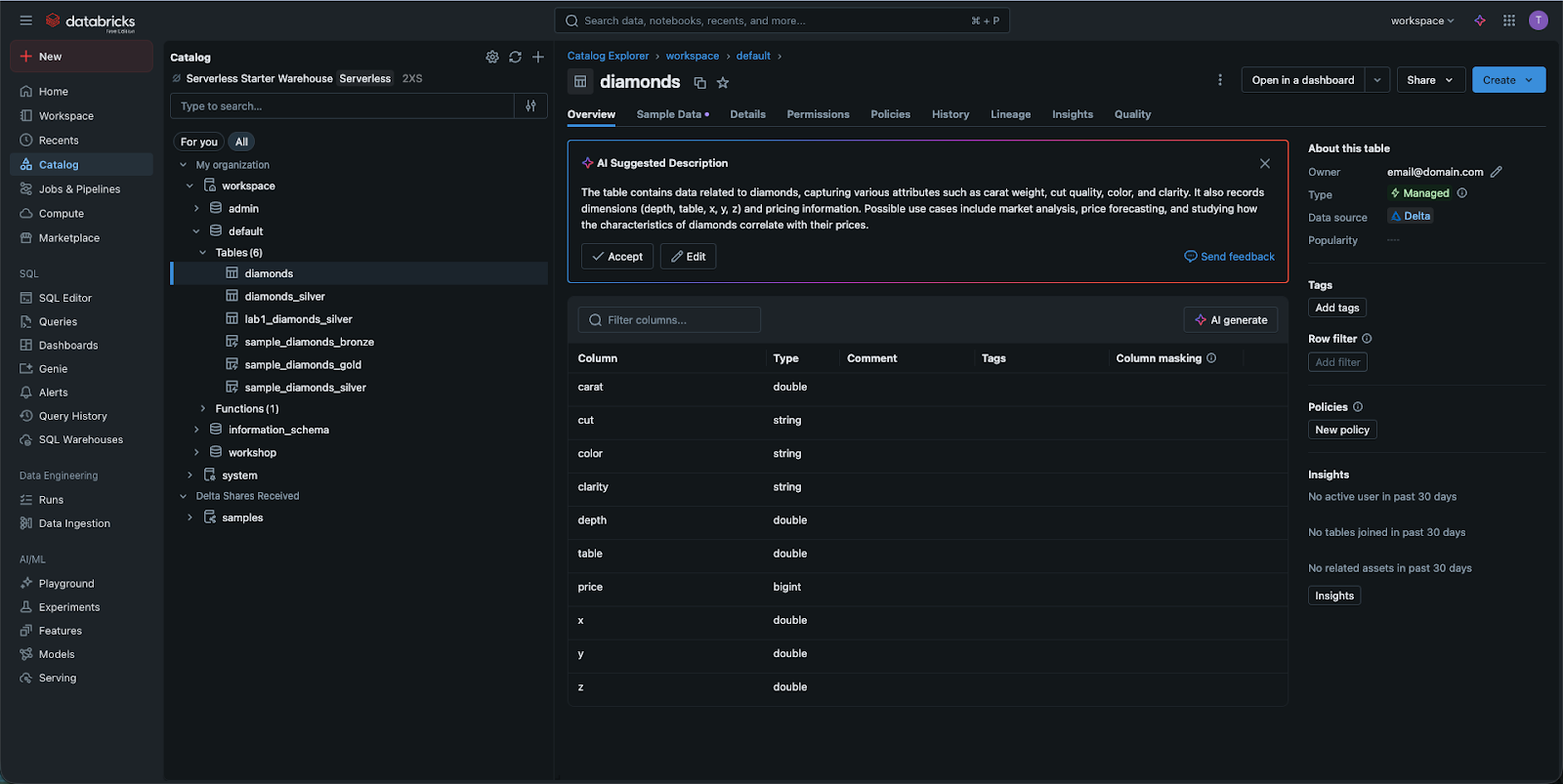
Når du vil se dataene dine, går du til Katalog-fanen. Tidligere var Databricks sterkt avhengig av noe som het DBFS (Databricks File System). Selv om du fortsatt kan se referanser til DBFS i eldre dokumentasjon, regnes det nå som en foreldet tilnærming.
I dag bruker vi Katalog (drevet av Unity Catalog). Dette gir en strukturert, "SQL-lignende" måte å vise dataene dine på:
- Unity-kataloger: en logisk gruppering (f.eks. production_data eller marketing_data) av skjemaer;
- Skjemaer (eller databaser): en måte å organisere tabeller innenfor en katalog, samt Volumes (se under), ML-modeller og funksjoner;
- Tabeller: de faktiske radene og kolonnene du skal forespørre.
Volumer: Håndtering av råfiler
Noen ganger har du data som ennå ikke er en tabell – for eksempel en rå CSV-fil eller en bildefil. I det moderne Databricks-grensesnittet lagres disse i Volumer. Tenk på en Volume som en bro mellom den gamle "mappe"-tankegangen og den nye, sikre "Katalog"-tilnærmingen. Du kan bla gjennom disse volumene direkte i Katalog-grensesnittet for å se råfilene dine før de lastes inn i tabeller.
Hvorfor er skillet viktig?
Det handler om sikkerhet og ytelse. Ved å holde kode i Workspace og data i Catalog, kan administratorer i Databricks gi en bruker tillatelse til å redigere et notatbok uten nødvendigvis å gi tilgang til sensitiv data i en tabell. Denne "ansvarsdelingen" er det som gjør Databricks til en plattform på bedriftsnivå.
1. Hvis du vil opprette en ny mappe for å organisere Python-notatbøkene dine, hvilken sidefeltfane bør du bruke?
2. Hva er den moderne, anbefalte måten å administrere og oppdage datatabeller i Databricks?
3. Hvilket eldre begrep kan du se i eldre Databricks-dokumentasjon som nå blir erstattet av Katalog og Volumer?
Takk for tilbakemeldingene dine!
Spør AI

Spør AI

Spør om hva du vil, eller prøv ett av de foreslåtte spørsmålene for å starte chatten vår
Administrere Filer i Arbeidsområdet
I Databricks er det et tydelig skille mellom Workspace Files (notatbøker og kode) og Data Objects (tabeller og råfiler). Catalog er den moderne inngangsporten som brukes til å administrere og oppdage disse dataobjektene.
En av de første tingene du må lære er at Databricks har "to sider av huset." Den ene siden er for arbeidet ditt – skriptene og notatbøkene dine. Den andre siden er for selve dataene du analyserer. Å forstå hvor hver del hører hjemme vil spare deg for mye frustrasjon når du begynner å skrive kode.
Workspace Files: Hvor koden din ligger
Når du klikker på Workspace-fanen i sidepanelet, ser du på et filsystem for din logikk.
- Dette er stedet hvor du oppretter mapper, undermapper og notatbøker.
- Du kan også lagre ikke-notatbokfiler her, som små Python-skript eller kravfiler.
- Viktig: dette er ikke "datatabeller." Du lagrer ikke en 100GB CSV-fil her. Dette området er for din immaterielle eiendom – koden som forteller Databricks hva som skal gjøres.
Katalogen: Hvor dataene dine ligger
Når du vil se dataene dine, går du til Katalog-fanen. Tidligere var Databricks sterkt avhengig av noe som het DBFS (Databricks File System). Selv om du fortsatt kan se referanser til DBFS i eldre dokumentasjon, regnes det nå som en foreldet tilnærming.
I dag bruker vi Katalog (drevet av Unity Catalog). Dette gir en strukturert, "SQL-lignende" måte å vise dataene dine på:
- Unity-kataloger: en logisk gruppering (f.eks. production_data eller marketing_data) av skjemaer;
- Skjemaer (eller databaser): en måte å organisere tabeller innenfor en katalog, samt Volumes (se under), ML-modeller og funksjoner;
- Tabeller: de faktiske radene og kolonnene du skal forespørre.
Volumer: Håndtering av råfiler
Noen ganger har du data som ennå ikke er en tabell – for eksempel en rå CSV-fil eller en bildefil. I det moderne Databricks-grensesnittet lagres disse i Volumer. Tenk på en Volume som en bro mellom den gamle "mappe"-tankegangen og den nye, sikre "Katalog"-tilnærmingen. Du kan bla gjennom disse volumene direkte i Katalog-grensesnittet for å se råfilene dine før de lastes inn i tabeller.
Hvorfor er skillet viktig?
Det handler om sikkerhet og ytelse. Ved å holde kode i Workspace og data i Catalog, kan administratorer i Databricks gi en bruker tillatelse til å redigere et notatbok uten nødvendigvis å gi tilgang til sensitiv data i en tabell. Denne "ansvarsdelingen" er det som gjør Databricks til en plattform på bedriftsnivå.
Takk for tilbakemeldingene dine!
