リストメソッド
メニューを表示するにはスワイプしてください
この章では、便利なリストメソッドについて説明します。
Remove()
Remove メソッドは、リストから要素の最初の出現を削除します。
構文:
exampleList.remove(targetElement);

index.cs
123456789101112131415161718192021222324252627using System; using System.Collections.Generic; namespace ConsoleApp { class Program { static void Main(string[] args) { List<string> fruits = new List<string> { "Apple", "Banana", "Orange", "Banana", "Grape" }; Console.Write("Before: "); foreach (string fruit in fruits) { Console.Write(fruit + " "); } fruits.Remove("Banana"); Console.Write("\nAfter: "); foreach (string fruit in fruits) { Console.Write(fruit + " "); } } } }
該当する要素が見つからない場合、何も実行されません。
index.cs
123456789101112131415161718192021222324252627using System; using System.Collections.Generic; namespace ConsoleApp { class Program { static void Main(string[] args) { List<string> fruits = new List<string> { "Apple", "Banana", "Orange", "Banana", "Grape" }; Console.Write("Before: "); foreach (string fruit in fruits) { Console.Write(fruit + " "); } fruits.Remove("some element"); // trying to remove an unknown element Console.Write("\nAfter: "); foreach (string fruit in fruits) { Console.Write(fruit + " "); } } } }
RemoveAt()
RemoveAt メソッドは、指定したインデックスの要素を削除。
構文:
exampleList.RemoveAt(index);
index.cs
123456789101112131415161718192021222324252627using System; using System.Collections.Generic; namespace ConsoleApp { class Program { static void Main(string[] args) { List<string> fruits = new List<string> { "Apple", "Orange", "Banana", "Grape" }; Console.Write("Before: "); foreach (string fruit in fruits) { Console.Write(fruit + " "); } fruits.RemoveAt(1); Console.Write("\nAfter: "); foreach (string fruit in fruits) { Console.Write(fruit + " "); } } } }
Clear
Clear メソッドは、リスト内のすべての要素を削除。
引数は不要。
構文:
exampleList.Clear();
index.cs
123456789101112131415161718192021222324252627using System; using System.Collections.Generic; namespace ConsoleApp { class Program { static void Main(string[] args) { List<string> fruits = new List<string> { "Apple", "Orange", "Banana", "Grape" }; Console.Write("Before: "); foreach (string fruit in fruits) { Console.Write(fruit + " "); } fruits.Clear(); Console.Write("\nAfter: "); foreach (string fruit in fruits) { Console.Write(fruit + " "); } } } }
Insert
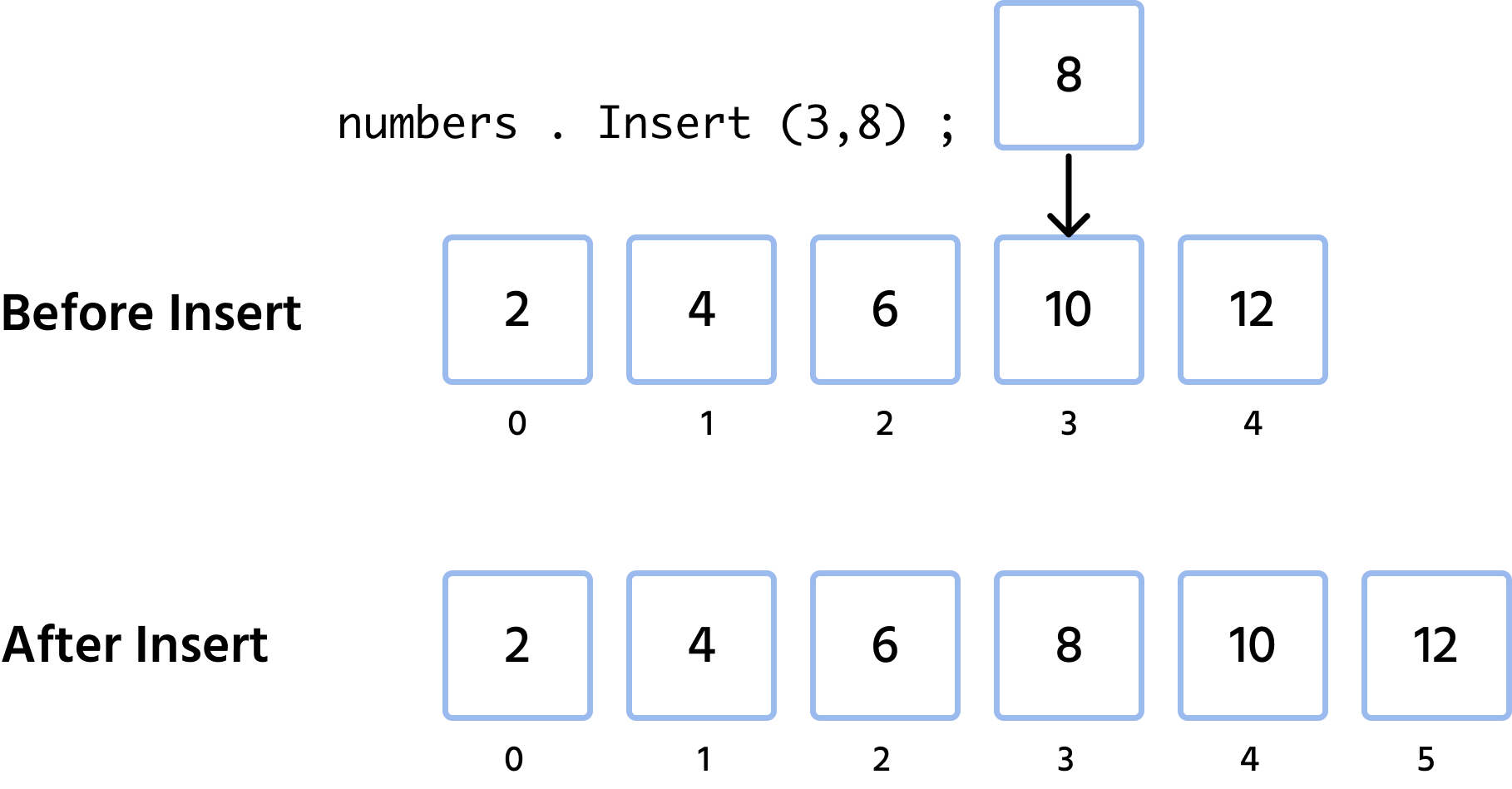
Insert メソッドは、指定したインデックス位置に要素を挿入。
構文:
exampleList.Insert(index, elementToInsert);
index.cs
1234567891011121314151617181920212223using System; using System.Collections.Generic; namespace ConsoleApp { class Program { static void Main(string[] args) { List<int> numbers = new List<int> { 2, 4, 6, 10, 12 }; Console.Write("Before: "); foreach (int number in numbers) Console.Write(number + " "); numbers.Insert(3, 8); Console.Write("\nAfter: "); foreach (int number in numbers) Console.Write(number + " "); } } }
{} 条件、if ループ、または for ループ内に単一の文のみがある場合、中括弧 foreach を省略可能。
index.cs
123foreach(int number in numbers) { Console.Write(number + " "); }
上記のスニペットは、次のものと同じです。
index.cs
12foreach(int number in numbers) Console.Write(number + " ");
指定したインデックスにすでに要素が存在する場合、その要素とそれ以降の配列要素(存在する場合)は右にシフトされます。次の図はこの処理を示しています。
Contains()
Contains メソッドは、リストに特定の要素が含まれているかどうかを確認する機能。
真偽値(true または false)を返す。
構文: exampleList.Contains(element);
index.cs
1234567891011121314using System; using System.Collections.Generic; namespace ConsoleApp { class Program { static void Main(string[] args) { List<char> vowels = new List<char> { 'a', 'e', 'i', 'o', 'u' }; Console.WriteLine("Contains 'o': " + vowels.Contains('o')); } } }
IndexOf()
IndexOf メソッドは、リスト内で要素が最初に出現する位置のインデックスを返します。
構文: exampleList.IndexOf(element);
index.cs
123456789101112131415using System; using System.Collections.Generic; namespace ConsoleApp { class Program { static void Main(string[] args) { List<char> vowels = new List<char> { 'a', 'e', 'i', 'o', 'u' }; vowels.Remove('o'); Console.WriteLine("Index of 'o': " + vowels.IndexOf('o')); } } }
要素がリストに存在しない場合、-1 が返されます:
indexOf メソッドは、インデックスで要素にアクセスしたいが、そのインデックスが分からない場合に特に便利。vowels で、要素 o にインデックスでアクセスし、大文字の O に変更する場合:
index.cs
12345678910111213141516171819using System; using System.Collections.Generic; namespace ConsoleApp { class Program { static void Main(string[] args) { List<char> vowels = new List<char> { 'a', 'e', 'i', 'o', 'u' }; int targetIndex = vowels.IndexOf('o'); Console.WriteLine(vowels[targetIndex]); vowels[targetIndex] = 'O'; Console.WriteLine(vowels[targetIndex]); } } }
1. Remove() メソッドは何をしますか?
2. リストに特定の要素が含まれているかを確認する最速の方法はどれですか?
3. リスト内のすべての要素を削除するために使用されるメソッドはどれですか?
4. 次のコードの出力はどうなりますか?
フィードバックありがとうございます!
AIに質問する

AIに質問する

何でも質問するか、提案された質問の1つを試してチャットを始めてください
