The Main Component in Angular
メニューを表示するにはスワイプしてください
Files in the app Folder
Before diving into the main component, let's go over the files found in the app folder and their roles in the application.
When you create a new Angular project, everything starts in the app folder. This is where the core files that define the structure of your application are stored. In this section, we'll explore what's inside this folder and take a closer look at the main component, which serves as the entry point to the user interface.
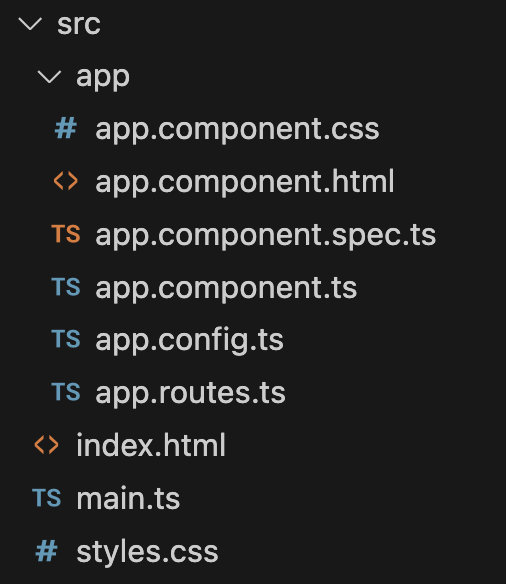

- Defines the application's navigation structure;
- Determines which components load for specific URLs.
- Stores global settings that affect the application's behavior;
- Allows customization of various parameters.
- The core file that defines the application's interface;
- Acts as the entry point for the user experience;
- Responsible for rendering content on the screen.
- Contains unit tests for
app.component.ts; - Ensures the main component functions correctly;
- This file can be removed since we won't be using it.
- Defines the HTML structure of the main component;
- Specifies how the component's content is displayed;
- Works together with
app.component.ts.
- Contains CSS styles for the main component;
- Defines the visual appearance of the UI;
- Helps maintain a consistent design.

The main files we will work with most often are app.component.ts, app.component.html, and app.component.css. You can ignore the rest for now.
Main Component
Now, let's take a closer look at the main component, AppComponent. This component is created by default when running the ng new command, and it serves as the root component of the application.

component.ts
In Angular, components are created using decorators. A decorator is a special function that adds extra functionality to a class.

The @Component decorator is used to transform a regular class, like AppComponent, into a fully-fledged Angular component with its own template, styles, and logic.
Within the @Component decorator, we specify important settings that determine how the component will look and behave. Let's break them down:
Key elements in the app.component.ts file:
-
Selector (
selector) – defines how the component will be named in the HTML. In this case, it can be used as<app-root></app-root>; -
Imports (
imports) – a list of dependencies required for the component to function. In this example, it usesRouterOutlet, which handles displaying content based on the route; -
Template (
templateUrl) – the path to the HTML file (app.component.html) containing the component's template; -
Styles (
styleUrls) – the path to the CSS file (app.component.css) defining the component's appearance.
How the Main Component Is Used
The process begins in the index.html file located in the src folder. It doesn't contain typical content, only a basic structure with one special tag:

index.html
This <app-root> tag corresponds to the selector in app.component.ts. When Angular initializes, it finds this tag and replaces it with the content from app.component.html.
Conclusion
The main component is the heart of the application. It loads first and manages the core template. Everything we see on the screen passes through it. The <app-root> tag in index.html is the entry point through which Angular "enters" the page.
1. What does the @Component decorator do in Angular?
2. Which file contains the template for the main component?
フィードバックありがとうございます!
AIに質問する

AIに質問する

何でも質問するか、提案された質問の1つを試してチャットを始めてください
