Justifying Content Horizontally
メニューを表示するにはスワイプしてください
The justify-content property is instrumental in determining the position of flex items along the main axis. Its default value is flex-start.
justify-content: flex-start | flex-end | center | space-between | space-around;
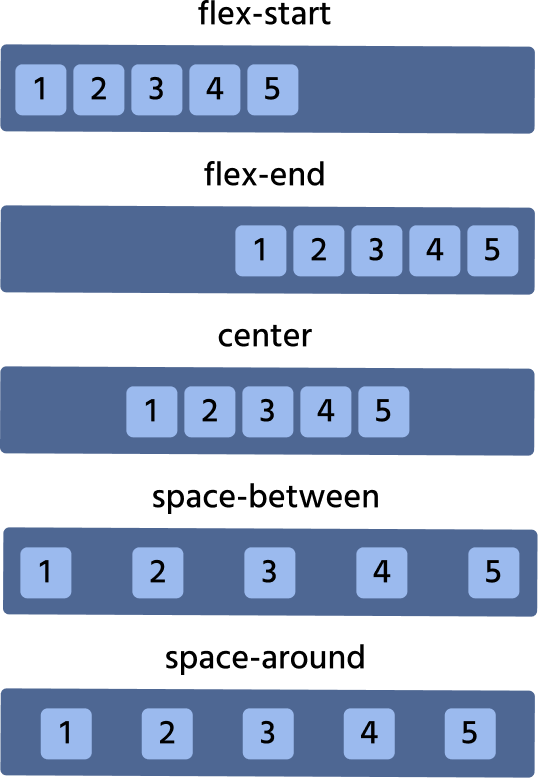
Let's consider each case on practice. We will play with the list of cards.
flex-start
Default value, which makes all the items be at the start of the main axis.

index.html

index.css
flex-end
All items are at the axis end.
index.html
index.css
center
All items are in the center.
index.html
index.css
space-around
It distributes all the items evenly along the main axis with a bit of space left at either end.
index.html
index.css
space-between
It is very similar to space-around except that it doesn't leave any space at the axis on both ends.
index.html
index.css
フィードバックありがとうございます!
AIに質問する

AIに質問する

何でも質問するか、提案された質問の1つを試してチャットを始めてください
Justifying Content Horizontally
The justify-content property is instrumental in determining the position of flex items along the main axis. Its default value is flex-start.
justify-content: flex-start | flex-end | center | space-between | space-around;
Let's consider each case on practice. We will play with the list of cards.
flex-start
Default value, which makes all the items be at the start of the main axis.
index.html
index.css
flex-end
All items are at the axis end.
index.html
index.css
center
All items are in the center.
index.html
index.css
space-around
It distributes all the items evenly along the main axis with a bit of space left at either end.
index.html
index.css
space-between
It is very similar to space-around except that it doesn't leave any space at the axis on both ends.
index.html
index.css
フィードバックありがとうございます!
