Margin and Padding Made Simple
メニューを表示するにはスワイプしてください
You know that every element has content, padding, border, and margin. Let's see how to control spacing using those properties.
Padding
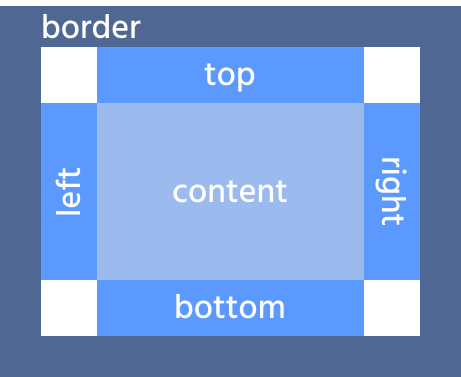
Padding creates space inside the element, between the content and the border.
.box {
  padding: 20px;
}
This applies 20px of padding on all four sides.
Padding Shorthand
Padding can be written using shorthand syntax.
The order of values is always: top → right → bottom → left
padding: 20px; /* all sides */
padding: 10px 20px; /* top/bottom | left/right */
padding: 10px 20px 5px; /* top | left/right | bottom */
padding: 10px 15px 20px 25px; /* top | right | bottom | left */
Individual Padding Properties
You can also control each side separately:
padding-top: 10px;
padding-right: 15px;
padding-bottom: 25px;
padding-left: 5px;
Margin
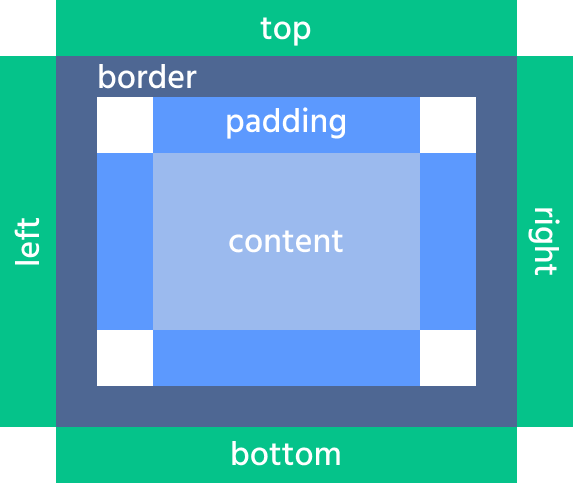
Margin creates space outside the element, between it and other elements.
.box {
  margin: 20px;
}
Margin Shorthand
Margin follows the same shorthand rules as padding:
margin: 20px; /* all sides */
margin: 10px 20px; /* top/bottom | left/right */
margin: 10px 20px 5px; /* top | left/right | bottom */
margin: 10px 15px 20px 25px; /* top | right | bottom | left */
Individual Margin Properties
Can also be set individually:
margin-top: 10px;
margin-right: 15px;
margin-bottom: 25px;
margin-left: 5px;
Border
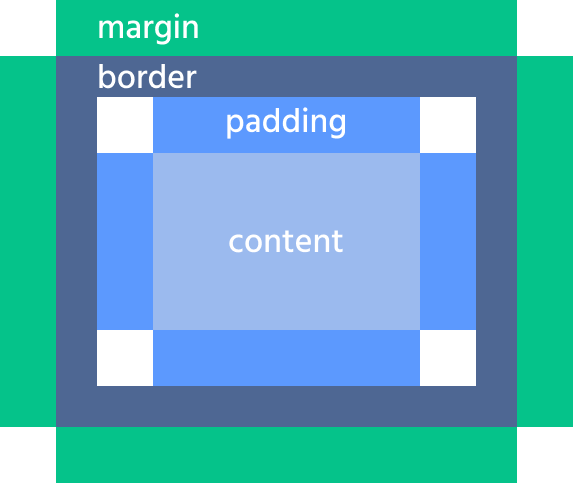
The border sits between padding and margin.
Basic shorthand:
border: 4px solid brown;
This defines: width, style, color.
Common border styles include solid, dotted, dashed, and double.
You can also control individual sides if needed:
border-top: 2px solid black;
Let's consider the following example and figure out the possible border styles:

index.html

styles.css
Output

Padding:
- Adds space inside the element;
- Expands the background area.
Margin:
- Adds space outside the element;
- Does not affect the element's background.
1. Which side receives 40px in the following declaration?
2. Which property adds space inside an element, between its content and border?
フィードバックありがとうございます!
AIに質問する

AIに質問する

何でも質問するか、提案された質問の1つを試してチャットを始めてください
