フラットデータをリレーショナルテーブルにリファクタリングする
メニューを表示するにはスワイプしてください
ワイドなフラットシートは、すべてのイベントに関するあらゆる情報を1つのテーブルにまとめたものです。顧客情報、商品情報、日付、取引金額などがすべて1か所に集約されています。読みやすい反面、リレーショナルデータモデルには対応できません。
繰り返しの問題点:Acme Corpの注文ごとに顧客名、地域、セグメントが繰り返されます。これらの情報が変更された場合、すべての行を個別に更新する必要があり、不整合やストレージの肥大化につながります。

ビデオで使用されているワークブックは、タスクで使用されているワークブックとは異なります。 レッスン中に講師と一緒にステップごとに進めたい場合は、開始前にビデオ下部にあるビデオ用ワークブックをダウンロードしてください。
ステップ 1 — 次元テーブルの特定と抽出
次元テーブルは、各イベントの「誰」「何」「いつ」を記述するテーブル。これらは境界が明確なため、最初に作成。各行は一意でなければならず、貼り付け後に重複を削除。
- Customers テーブル: CustomerID (PK), CustomerName, Region, Segment;
- Products テーブル: ProductID (PK), ProductName, Category;
- Dates テーブル: Date (PK), Year, Month (number), Month name, Quarter.
なぜ日付テーブルは1年全体をカバーする必要があるのか?
タイムインテリジェンス計算(年初来、移動平均、期間比較)には、連続したギャップのないカレンダーが必要。テーブルに注文日だけが含まれている場合、売上のない月が完全に欠落し、計算が正しく行えない。
ステップ 2 — ファクトテーブルの作成
ファクトテーブルは発生した事象を記録し、1行が1イベントを表す。測定値と、各イベントを次元テーブルに紐付ける外部キーを格納。説明的なテキストは意図的に含めない。
- Sales(ファクトテーブル): OrderID (PK), OrderDate → Dates (FK), CustomerID → Customers (FK), ProductID → Products (FK), UnitPrice, Quantity, Total.
- PK — 主キー(テーブル内の各レコードを一意に識別する識別子);
- FK — 外部キー(他のテーブルの主キーとリンクするフィールド)。
スター・スキーマ
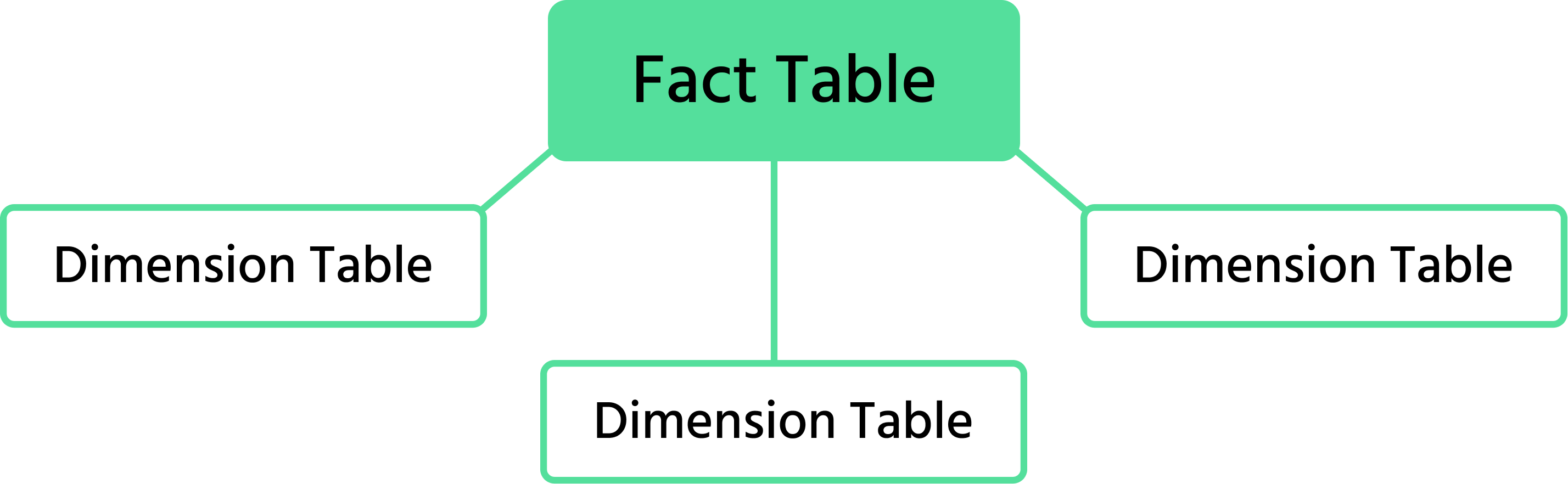
4つのテーブルはスター・スキーマを形成し、ファクトテーブルが中心に位置し、ディメンションテーブルが外側に放射状に配置され、それぞれが主キー/外部キーのペアで接続されている。
タスク
- ワイドなフラットシートの列を、宛先ごとに色分け:顧客(青)、商品(オレンジ)、日付(緑)、ファクト値(黄)。
- 各色グループを新しいシートにコピーし、範囲を名前付きのExcelテーブルに変換(挿入 → テーブル)。
- 主キー列を選択し、データ → 重複の削除を使用して各行が一意であることを確認。
- 日付テーブルでは、日付列を1月1日から12月31日までカバーするように拡張し、Year, Month, Month Name、およびQuarter列を追加。
=YEAR()、=MONTH()、=TEXT(B2, "MMMM")、および四半期の数式="Q"&INT((MONTH(B2)-1)/3+1)を使用。 - 日付シートを値のみ(数式なし)で新しいクリーンなシートに貼り付けてからテーブルに変換。
- 残りの列と3つの外部キー(
OrderDate、CustomerID、ProductID)を使ってファクトテーブルを作成。
1. フラットなシートをファクトテーブルとディメンションにリファクタリングする主な利点は何ですか?(2つ選択)
2. フラットテーブルからCustomersディメンションを作成する際に不可欠なステップはどれですか?
フィードバックありがとうございます!
AIに質問する

AIに質問する

何でも質問するか、提案された質問の1つを試してチャットを始めてください
フラットデータをリレーショナルテーブルにリファクタリングする
ワイドなフラットシートは、すべてのイベントに関するあらゆる情報を1つのテーブルにまとめたものです。顧客情報、商品情報、日付、取引金額などがすべて1か所に集約されています。読みやすい反面、リレーショナルデータモデルには対応できません。
繰り返しの問題点:Acme Corpの注文ごとに顧客名、地域、セグメントが繰り返されます。これらの情報が変更された場合、すべての行を個別に更新する必要があり、不整合やストレージの肥大化につながります。
ビデオで使用されているワークブックは、タスクで使用されているワークブックとは異なります。 レッスン中に講師と一緒にステップごとに進めたい場合は、開始前にビデオ下部にあるビデオ用ワークブックをダウンロードしてください。
ステップ 1 — 次元テーブルの特定と抽出
次元テーブルは、各イベントの「誰」「何」「いつ」を記述するテーブル。これらは境界が明確なため、最初に作成。各行は一意でなければならず、貼り付け後に重複を削除。
- Customers テーブル: CustomerID (PK), CustomerName, Region, Segment;
- Products テーブル: ProductID (PK), ProductName, Category;
- Dates テーブル: Date (PK), Year, Month (number), Month name, Quarter.
なぜ日付テーブルは1年全体をカバーする必要があるのか?
タイムインテリジェンス計算(年初来、移動平均、期間比較)には、連続したギャップのないカレンダーが必要。テーブルに注文日だけが含まれている場合、売上のない月が完全に欠落し、計算が正しく行えない。
ステップ 2 — ファクトテーブルの作成
ファクトテーブルは発生した事象を記録し、1行が1イベントを表す。測定値と、各イベントを次元テーブルに紐付ける外部キーを格納。説明的なテキストは意図的に含めない。
- Sales(ファクトテーブル): OrderID (PK), OrderDate → Dates (FK), CustomerID → Customers (FK), ProductID → Products (FK), UnitPrice, Quantity, Total.
- PK — 主キー(テーブル内の各レコードを一意に識別する識別子);
- FK — 外部キー(他のテーブルの主キーとリンクするフィールド)。
スター・スキーマ
4つのテーブルはスター・スキーマを形成し、ファクトテーブルが中心に位置し、ディメンションテーブルが外側に放射状に配置され、それぞれが主キー/外部キーのペアで接続されている。
タスク
- ワイドなフラットシートの列を、宛先ごとに色分け:顧客(青)、商品(オレンジ)、日付(緑)、ファクト値(黄)。
- 各色グループを新しいシートにコピーし、範囲を名前付きのExcelテーブルに変換(挿入 → テーブル)。
- 主キー列を選択し、データ → 重複の削除を使用して各行が一意であることを確認。
- 日付テーブルでは、日付列を1月1日から12月31日までカバーするように拡張し、Year, Month, Month Name、およびQuarter列を追加。
=YEAR()、=MONTH()、=TEXT(B2, "MMMM")、および四半期の数式="Q"&INT((MONTH(B2)-1)/3+1)を使用。 - 日付シートを値のみ(数式なし)で新しいクリーンなシートに貼り付けてからテーブルに変換。
- 残りの列と3つの外部キー(
OrderDate、CustomerID、ProductID)を使ってファクトテーブルを作成。
フィードバックありがとうございます!
