if-else文
メニューを表示するにはスワイプしてください
比較演算子
まず、比較演算子について理解します。
次のものが比較演算子です:>, <, >=, <=, ==, !=。
これらの演算子は値を比較し、比較結果に基づいてブール値(true または false)を返します。
if文
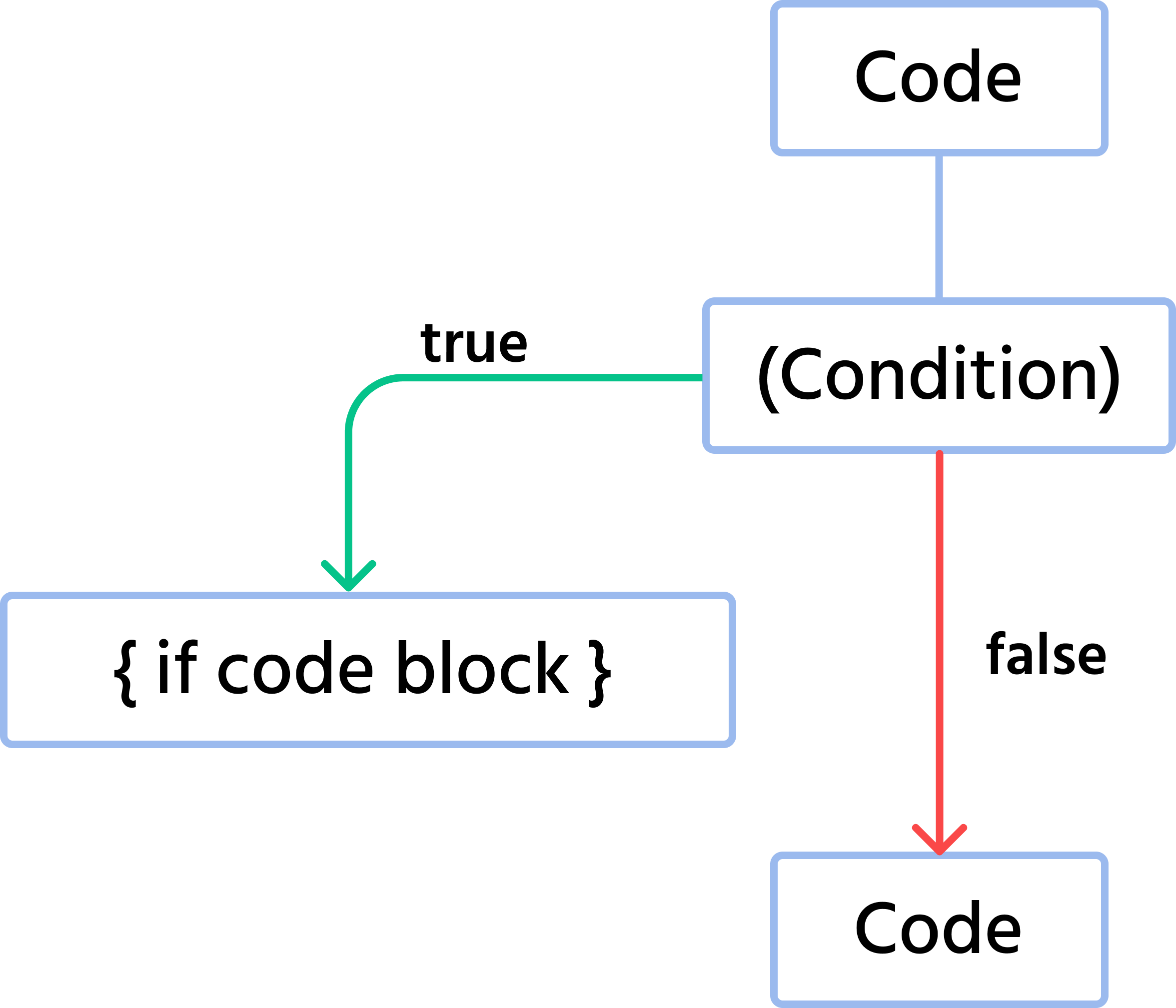
if文は、あらゆるプログラムにおいて不可欠な要素。if文を使うことで、プログラムに条件を設定可能。if文の構文と図は以下の通り。

Main.java
1234if (condition) { // This block runs only if the condition is true } // Below is the regular code that always runs
以下は、if文の使用を示すフローチャート。ifブロックに入る前に、条件を確認。条件がtrueの場合、ifブロックに入り、必要な処理を実行。条件がfalseの場合、ifブロックをスキップし、コードの続行。
実際の値を使った例を見てみましょう。
Main.java
123456789101112131415package com.example; public class Main { public static void main(String[] args) { // You can change the values of variables `a` and `b' to test the `if` statements double a = 13.71; double b = 14.01; if (b > a) { System.out.println("b is greater than a"); } if (a > b) { System.out.println("a is greater than b"); } } }
このコードでは、条件を設定しています。a の値が b より大きい場合、その情報を表示します。b の値が a を上回る場合、どちらの値が大きいかを示すメッセージを表示します。
if-else
2つの独立した if 文を使うのは、あまり洗練されていません。このような場合に使える専用の構文が if-else statement です。
上記のコードを if-else statement を使ってどのように改善できるか見てみましょう。
Main.java
1234567891011121314package com.example; public class Main { public static void main(String[] args) { // You can change the values of variables `a` and `b' to test the `if` statements double a = 13.71; double b = 14.01; if (b > a) { System.out.println("b is greater than a"); } else { System.out.println("a is greater than or equal to b"); } } }
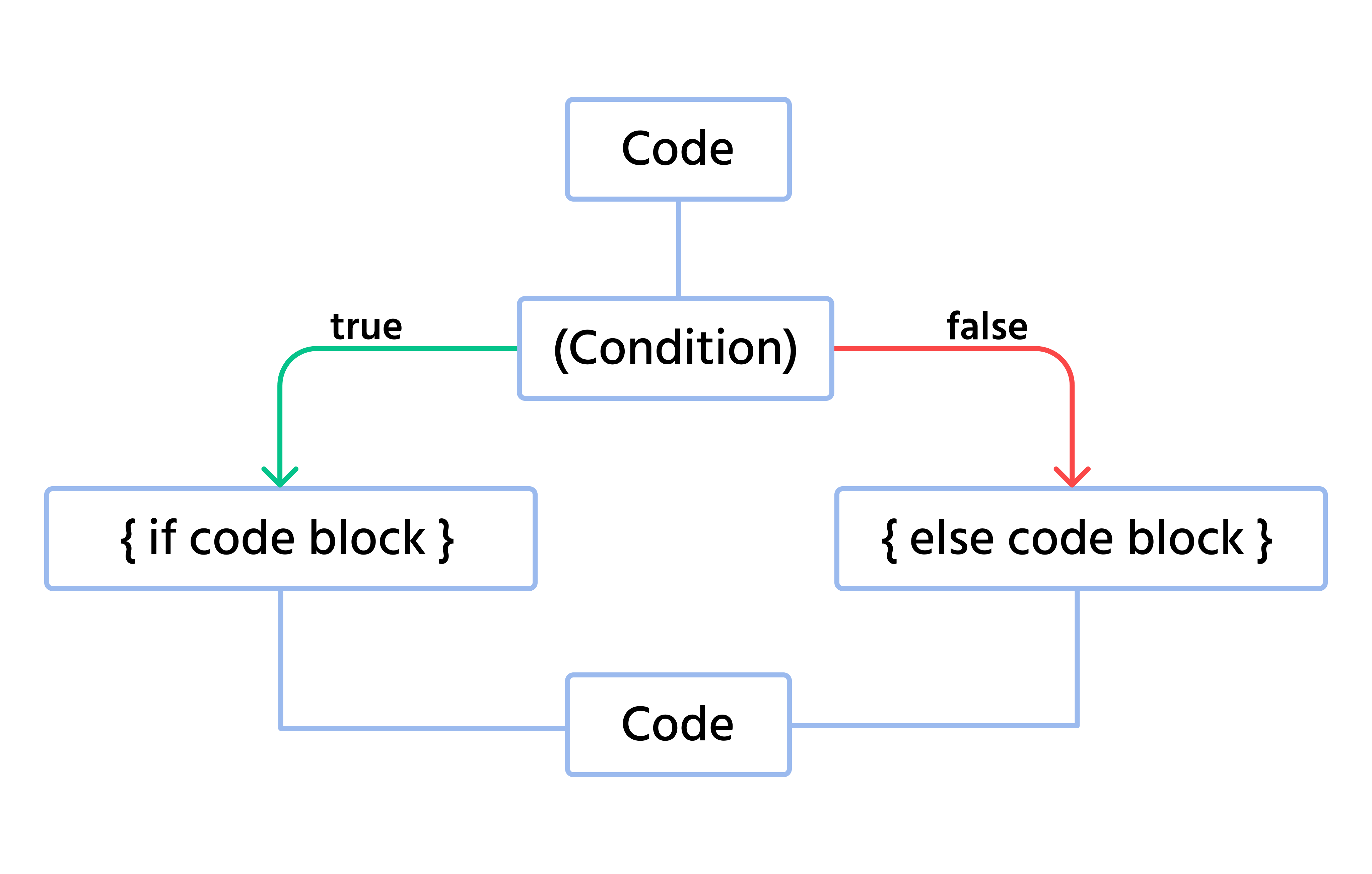
if-else statementを使用して前回のコードをどのように改善したかを確認できます。簡単に言えば、変数bの値が大きいかどうかを確認し、返される値がfalseの場合はelseブロックに入り、そこで異なるメッセージを表示します。
if-else文のブロック図:
2つの変数の値が等しいかどうかを比較するコード断片の検討
Main.java
1234567891011121314package com.example; public class Main { public static void main(String[] args) { // You can change the values of variables `a` and `b' to test the `if` statements int a = 10; int b = 10; if (a == b) { System.out.println("a equals b"); } else { System.out.println("a is not equal to b"); } } }
ここでは、a と b の値が等しいかどうかを確認し、その情報を表示。両方の a と b の値が 10 であるため、結果は true となり、対応するメッセージが表示される。
else-ifチェーン
else-if文についても触れておく価値があります。
複数の異なる実行条件を指定する必要がある場合、次の構文を使用できます。
Main.java
12345678910111213141516package com.example; public class Main { public static void main(String[] args) { // You can change the values of variables `a` and test the `if-else` statement int a = 25; int b = 13; if (a > b) { System.out.println("a is greater than b"); } else if (a == b) { System.out.println("a equals b"); } else { System.out.println("b is greater than a"); } } }
上記のコードでは、複数の異なる条件が使用されていることがわかります。このため、単純なアルゴリズムチェーンに従います。最初の条件が false の場合、次の条件を確認し、このように続けます。true になるまで続け、すべての条件が false の場合は、よく知られている else ブロックに入ります。
1. このコードの結果は何ですか?
2. このコードを実行した後、コンソールに出力される内容は何ですか?
フィードバックありがとうございます!
AIに質問する

AIに質問する

何でも質問するか、提案された質問の1つを試してチャットを始めてください
