Notice: This page requires JavaScript to function properly.
Please enable JavaScript in your browser settings or update your browser.
学ぶ Choosing the Right Chart Type | Visualizing Data Like a Pro
A Fun Way to Excel

bookChoosing the Right Chart Type

メニューを表示するにはスワイプしてください

Choosing the right chart type is an analytical skill.

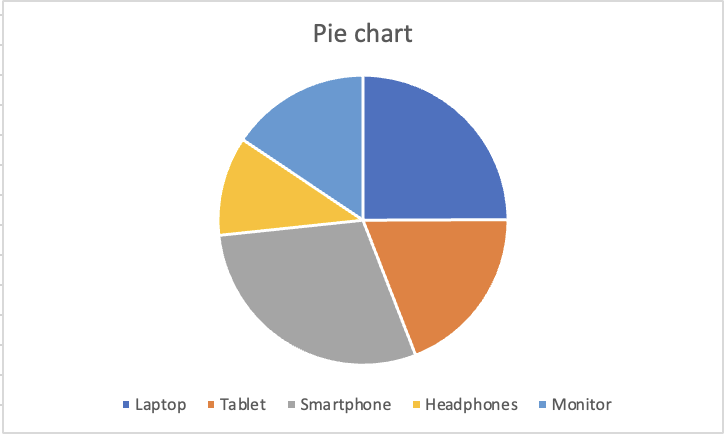
Pie Chart

Shows how individual categories add up to 100%. Only effective when categories are few (ideally 5 or fewer) and differences between slices are large enough to see. Avoid when slices are similar in size.

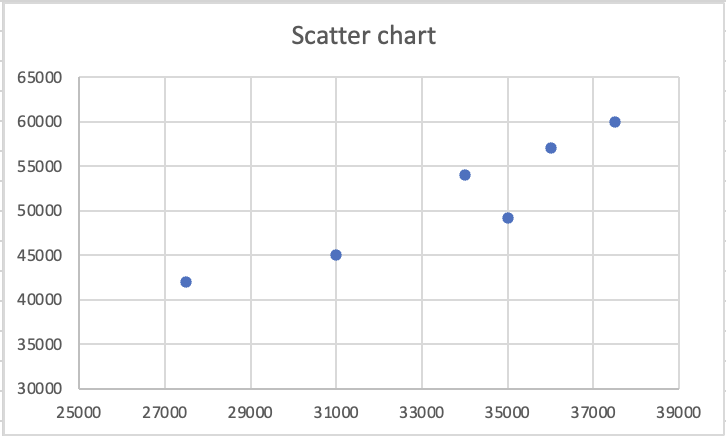
Scatter Chart

Each dot is a pair of values — one column becomes the X-axis, the other becomes the Y-axis. Used to identify correlation, clusters, or outliers between two numeric variables. Not suitable for categories.

In a column or line chart, one axis is categories and the other is values. In a scatter chart, both axes are numeric values — and Excel pairs them as coordinates. Each dot is not a category; it is a data point with both an X position and a Y position, where X comes from one column and Y comes from another.

This makes scatter charts powerful for a specific analytical question: when one value goes up, does the other go up too? If the dots form a diagonal pattern rising from bottom-left to top-right, the two variables move together. If the dots are scattered randomly, there is no visible relationship. A cluster of dots in one area signals that certain combinations of values appear repeatedly in the data.

Note
Note

Professional reporting avoids 3D charts entirely. The rule is simple: clarity takes priority over decoration. A 2D column chart that clearly communicates the data is always better than a 3D chart that looks impressive but introduces ambiguity.

question mark

Hi

正しい答えを選んでください

すべて明確でしたか?

どのように改善できますか?

フィードバックありがとうございます!

セクション 4.  2

AIに質問する

expand

AIに質問する

ChatGPT

何でも質問するか、提案された質問の1つを試してチャットを始めてください

セクション 4.  2
some-alt