テーブル
メニューを表示するにはスワイプしてください
範囲は強力ですが、静的です。データが増え続ける場合—新しい行、新しい顧客、新しい取引—より賢い方法が必要です。そこで登場するのがテーブルです。
重要ポイント
- テーブルは範囲を構造化された拡張可能なデータセットに変換;
- Ctrl / Cmd + Tで任意の範囲をテーブルに変換;
- テーブルはフィルター、構造化参照、自動拡張を追加;
- 各列=1つのデータ型。各行=1つのレコード。内部に空行なし。
テーブルとは?
テーブルは、Excelに「これは拡張可能なデータセットです、そのように扱ってください」と伝える構造化範囲です。
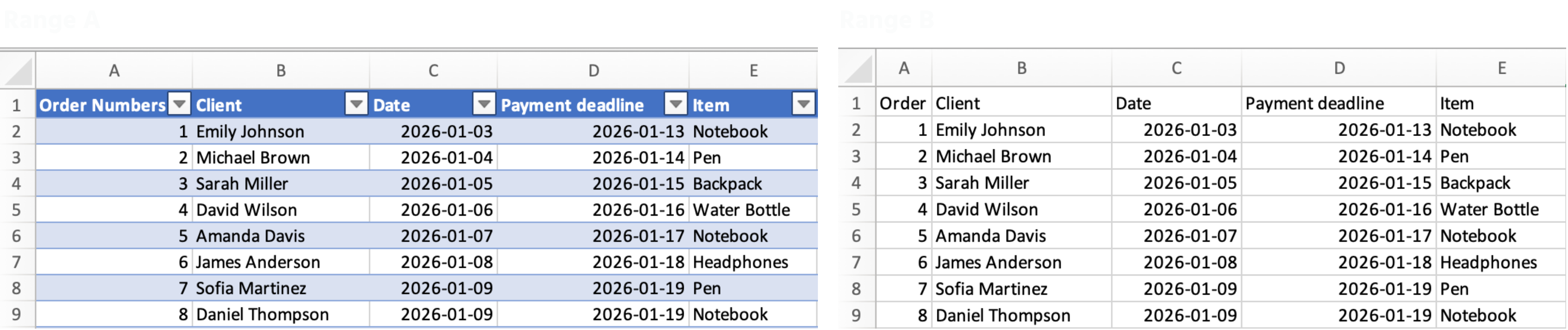
範囲をテーブルに変換すると、Excelは自動的に以下を行います:
- ヘッダーにフィルターと並べ替えボタンを追加;
- 数式や書式を新しい行すべてに拡張;
Sales[Total_Cost]のような構造化参照を使用(K2:K54の代わり)。
テーブルの作成方法
- データ内の任意の場所をクリック;
- Ctrl + T(Windows)または Cmd + T(Mac)を押す;
- データにヘッダーがあることを確認し、OKをクリック。
すべて明確でしたか?
フィードバックありがとうございます!
セクション 1. 章 2
AIに質問する

AIに質問する

何でも質問するか、提案された質問の1つを試してチャットを始めてください
セクション 1. 章 2
