Modifica in tempo reale
Scorri per mostrare il menu
Uno dei principali vantaggi dei fogli di lavoro Excel basati su cloud è la collaborazione in tempo reale. Più utenti possono lavorare contemporaneamente sullo stesso file senza creare copie separate della cartella di lavoro.
Quando una cartella di lavoro condivisa è archiviata su OneDrive o SharePoint, Excel sincronizza automaticamente gli aggiornamenti tra tutti i collaboratori.
Comprendere la co-creazione
La collaborazione in tempo reale in Excel è comunemente chiamata co-creazione. Questa funzione consente a più utenti di modificare la cartella di lavoro contemporaneamente.
Quando i collaboratori aprono lo stesso file:
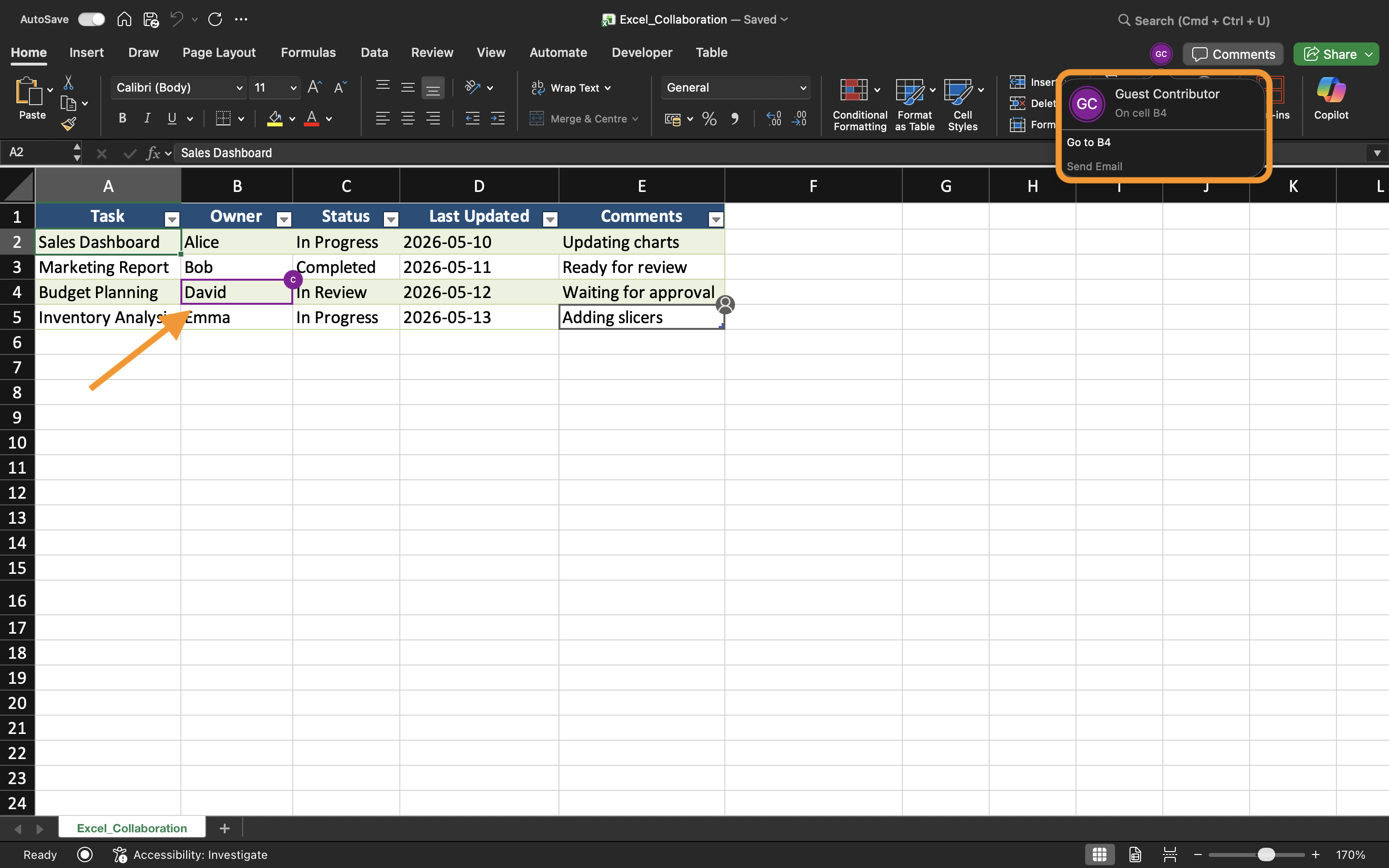
- Excel mostra gli utenti attivi vicino all'angolo in alto a destra;
- Le modifiche appaiono automaticamente mentre gli utenti modificano la cartella di lavoro;
- Gli aggiornamenti si sincronizzano continuamente in background.
Questo crea un flusso di lavoro molto più rapido rispetto all'invio manuale di allegati aggiornati della cartella di lavoro.
Visualizzazione delle modifiche in tempo reale
Mentre i collaboratori modificano la cartella di lavoro, Excel aggiorna le celle in tempo reale. Gli utenti possono notare selezioni evidenziate o indicatori che mostrano dove un'altra persona sta lavorando in quel momento.
Ad esempio, se un utente aggiorna i dati di vendita mentre un altro modifica i dati regionali, entrambe le modifiche possono apparire quasi istantaneamente nella cartella di lavoro condivisa.
Questo aiuta i team a rimanere sincronizzati durante le sessioni di lavoro collaborativo.
Evitare conflitti di modifica
Sebbene Excel gestisca automaticamente la maggior parte delle sincronizzazioni, possono comunque verificarsi conflitti quando più utenti modificano contemporaneamente le stesse celle.
Per ridurre i problemi di modifica:
- Assegnare aree diverse del foglio di lavoro ai collaboratori;
- Comunicare prima di apportare grandi modifiche strutturali;
- Evitare di eliminare fogli durante la collaborazione attiva;
- Mantenere attiva la funzione Salvataggio automatico.
Queste pratiche aiutano a mantenere flussi di lavoro condivisi più fluidi.
Lavorare tra Excel Desktop e Web
La collaborazione in tempo reale funziona sia nell'app desktop di Excel sia in Excel per il Web. Gli utenti possono collaborare anche utilizzando dispositivi e sistemi operativi diversi.
Tuttavia, alcune funzionalità avanzate di Excel possono comportarsi in modo diverso a seconda della piattaforma utilizzata. Per la migliore esperienza di collaborazione, i team dovrebbero cercare di utilizzare versioni compatibili di Excel quando possibile.
Vantaggi della modifica in tempo reale
La modifica in tempo reale migliora il lavoro di squadra rendendo la collaborazione più rapida e trasparente. I team possono rivedere gli aggiornamenti immediatamente, ridurre i ritardi nella comunicazione ed evitare confusione causata da copie obsolete della cartella di lavoro.
Questo flusso di lavoro è particolarmente utile per:
- Pianificazione del budget;
- Reportistica sulle vendite;
- Monitoraggio dei progetti;
- Pianificazione dei team;
- Dashboard operativi.
Attività
La cartella di lavoro contiene un report trimestrale delle vendite condiviso, gestito da più membri del dipartimento. L'obiettivo è testare la collaborazione in tempo reale e osservare come gli aggiornamenti della cartella di lavoro si sincronizzano tra gli utenti.
- Aprire la cartella di lavoro condivisa da due dispositivi o sessioni browser differenti;
- Modificare contemporaneamente aree diverse del foglio di lavoro;
- Osservare come Excel sincronizza le modifiche alla cartella di lavoro;
- Verificare che gli aggiornamenti compaiano automaticamente per tutti i collaboratori;
- Testare la collaborazione sia con Excel Desktop che con Excel per il Web.
Grazie per i tuoi commenti!
Chieda ad AI

Chieda ad AI

Chieda pure quello che desidera o provi una delle domande suggerite per iniziare la nostra conversazione
