Protezione tramite password
Scorri per mostrare il menu
Excel consente agli utenti di applicare la protezione tramite password ai file di lavoro per limitare l'accesso non autorizzato. Le password aiutano a proteggere file aziendali sensibili come report finanziari, registri dei dipendenti o documenti di pianificazione riservati. La protezione tramite password aggiunge un ulteriore livello di controllo quando i file di lavoro vengono condivisi tra team o archiviati esternamente.
Comprendere le password dei file di lavoro
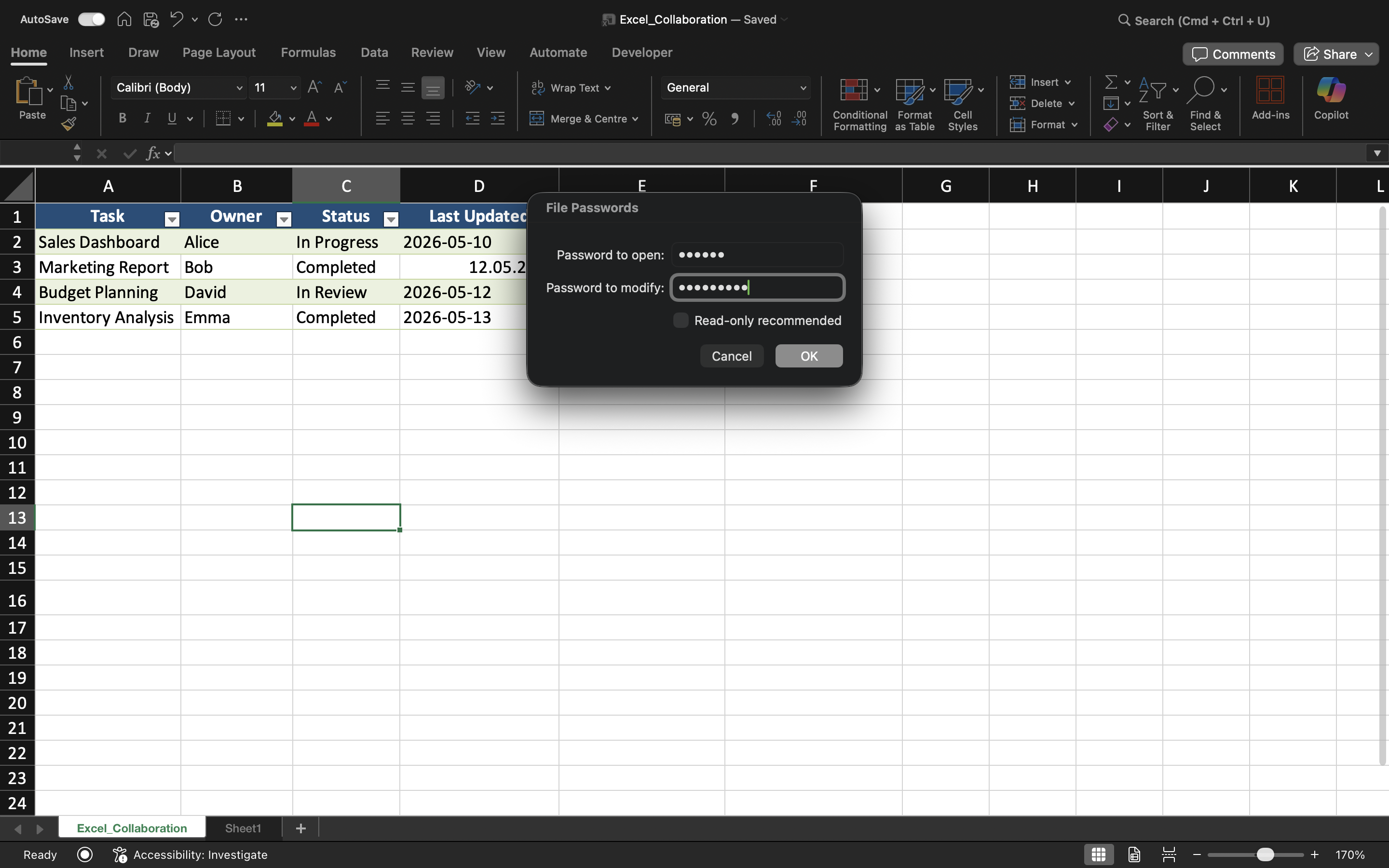
Excel supporta diversi tipi di protezione tramite password. Gli utenti possono richiedere una password per aprire un file di lavoro o limitare le autorizzazioni di modifica all'interno del file.
Una password per il file di lavoro aiuta a impedire che utenti non autorizzati accedano ai contenuti del file. Le restrizioni di modifica, invece, consentono di aprire il file limitando però l'accesso alle modifiche.
Proteggere un file di lavoro con una password
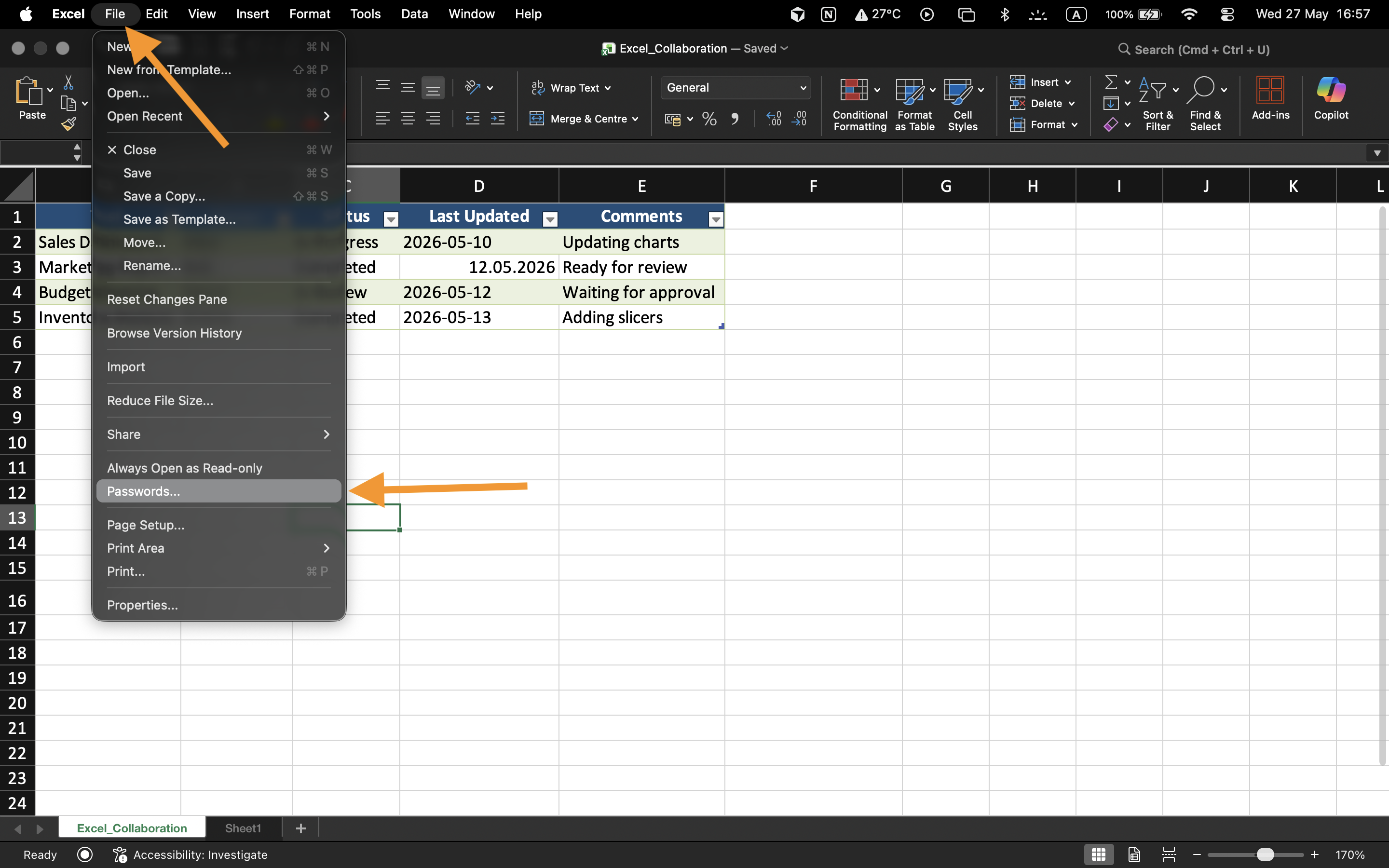
Per applicare la protezione tramite password:
- Aprire il file di lavoro;
- Selezionare File → Informazioni;
- Scegliere Proteggi cartella di lavoro;
- Selezionare Crittografa con password;
- Inserire e confermare la password.
Una volta salvato, il file di lavoro richiederà la password ogni volta che un utente tenterà di aprire il file.
Comprendere i limiti delle password
Le password dei file di lavoro migliorano la sicurezza dei file, ma password deboli possono comunque essere vulnerabili ad accessi non autorizzati.
Per una protezione migliore:
- Utilizzare password robuste;
- Evitare parole o date semplici;
- Conservare le password in modo sicuro;
- Condividere le password solo con collaboratori autorizzati.
Restrizioni di modifica
Excel può anche proteggere la modifica dei file di lavoro senza bloccare completamente l'accesso al file. Questo consente agli utenti di visualizzare i contenuti del file limitando però le modifiche.
Questo tipo di protezione è utile per report finali, modelli o dashboard condivisi che non devono essere modificati accidentalmente.
Quando è utile la protezione tramite password
La protezione tramite password viene comunemente utilizzata quando i file di lavoro contengono informazioni finanziarie riservate, dati dei dipendenti, previsioni aziendali o report operativi sensibili. È particolarmente importante quando i file vengono condivisi al di fuori dell'organizzazione o archiviati su dispositivi esterni.
Esercizio
Il file di lavoro contiene informazioni riservate sugli stipendi dei dipendenti che dovrebbero essere accessibili solo ai manager autorizzati. L'obiettivo è proteggere il file di lavoro con una password e testare le restrizioni di accesso.
- Aprire le impostazioni di protezione del file di lavoro;
- Applicare una password al file di lavoro;
- Salvare e chiudere il file di lavoro;
- Riaprire il file e verificare la protezione tramite password;
- Testare le restrizioni di modifica sul file protetto.
Grazie per i tuoi commenti!
Chieda ad AI

Chieda ad AI

Chieda pure quello che desidera o provi una delle domande suggerite per iniziare la nostra conversazione
Protezione tramite password
Excel consente agli utenti di applicare la protezione tramite password ai file di lavoro per limitare l'accesso non autorizzato. Le password aiutano a proteggere file aziendali sensibili come report finanziari, registri dei dipendenti o documenti di pianificazione riservati. La protezione tramite password aggiunge un ulteriore livello di controllo quando i file di lavoro vengono condivisi tra team o archiviati esternamente.
Comprendere le password dei file di lavoro
Excel supporta diversi tipi di protezione tramite password. Gli utenti possono richiedere una password per aprire un file di lavoro o limitare le autorizzazioni di modifica all'interno del file.
Una password per il file di lavoro aiuta a impedire che utenti non autorizzati accedano ai contenuti del file. Le restrizioni di modifica, invece, consentono di aprire il file limitando però l'accesso alle modifiche.
Proteggere un file di lavoro con una password
Per applicare la protezione tramite password:
- Aprire il file di lavoro;
- Selezionare File → Informazioni;
- Scegliere Proteggi cartella di lavoro;
- Selezionare Crittografa con password;
- Inserire e confermare la password.
Una volta salvato, il file di lavoro richiederà la password ogni volta che un utente tenterà di aprire il file.
Comprendere i limiti delle password
Le password dei file di lavoro migliorano la sicurezza dei file, ma password deboli possono comunque essere vulnerabili ad accessi non autorizzati.
Per una protezione migliore:
- Utilizzare password robuste;
- Evitare parole o date semplici;
- Conservare le password in modo sicuro;
- Condividere le password solo con collaboratori autorizzati.
Restrizioni di modifica
Excel può anche proteggere la modifica dei file di lavoro senza bloccare completamente l'accesso al file. Questo consente agli utenti di visualizzare i contenuti del file limitando però le modifiche.
Questo tipo di protezione è utile per report finali, modelli o dashboard condivisi che non devono essere modificati accidentalmente.
Quando è utile la protezione tramite password
La protezione tramite password viene comunemente utilizzata quando i file di lavoro contengono informazioni finanziarie riservate, dati dei dipendenti, previsioni aziendali o report operativi sensibili. È particolarmente importante quando i file vengono condivisi al di fuori dell'organizzazione o archiviati su dispositivi esterni.
Esercizio
Il file di lavoro contiene informazioni riservate sugli stipendi dei dipendenti che dovrebbero essere accessibili solo ai manager autorizzati. L'obiettivo è proteggere il file di lavoro con una password e testare le restrizioni di accesso.
- Aprire le impostazioni di protezione del file di lavoro;
- Applicare una password al file di lavoro;
- Salvare e chiudere il file di lavoro;
- Riaprire il file e verificare la protezione tramite password;
- Testare le restrizioni di modifica sul file protetto.
Grazie per i tuoi commenti!
