Notice: This page requires JavaScript to function properly.
Please enable JavaScript in your browser settings or update your browser.
Impara Finding Sources with Deep Research and Discover | Grounded Research with Gemini Notebook
Gemini Notebook Overview

Finding Sources with Deep Research and Discover

Scorri per mostrare il menu

A grounded tool has an obvious weakness at the start. It is useless until you have sources, and gathering sources is the slow part. Two features solve that from inside the notebook.

Discover

Describe the topic and Discover proposes around ten web sources that fit it. You review the list, pick the ones that look credible, and add them to the notebook in one step. It is the fast option when you know roughly what you are looking for and just need the links.

Deep Research

Deep research is the heavier option. It behaves like an agent: it plans, searches the open web across many pages, and comes back with a cited report plus the sources behind it, which you can then import into the notebook.

The order of operations is what makes this powerful. Research first to assemble a credible source set, then ground everything else on it. What starts as an empty notebook becomes a curated library in one run.
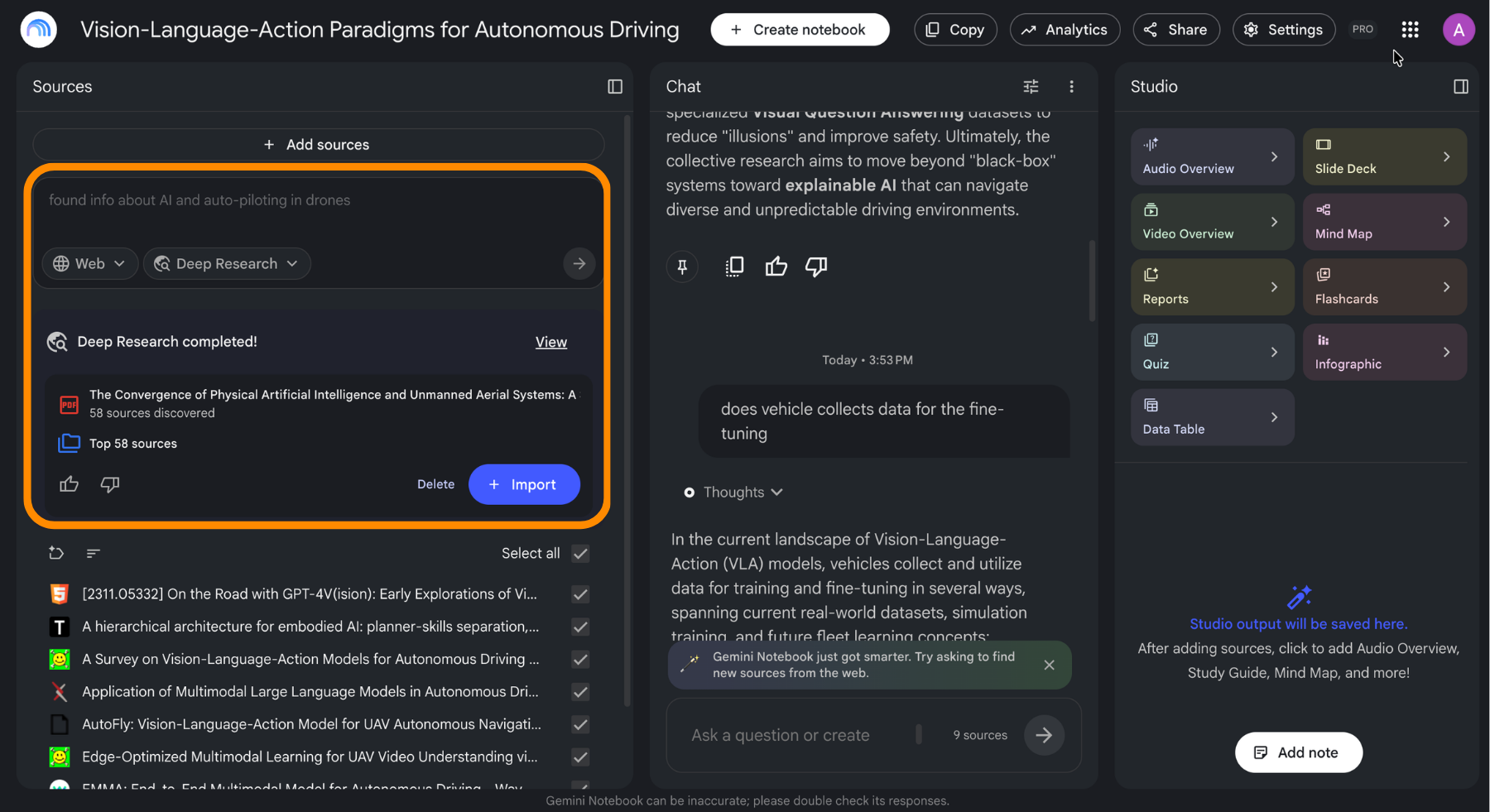
 > **📸 Screen 6** – Page: deep research results with the discovered sources listed, whole window. > Circle: the control that adds the found sources to the notebook.

Free accounts get a small monthly allowance of deep research runs, and paid tiers move that to a daily allowance, which is the difference between using it occasionally and using it as a default first step.

Note
Note

A source discovered automatically is still just a web page. The citation tells you where a claim came from, not whether that page was worth trusting, so skim what gets added before building on it.

question mark

What is the practical reason to run deep research before asking questions?

Seleziona la risposta corretta

Tutto è chiaro?

Come possiamo migliorarlo?

Grazie per i tuoi commenti!

Sezione 1. Capitolo 4

Chieda ad AI

expand

Chieda ad AI

ChatGPT

Chieda pure quello che desidera o provi una delle domande suggerite per iniziare la nostra conversazione

Finding Sources with Deep Research and Discover

A grounded tool has an obvious weakness at the start. It is useless until you have sources, and gathering sources is the slow part. Two features solve that from inside the notebook.

Discover

Describe the topic and Discover proposes around ten web sources that fit it. You review the list, pick the ones that look credible, and add them to the notebook in one step. It is the fast option when you know roughly what you are looking for and just need the links.

Deep Research

Deep research is the heavier option. It behaves like an agent: it plans, searches the open web across many pages, and comes back with a cited report plus the sources behind it, which you can then import into the notebook.

The order of operations is what makes this powerful. Research first to assemble a credible source set, then ground everything else on it. What starts as an empty notebook becomes a curated library in one run.

 > **📸 Screen 6** – Page: deep research results with the discovered sources listed, whole window. > Circle: the control that adds the found sources to the notebook.

Free accounts get a small monthly allowance of deep research runs, and paid tiers move that to a daily allowance, which is the difference between using it occasionally and using it as a default first step.

Note
Note

A source discovered automatically is still just a web page. The citation tells you where a claim came from, not whether that page was worth trusting, so skim what gets added before building on it.

Tutto è chiaro?

Come possiamo migliorarlo?

Grazie per i tuoi commenti!

Sezione 1. Capitolo 4
some-alt