Generating Images with Magic Media
Scorri per mostrare il menu
Magic Media turns a written description into an original image or a short video clip, directly on your canvas. It is useful when a stock photo does not match your exact idea — a mascot in a specific pose, a product mockup in an unusual color, or an abstract background for a title slide.
To generate an image:
- Select Apps → Magic Media;
- Choose the Text to Image tab;
- Type a description of the scene, subject, and style;
- Pick a style preset such as Photo, Watercolor, or 3D;
- Click Generate to produce four variations.
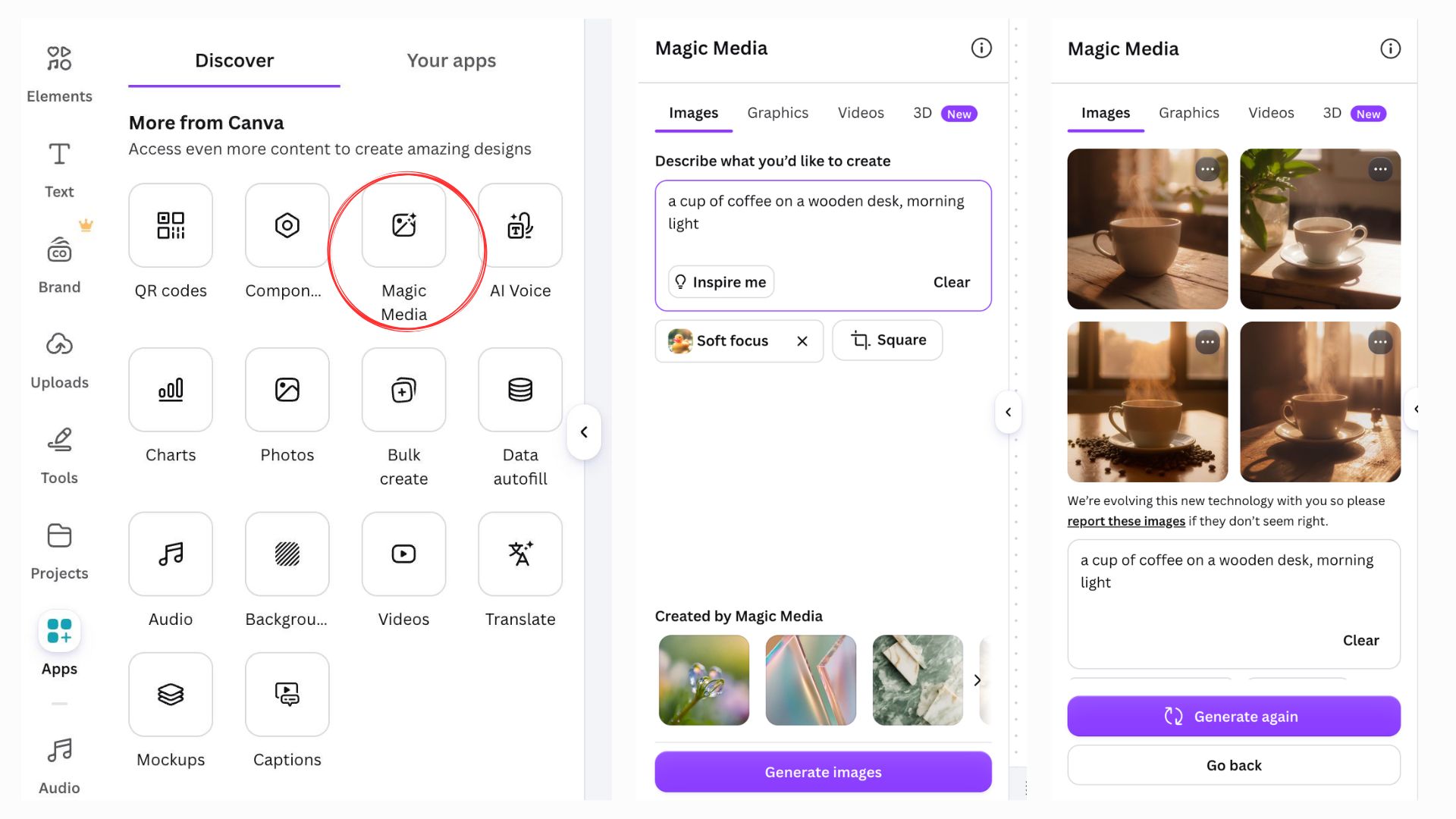
The more specific the prompt, the closer the result matches what you pictured. A prompt like "a red bicycle" returns a generic result; "a red vintage bicycle leaning against a brick wall, autumn leaves on the ground" gives Magic Media enough detail to make deliberate choices about composition and lighting.
Once you like a result, click it to place it on the page, then resize or crop it like any other image.
Grazie per i tuoi commenti!
Chieda ad AI

Chieda ad AI

Chieda pure quello che desidera o provi una delle domande suggerite per iniziare la nostra conversazione
