Writing with Magic Write
Scorri per mostrare il menu
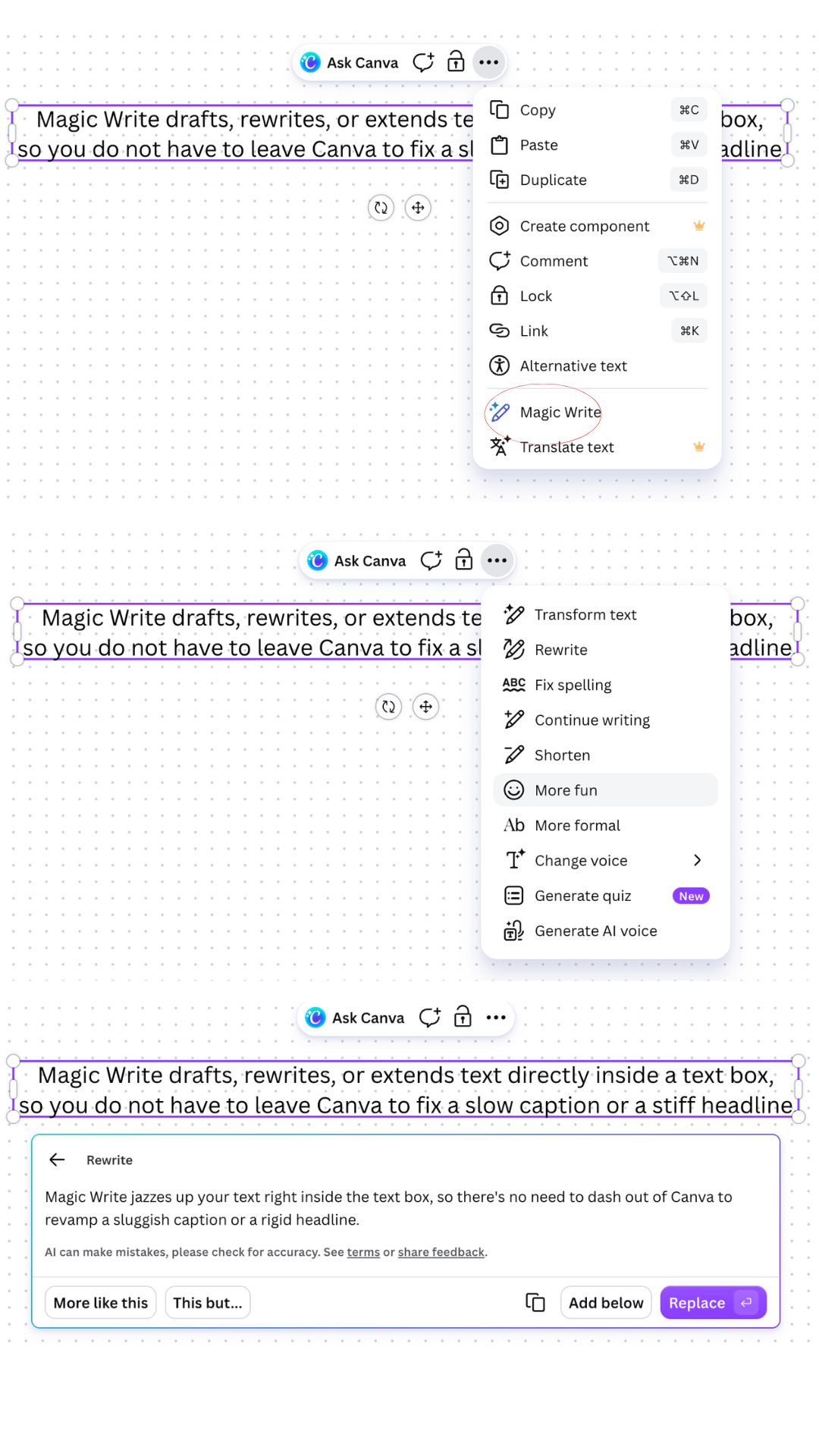
Magic Write drafts, rewrites, or extends text directly inside a text box, so you do not have to leave Canva to fix a slow caption or a stiff headline.
To open it:
- Click into any text box;
- Select the text you want to change, or place your cursor where new text should appear;
- Click the Magic Write icon in the floating toolbar;
- Choose an action such as Continue writing, Shorten, Expand, Fix spelling and grammar, or Change tone;
- Review the suggestion, then Insert it or ask for another version.

Changing tone does not rewrite the meaning of your text — it adjusts word choice and sentence rhythm to sound more formal, casual, or persuasive while keeping the same facts.
Magic Write also has a standalone mode: open Apps → Magic Write, type a topic or a rough sentence, and it drafts a full paragraph you can drag onto the canvas. This is a faster starting point than a blank text box when you are writing a caption, a slide's body text, or a short product description.
Grazie per i tuoi commenti!
Chieda ad AI

Chieda ad AI

Chieda pure quello che desidera o provi una delle domande suggerite per iniziare la nostra conversazione
