Gestione e Cattura delle Eccezioni
Scorri per mostrare il menu
Quando si lavora con operazioni sui file o altro codice che potrebbe incontrare errori, la gestione strutturata degli errori di Python tramite i blocchi try, except, else e finally è fondamentale per scrivere programmi resilienti. Il blocco try contiene il codice che potrebbe generare un'eccezione. Se si verifica un'eccezione, viene eseguito il blocco except, consentendo di gestire l'errore in modo appropriato. Se non viene sollevata alcuna eccezione, viene eseguito il blocco else, che è un buon posto per il codice che deve essere eseguito solo quando tutto nel blocco try ha successo. Il blocco finally viene sempre eseguito, indipendentemente dal fatto che si sia verificata un'eccezione o meno, rendendolo ideale per azioni di pulizia come la chiusura dei file o il rilascio delle risorse. Come visto nel video, questa struttura aiuta a separare la logica normale, la gestione degli errori e la pulizia, risultando in un codice più chiaro e sicuro.
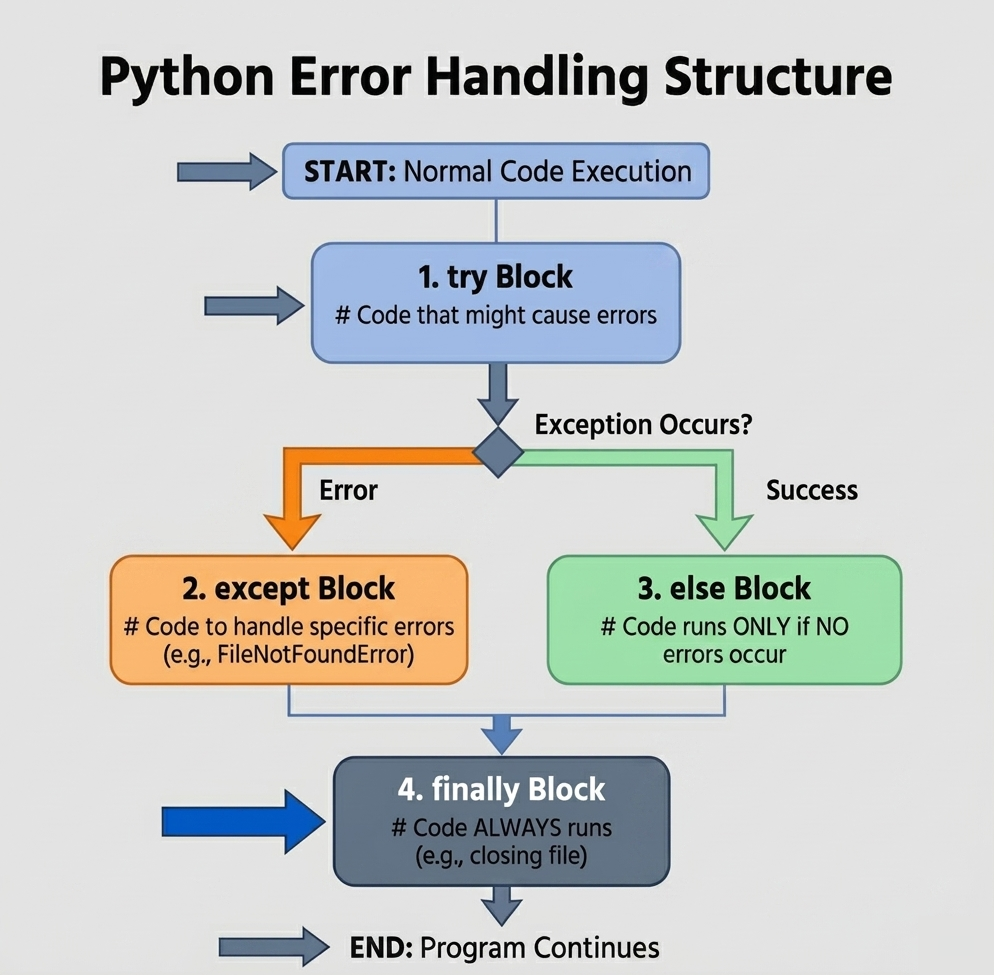
Blocchi di gestione degli errori in Python
- Il blocco
trycontiene il codice che potrebbe generare un'eccezione; - Il blocco
exceptintercetta e gestisce le eccezioni se si verificano; - Il blocco
elseviene eseguito solo se nessuna eccezione è stata sollevata nel bloccotry; - Il blocco
finallyviene sempre eseguito, sia che si sia verificata un'eccezione o meno.
123456789101112131415filename = "example.txt" try: file = open(filename, "w") file.write("Hello, Python error handling!") except OSError as e: print("An error occurred while writing to the file:", e) else: print("File written successfully.") finally: try: file.close() print("File closed.") except Exception: print("File was never opened or already closed.")
Questa struttura consente di separare la logica normale, la gestione degli errori e le operazioni di pulizia. Utilizzare try per il codice a rischio, except per la gestione degli errori, else per le esecuzioni senza eccezioni e finally per le azioni che devono essere sempre eseguite, come la chiusura dei file o il rilascio delle risorse.
Grazie per i tuoi commenti!
Chieda ad AI

Chieda ad AI

Chieda pure quello che desidera o provi una delle domande suggerite per iniziare la nostra conversazione
