Minigrafici
Scorri per mostrare il menu
Le sparklines rappresentano il modo più compatto per aggiungere un contesto visivo a una tabella. Invece di chiedere al lettore di passare da una cella della tabella a un grafico separato presente altrove nel foglio, una sparkline inserisce l'andamento direttamente all'interno della cella.
Non sostituiscono i grafici completi. Una sparkline non può mostrare etichette degli assi, valori esatti o confronti dettagliati tra molti prodotti contemporaneamente. Quello che permette di fare è consentire al lettore di scorrere una colonna di sparklines e vedere immediatamente quali prodotti sono in crescita, quali sono stabili e quali sono in calo — senza uscire dalla tabella.
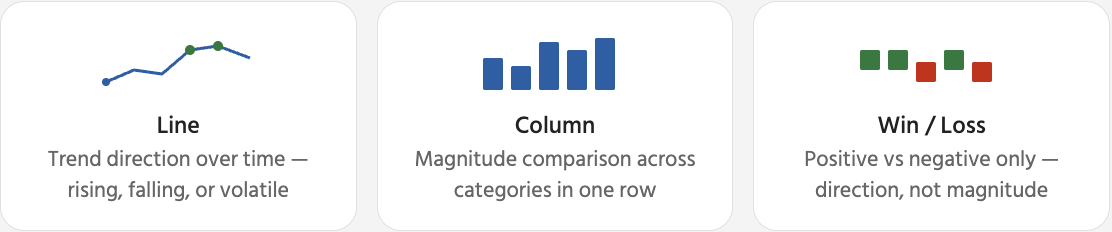
Una volta selezionata una sparkline, nella barra multifunzione appare una scheda contestuale Sparkline. Da qui si controlla l'aspetto della sparkline e quali punti dati vengono evidenziati. Le opzioni più utili sono i marcatori e l'evidenziazione dei punti — aiutano il lettore a identificare rapidamente il picco e il minimo senza dover leggere i numeri sottostanti.

Rimozione delle sparklines: selezionare la/le cella/e della sparkline → Scheda Sparkline → Cancella → Cancella Sparklines selezionate. Questo rimuove solo l'indicatore visivo — i dati della tabella nella stessa riga rimangono completamente invariati. Premendo Elimina si rimuove il contenuto della cella, non la sparkline.
Grazie per i tuoi commenti!
Chieda ad AI

Chieda ad AI

Chieda pure quello che desidera o provi una delle domande suggerite per iniziare la nostra conversazione
