Da Dati a Grafico
Scorri per mostrare il menu
Excel offre due modalità per creare un grafico. Grafici consigliati è il punto di partenza più rapido. Excel analizza i dati selezionati e suggerisce i tipi di grafico più adatti alla loro struttura. Il gruppo Grafici nella scheda Inserisci consente di scegliere manualmente qualsiasi tipo di grafico.

Grafico a colonne / barre
L'altezza di ciascuna barra rappresenta il valore. Gli spazi tra le barre sottolineano che le categorie sono distinte e indipendenti, non fanno parte di una sequenza continua.
Confronto:
- Ricavo totale per prodotto;
- Vendite per regione o categoria;
- Qualsiasi classifica o confronto affiancato;
- Non ideale per mostrare variazioni nel tempo.
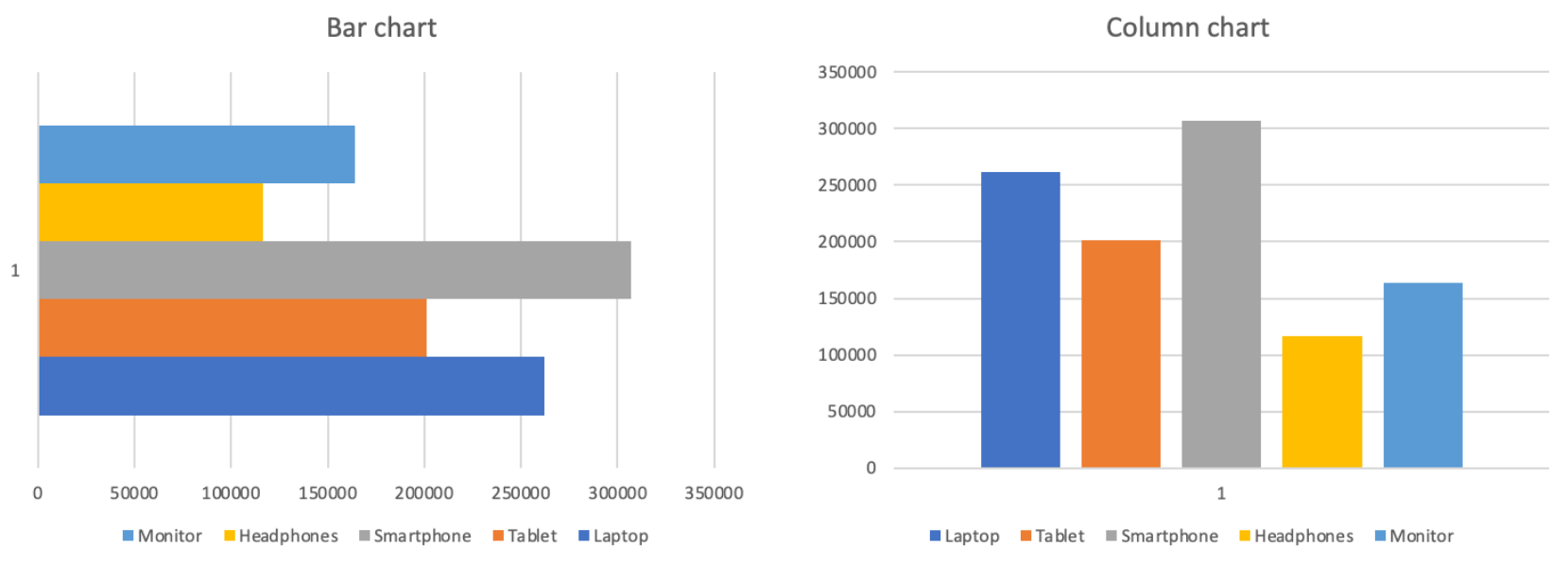
Grafico a linee
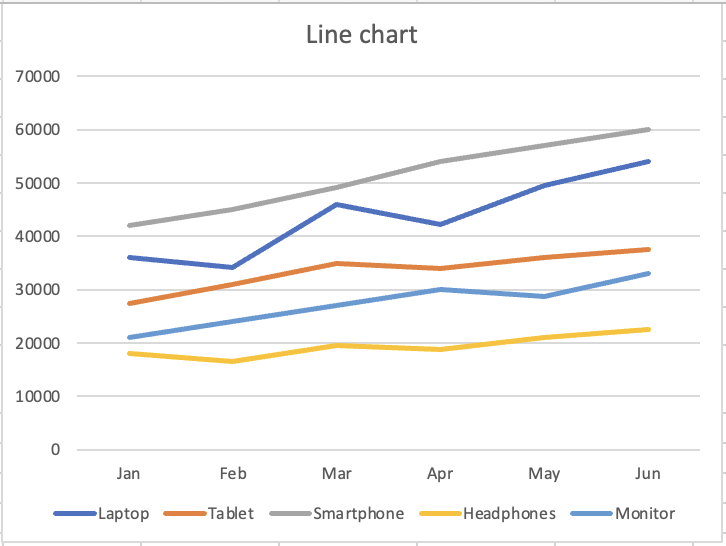
La linea continua suggerisce movimento e progressione. Ogni punto è collegato al successivo, mostrando direzione e slancio. La forma visiva comunica al lettore "questo sta cambiando".
Tendenza nel tempo:
- Ricavo mensile per prodotto;
- Qualsiasi metrica monitorata su periodi di tempo;
- Confronto delle tendenze di più serie;
- Non ideale per confrontare categorie distinte.
Grazie per i tuoi commenti!
Chieda ad AI

Chieda ad AI

Chieda pure quello che desidera o provi una delle domande suggerite per iniziare la nostra conversazione
Da Dati a Grafico
Excel offre due modalità per creare un grafico. Grafici consigliati è il punto di partenza più rapido. Excel analizza i dati selezionati e suggerisce i tipi di grafico più adatti alla loro struttura. Il gruppo Grafici nella scheda Inserisci consente di scegliere manualmente qualsiasi tipo di grafico.
Grafico a colonne / barre
L'altezza di ciascuna barra rappresenta il valore. Gli spazi tra le barre sottolineano che le categorie sono distinte e indipendenti, non fanno parte di una sequenza continua.
Confronto:
- Ricavo totale per prodotto;
- Vendite per regione o categoria;
- Qualsiasi classifica o confronto affiancato;
- Non ideale per mostrare variazioni nel tempo.
Grafico a linee
La linea continua suggerisce movimento e progressione. Ogni punto è collegato al successivo, mostrando direzione e slancio. La forma visiva comunica al lettore "questo sta cambiando".
Tendenza nel tempo:
- Ricavo mensile per prodotto;
- Qualsiasi metrica monitorata su periodi di tempo;
- Confronto delle tendenze di più serie;
- Non ideale per confrontare categorie distinte.
Grazie per i tuoi commenti!
